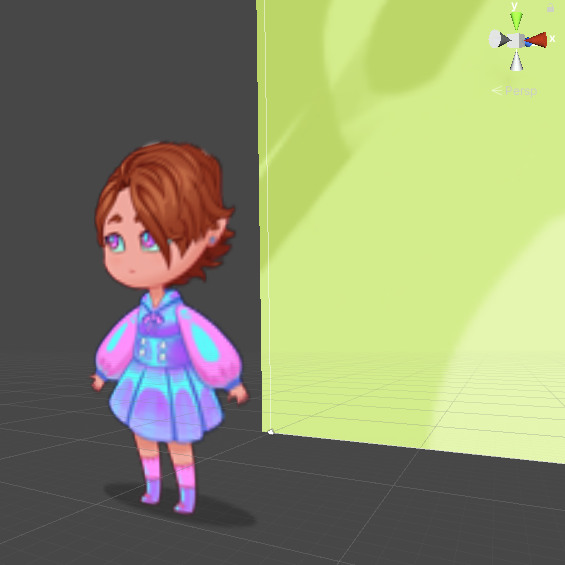
Hi, I have a problem where I can’t get the sprite to be in my game view.
Even when I disable the background image, I can’t get the sprite to show in the gameview.
Another thing I’ve noticed is that when I drag the spritesheet in under Canvas, instead of putting it on top of the canvas like other UI elements, it gets placed down in the left corner like a tiny sprite, within the camera view?
I’ve also tried to put the sprite itself in front of the Canvas, but as you can see by the pictures I’ve posted aswell, the sprite gets clipped out somehow.
Any idea how to fix this?
(The images I’ve uploaded are from 3D view of the game, showcasing how the sprite iself is clipping behind the Canvas, even though it is in front.)
Are these both Images on the Canvas? The Canvas is for UI elements. By default, UI images render in front of everything else.
SpriteRenderers, in contrast, will sort against one another depending on (1) Sorting Layer, (2) Sorting Order, (3) z-level. I have a feeling that you mean to instead use SpriteRenderers in the scene, as opposed to on the canvas. If you want these to be rendered as UI, then Canvas images (absent a Sorting Groups) render in the hierarchy order. Rearrange the hierarchy will rearrange what renders on top of what.
To fix, you should either take it all off the the Canvas and then use sorting layer/order/z with SpriteRenderers, or - if this is supposed to be UI - put it all on the Canvas with Image components.
The sprite is moving, aswell as it’s gonna be interactable, as in if you press it it makes a sound for example. But even if I try to make the sprite itself outside of the canvas, it doesn’t show in the game scene, it’s just white, but the other UI elements shows though. Should the sprite not be child of canvas?
When I try to put the sprite outside of canvas it doesn’t work either…
SpriteRenderer supposed to be outside Canvas. Image, on the other hand, is similar but for Canvas. It would be helpful to see what you’re seeing with it appearing white.