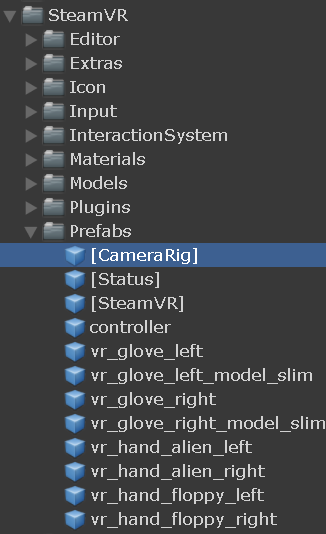
Valves reset seems like the way to go, but it does nothing I can detect. Use the commented lines and remove/comment the ResetSeatedZeroPose line, make sure the camera (origin) is a child of something that looks at your centre. And dont forget to set a reOrient key in the inspector (This code can create strange offsets when reorienting)
I spent a lot of time looking for a answer on this. Tried all of the options on this thread and the miracle one without success. Looked like several of the SteamVR/Valve and native solutions stopped working after a recent update. Eventually wrote this script which took care of it to my liking.
This script will allow a reset of the SteamVR camera rig to align with a transform representing the desired head position in the scene. Attach to any GameObject in the scene. Useful for seated experiences like cockpits.
using UnityEngine;

public class ResetSeatedPosition : MonoBehaviour {
    [Tooltip("Desired head position of player when seated")]
    public Transform desiredHeadPosition;
    private Transform steamCamera;
    private Transform steamController;

    // Update is called once per frame
    void Update () {

        if (Input.GetKeyDown(KeyCode.Space))
        {
            if (desiredHeadPosition != null)
            {
                ResetSeatedPos(desiredHeadPosition);
            }
            else
            {
                Debug.Log("Target Transform required. Assign in inspector.");
            }

        }
    }

    private void ResetSeatedPos(Transform desiredHeadPos){

        //find VR Camera and CameraRig transforms in scene
        steamCamera = FindObjectOfType<SteamVR_Camera>().gameObject.transform;
        steamController = FindObjectOfType<SteamVR_ControllerManager>().transform;

        if ((steamCamera != null) && (steamController != null))
            {
            //{first rotation}
                //get current head heading in scene
                //(y-only, to avoid tilting the floor)
                float offsetAngle = steamCamera.rotation.eulerAngles.y;
                //now rotate CameraRig in opposite direction to compensate
                steamController.Rotate(0f, -offsetAngle, 0f);

            //{now position}
                //calculate postional offset between CameraRig and Camera
                Vector3 offsetPos = steamCamera.position - steamController.position;
                //reposition CameraRig to desired position minus offset
                steamController.position = (desiredHeadPos.position - offsetPos);

                Debug.Log("Seat recentered!");
            }
        else
            {
                Debug.Log("Error: SteamVR objects not found!");
            }
    }
}
Turned out to be simpler than I expected. Hope it can save someone else the time!
The solution @gstarch suggested is the way to go. It works both for Room Scale & Seated Experiences.
Some things to remember though:
An important change is that the SteamVR_ControllerManager-script isn’t attached to the [CameraRig]-prefab coming with the SteamVR-plugin anymore (in SteamVR version 1.2.3 and up).
This also means that the variable steamController is supposed to be set to the [CameraRig]-prefab coming with the SteamVR-plugin.
How Unity.XR works:
The function UnityEngine.XR.InputTracking.Recenter();ONLY works for Seated/Standing Experiences, ie. it won’t do anything if you have set up a Room Scale-experience.
Here’s our modified version of @gstarch 's solution. Works with Unity 2018.3.0b11 & SteamVR Version 1.2.3
Hope this helps someone!
using UnityEngine;

public class PlayAreaController : MonoBehaviour
{
    [Tooltip("Desired head position of player when seated")]
    public Transform desiredHeadPosition;

    //Assign these variables in the inspector, or find them some other way (eg. in Start() )
    public Transform steamCamera;
    public Transform cameraRig;

    private void Update()
    {
        if (Input.GetKeyDown(KeyCode.Space))
        {
            if (desiredHeadPosition != null)
            {
                ResetSeatedPos(desiredHeadPosition);
            }
            else
            {
                Debug.LogError("Target Transform required. Assign in inspector.", gameObject);
            }
        }
    }

    private void ResetSeatedPos(Transform desiredHeadPos)
    {
        if ((steamCamera != null) && (cameraRig != null))
        {
            //ROTATION
            // Get current head heading in scene (y-only, to avoid tilting the floor)
            float offsetAngle = steamCamera.rotation.eulerAngles.y;
            // Now rotate CameraRig in opposite direction to compensate
            cameraRig.Rotate(0f, -offsetAngle, 0f);

            //POSITION
            // Calculate postional offset between CameraRig and Camera
            Vector3 offsetPos = steamCamera.position - cameraRig.position;
            // Reposition CameraRig to desired position minus offset
            cameraRig.position = (desiredHeadPos.position - offsetPos);

            Debug.Log("Seat recentered!");
        }
        else
        {
            Debug.Log("Error: SteamVR objects not found!");
        }
    }
}
I’m not sure what you are setting as the “Camera Rig”
I can make an object to be the “desiredHeadPosition” and I see the Players “VRCamera” to set as the “steamCamera”
but whats the rig? Is this something that has been removed in SteamVR 2.x (SDK 1.7.15) ?
Thank you. That image helped clarify things as did the code. Unfortunately when I load from one scene to another the player is still facing the wrong direction in the new scene.
Edit: Silly me. I Just needed to turn the player prefab around.
P.P.S Edit … Turning the player prefab only works for going to the scene if I return to the previous scene The player will now be facing the wrong way in that scene.
Hi fgheorghe.
Thank you for posting that 2020 version.
I have given it a go but it resets the Y value as well and puts the floor up to eye level. I have to close and restart SteamVR every time to put the floor back at my feet again.
Would you have any experience on what to do to keep the Y setting?
Cheers,
Lins
Hi Lins, I am wondering if the Y setting changes due to player height settings in SteamVR, outside unity, or depending on your setup, if the camera needs to be a made a child of an empty object set at a desired height - this way if Y is reset to 0, and the camera’s parent is set to 1, then when the position gets reset it will be above the floor at Y 1. Hope this helps!
I think it was a mismatch of the SteamVR_Settings saying tracking space origin seated. When I set that to standing and then in the code set
ETrackingUniverseOrigin.TrackingUniverseSeated
to
ETrackingUniverseOrigin.TrackingUniverseStanding
then it keeps the floor at my feet. Even if I have set my room guardian to stationary or free draw etc. It always sets up as standing for SteamVR.