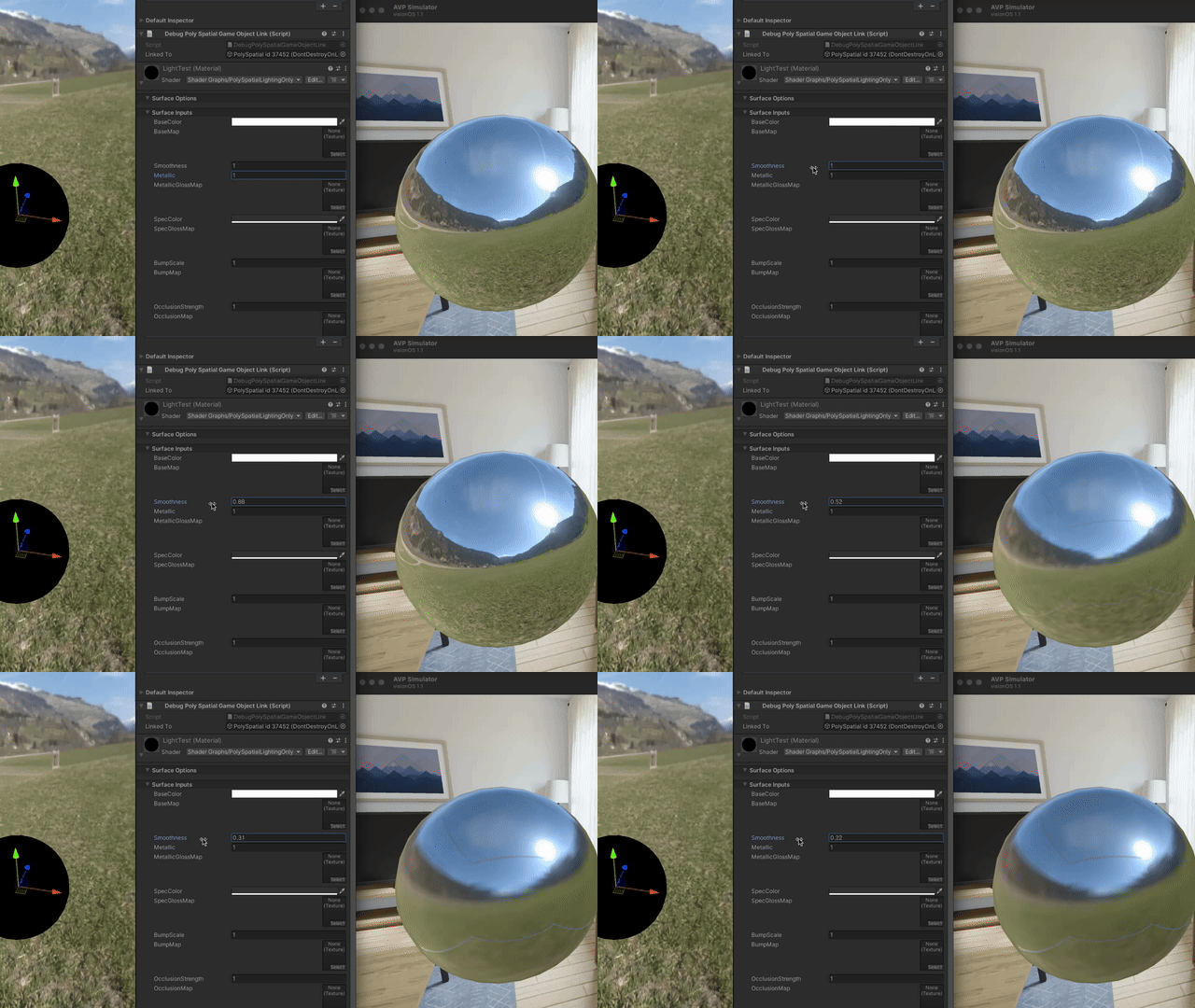
I have a simple test scene with a baked reflection probe of a skybox (I know skyboxes aren’t supported in MR, just wanted something to feed the probe). With the URP/Lit shader, everything behaves as expected in both the editor and RealityKit renderer as I vary the material properties:
I want to be able to have objects transition between lighting environments, similar to how the dinosaur in Apple’s Encounter Dinosaurs demo transitions between being fully lit by the virtual environment, and fully lit by the real environment as it leaves the portal.
As far as I can tell there’s no way to change the IBL texture used by the RealityKit Lit shader on a per-fragment basis, so as a first step, I created a simple Unlit shader with the PolySpatial Lighting Node.
This looks as expected when smoothness and metallic are set to 1 (the reflection map appears in the simulator).
But there are two issues:
When smoothness is less than 1, very obvious seams become visible in the reflection. It looks as if the reflection cubemap’s edges are being repeated instead of clamped (changing wrap settings on the generated cubemap made no difference). The “blur” is also very low quality–it almost looks like it’s jumping between mipmap levels instead of convolving: This all looks particularly bad at low smoothness levels:
How it looks in the Editor (left) and visionOS simulator (right) with the same material properties, but with the URP/Lit shader (which I suppose in the simulator is the RK PhysicallyBasedMaterial):
When there are no dynamic lights, reducing the Metallic value just fades the base color to black, instead of to the correct base color. There seems to be some similar (but less obvious) behavior when reducing smoothness too. The URP/Lit shader in the Editor does not behave this way, though this might not be too hard to work around.
As far as I can tell this is a bug in PolySpatial Lighting, but I’d love to know if I’m just doing something wrong. Thanks!
Some control over the IBL is possible using the VisionOSImageBasedLight[Receiver] components, though that can only change the “system IBL” (when immersion is dialed down, this is a fixed pattern of white highlights; when dialed up, it’s the simulated environment).
My guess is that this has to do with how we handle cube maps in ReaityKit. RealityKit doesn’t support cube maps natively, so we use 2D textures that contain the cube map data and remap the texture coordinates in the shader graph. One thing you might try is to use an uncompressed texture format (e.g., RGBA32–versus AST6x6, the default).
You might want to try enabling Baked Lighting → Light Probes on the PolySpatial Shader Graph instance. The default light probe (which uses the settings in Lighting → Environment → Environment Lighting) provides the ambient contribution.
Looks like that did the trick for Metallic being weird! I guess URP/Lit uses the default one regardless. Apologies for the dumb question, I guess I was expecting it to behave similar to PhysicallyBasedMaterial where the IBLs are the only lighting.
Changing texture formats on the reflection map made no difference sadly.
From what I can piece together from what you said, and observed behavior, it seems like cube maps are being converted into 3 2D textures internally in PolySpatial:
A texture for the top face
A texture for the bottom face
A continuous texture for the front, left, back, and right faces
It seems like one of the issues here is that those internal textures have a wrap mode of repeat, when it should be clamp. This results in the top and bottom of each side being blurred together when reducing Smoothness, resulting in the artifacts I posted. If you look closely, you can see how the blue from the sky becomes visible at the bottom seam, and the green from ground is visible on the bottom seam.
I guess the proper fix would actually updating the reflection texture sampling code so that if the texture coordinates go above/below 1 or 0 it samples the adjacent texture rather than continuing to reach out of bounds.
Would it also be possible to get more clarity on what the PolySpatial Lighting node is doing internally? It seems like a bit of a black box right now, and as far as I can tell this is not something I can fix myself. It’d be great we can access/modify the node source.
I know this might sound like an edge case, but for any PolySpatial app that uses portals or immersive environments similar to Encounter Dinosaurs, I think this is critical for making lighting look good.
(as an aside, I’m very curious how Apple did that in the Encounter demo–my assumption is they did their own lighting implementation in an RK shader graph so they could get per-pixel control over light sources)
Sounds like we need to update the documentation! There are a lot of corner cases with this stuff.
What we are doing is literally reinterpreting the cube map data as a 2D texture. That means all the faces are stacked vertically, ordered (from V=0 to V=1) X+, X-, Y+, Y-, Z+, Z-. As I said, we do this because RealityKit doesn’t have any way to supply a cube map texture from data (via the API we use, TextureResource.init). Feel free to suggest to them via their Feedback Assistant that they should add such support; you can refer them to our request, FB12992894.
That makes sense; it looks like we don’t currently do anything as far as clamping or wrapping goes except for the standard 2D clamping (meaning it won’t clamp against the internal edges). I can look into that.
It reimplements the relevant parts of the URP lighting shaders in the subset of HLSL that we support for conversion into MaterialX nodes. In order to do so, we supply a number of (currently undocumented) globals and per-instance material properties containing the lighting information. These are defined in PolySpatialShaderGlobals and PolySpatialShaderProperties and only set in play mode/builds (hence, the lighting doesn’t work in editor or preview mode). It would technically be possible to reimplement the lighting using these properties, but it would be a substantial amount of work. Alternately, you could pass in whatever properties you might need in the usual way (material properties, globals, material property blocks) and create your own lighting calculations in a shader graph.
Totally understand that y’all have to work with RealityKit’s many limitations, and I appreciate that you’ve built a bunch of great usability improvements like Lighting and P2D in the first place I’ll file feedback with them requesting cubemap support so workarounds like this are hopefully not needed going forward.
Got it, thanks for the info! I’m hoping we don’t have to reimplement our own lighting calculations in a shader graph but worst case we might go down that route.
Much appreciated! In the interim, is it possible to modify the HLSL code? If so I can take a stab at implementing it myself in case we need a solution sooner.
Unfortunately, it is not; we generate the HLSL on the fly as part of the asset import process (specifically to handle the SAMPLE_TEXTURECUBE_LOD macro).
Good news! Apple added native cube map support in the visionOS 2.0 beta, and we will be updating PolySpatial to use that instead of our hack that repurposed 2D textures. Hopefully that should address the issue.


 This all looks particularly bad at low smoothness levels: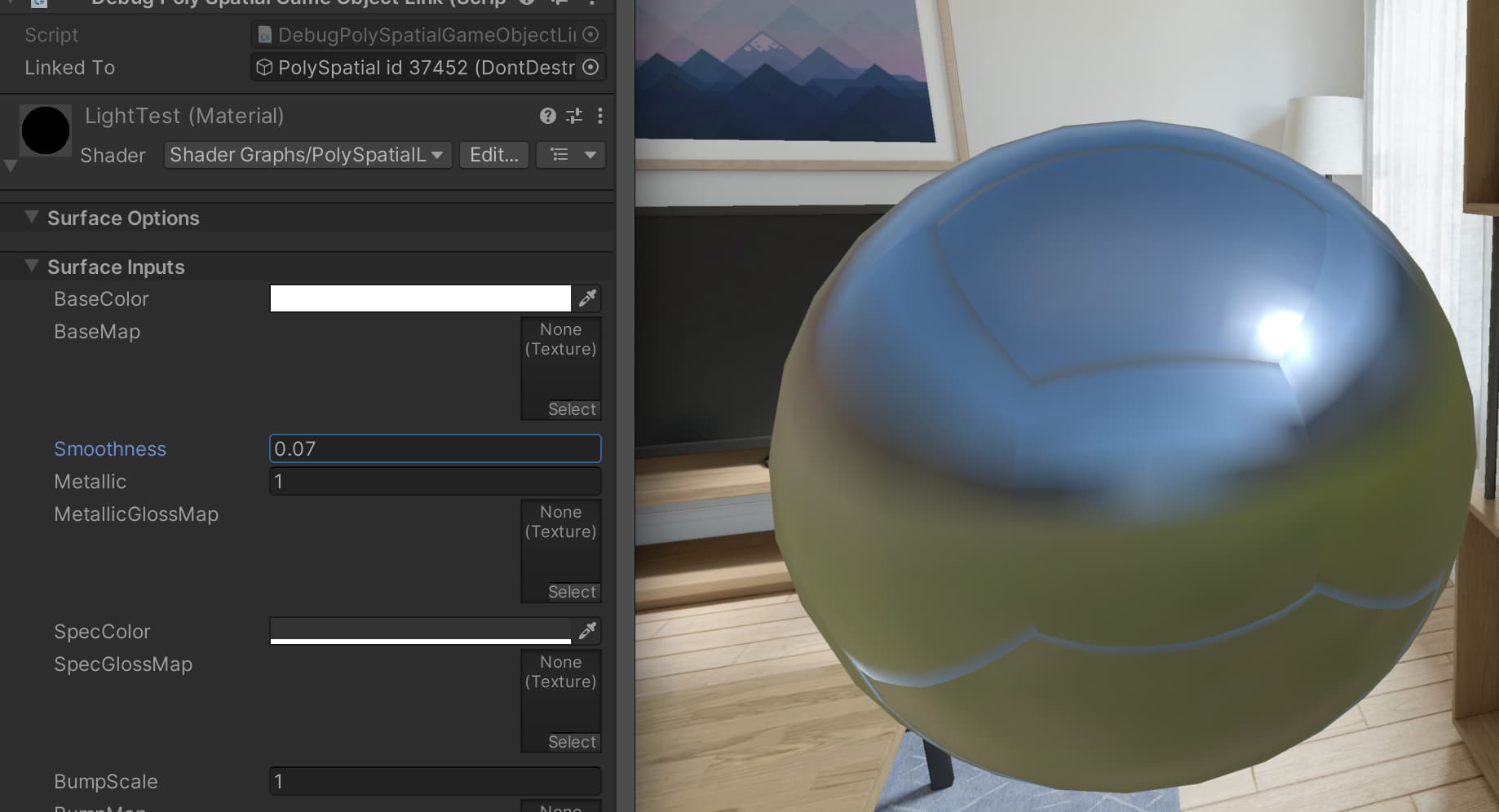


 I’ll file feedback with them requesting cubemap support so workarounds like this are hopefully not needed going forward.