ok, no problem, i will send it to you, agian thnx for the reply.
Working a new feature, which I had in the back of my head for a while. Where the grass length can be scaled, depending on how strongly a terrain layer is painted. This allows the grass to be shorter on certain terrain layers.

The height is saved along with the color map and works with tiled terrain setups and is GPU based, so bakes in a split second.
3 Likes
Yeaaa, that’s a good idea! I think Genshin Impact does this for their grass too: 
On an unrelated note, I think your colormap editor does not properly calculate the bounds for multiple terrain tiles. At least, when they share a corner all at 0,0,0.
Changing the logic for min/max bounds in the following way works, for all dimensions, seems to fix it:
if(max.x > maxSum.x)
     maxSum.x = max.x;
Another suggestion I have is to maybe offer a conditional shader feature that blends the global colormap with the gust tint. Otherwise, if you use the color map for shadows on the grass for efficiency your gust tint will look very strange! 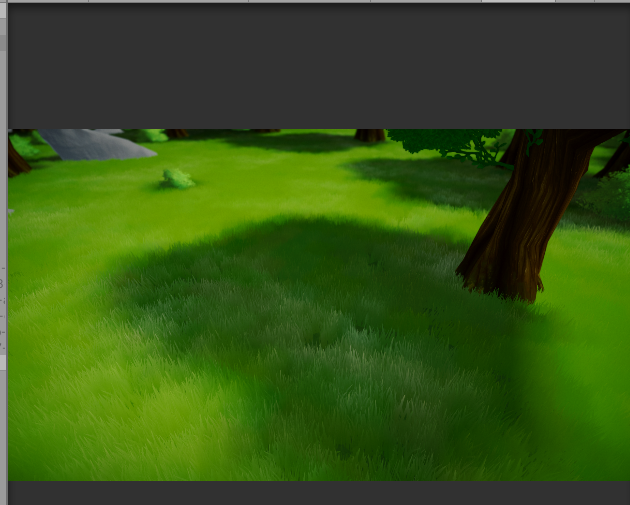
1 Like
I fixed the bounds calculation for next update, noticed it acted up if terrains were under a parent object that had a negative position. It now works correctly in every and any case. But thanks for the headsup, would probably have gone unnoticed 
Unfortunately due to the way/order color is composited your suggestion isn’t viable. When using realtime shadows, the wind gust is hidden in shadows, but if they’re baked into the color map, there’s no way to accurately tell what represents a shadow or not.
1 Like
Hi guys! My rendered colormap is much darker than the actual terrain, so when I apply it the grass is dark grey. How should I render the colormap to get true colors?
It seems like the Colormap renderer does not take into account directional lights, so the terrain is extremely dark
Ok, I solved it by baking my directional light 
Hi @StaggartCreations , still loving the shader and excited for the next update. I had a question regarding performance. I’m using VegStudioPro, and have a rotating sunlight to simulate time of day. My performance absolutely tanks whenever the sun is setting (hitting the grass directly from the side). My grass isn’t casting shadows but is receiving it, and at this point it’s all receiving some sort of shadow with the light that low. Although perhaps it might have something to do with the translucency effect? Do you have any recommendations?
It’s also possibly a VSP issue, I’m working URP and not sure if there’s something going on there. I also still can’t get wind to communicate between VSP and the shader.
Also, any luck on our discussions regarding omitting grass bends based on elevation above/below grass? Thanks!
Edit: Regarding the performance… sorry, just as I was typing that it occurred to me that it might have nothing to do with the grass and rather the way I’m rendering trees (a custom setup, outside VSP). I’ll keep testing.
I’ve encountered the same sort of issue using VSP, though this is in a project that doesn’t use this grass shader. It’s due to the fact that a low sun angle a whole lot more shadows are being rendered, because VSP’s shadow culling feature also renders shadows for vegetation outside the camera view, but within the light’s frustrum. At a low angle, the light essentially “sees” more vegetation.
I haven’t been able to mitigate this, except disable shadow culling, but this causes tree shadows to pop in. Pulling the shadow distance back 10% when the sun approaches the horizon made a bit of improvement. In any case, the translucency rendering has a constant but unmeasurable performance cost, it merely becomes more visible at low sun angles.
Despite several attempts, I haven’t been able to fade out the grass bending when a bending goes below a grass mesh. It’s still on my todo list, so I’ll have another swing at it when a better idea comes up.
The wind strength can be controlled by assigning a wind zone to the Stylized Grass Rendering component. This’ll multiply the ambient/gust wind strength value of the material by the wind zone’s “main” value. Speed and direction can’t be changed, since this would cause the grass to jitter, until the values are fixed. I can make a wind controller for VSP with strength, speed and direction controls if this doesn’t matter!
Hello! I’m having a really strange issue with the latest LTS for 2019/ URP / Nature Renderer
Whenever I have grass on the terrain with stylized grass shader… the grass pops in and out. You can see this happening in the video at the edge of the terrain in this example.
If I use another grass asset without the shader, this doesn’t happen.

Here is how it looks in the editor. That empty space should have grass visible.

Thanks for the video, it appears the vegetation cells are being culled early or incorrectly. If you have “Procedural Instancing” checked on Nature Renderer, you’ll have to ensure the grass shader is also using this configuration (by default it isn’t). That may be the cause.
You can find this option at the bottom of the grass material:

Thank you for the quick reply. Yes I have the Third party shader config set to Nature Renderer… and I have the the NR Procedural Instancing turned on. I’ve also tried turning it off for both.Still no luck.
Here’s what my inspectors look like for both NR and SG.


In the Nature Renderer demo scene, I can reproduce the same result: https://gyazo.com/e862704458bf8c8dde03ff924e382941.
Procedural Instancing in this case doesn’t seem to make a difference, and it also occurs when switching the grass material to the URP Unlit shader, so doesn’t appear to be related to the shader being used.
Summoning @Visual-Design-Cafe , is this a known issue?
Thanks for testing that! Can you also confirm one last thing.
When I use the Visual Design Cafe grass assets I don’t see this issue. I know you said you changed the grass material and still saw the issue. However when I used the grass that came with the Open World nature asset (also made by Visual Design Cafe), I don’t have that issue.
I did some further testing, and it turns out if the grass prefab has a LOD Group, some grass patches don’t get rendered properly like you’re seeing. The “Grass Generic Group Medium” prefab included with NR doesn’t have a LOD Group, which is why it does seem to work correctly. This somewhat makes sense, since the terrain detail system doesn’t support LOD groups to begin with, but this worked in an earlier version of NR.
So you can either convert the “GrassPatch” prefab to not use any LODs, or create a new grass prefab using the same mesh and material:

1 Like
Thank you SO MUCH for catching that! I don’t think I would’ve ever figured that out lol.
@StaggartCreations @GamePowerNetwork
I just tested it and I can confirm that it is broken. The issue is the culling distance set in the LOD Group. If you increase the culling distance to something like this (see screenshot) then everything should work fine.

Nature Renderer calculates the LOD distance based on tiles with a fixed size, instead of per-object. I think that in this case the culling distance is too close to the transition distance, and both fall within the same tile. This should still work correctly but there must be a wrong calculation somewhere and it ends up using culling the entire tile. I’ll look into it and fix it for the next update.
1 Like
Working on getting the v1.1.0 update out the door. This includes the terrain layer-based grass scale, and a number of fixes.
Last minute addition is a fix for “shadow acne” available for the Advanced Lighting mode.

(URP Lit shader on the left sphere, notice the banding artifacts)
The workaround for this is to increase the shadow depth bias in the URP settings, but this affects all objects, and also pushes the shadows cast by the grass away from the mesh, making them appear to slightly float.
With the fix enable, the shadows received on the grass are pushed away a very small amount. Meaning there’s no self-intersecting shadows anymore, while keeping the shadows cast by the grass as is.

Shadow bias settings now no longer have any effect on shadows cast by grass. Meaning the settings can be tweaked for regular objects, without creating a gap between shadows and the base of the grass mesh.
2 Likes

Managed to get LOD crossfading working, added an additional LOD mesh to accomendate this. LOD0 now has more edge loops, which results in smoother wind animations and bending. This is something that has to be enabled on a prefab’s LOD group:

Self-cast shadows don’t fade correctly, where the shadows from the previous LOD are cast onto the next, so they still pop. But this is related to how LOD groups work and has been around since at least Unity 4 
1 Like

Submitted version 1.1.0. Change log:
Added:
- Colormap Renderer can now also render a scale map for grass, based on terrain layers. Allows grass scale to be determined by painted terrain layer strength.
Material now has a Vector3 field to control the scale influence for the XYZ axis. The “Apply scalemap” toggle must be enabled on a material. - “Shadow banding correction” toggle. Offsets the shadows received by the grass a tiny bit. This avoids unwanted self-shadowing (aka shadow acne).
- Support for LOD dithered crossfading (requires to be enabled on LOD group)
Changed:
- Height offset for mesh grass benders is now also applied to the wireframe gizmo
- Active color map is now re-assigned whenever scene is saved, to avoid the link to the shader being broken
- “Bending” section in material UI was renamed to “Vertices”.
- Bending render area edge masking now also works when not in play-mode.
- Added additional edge loop to LOD0 of meshes. Added a LOD2 mesh with fewer vertices.
Fixed:
- Color Map Renderer
- Render area calculations when terrains have a negative position
- Handling cases where terrains are entirely flat
- (Preemptive) Warning about obsolete method in URP 9.0.0+ (2020.2)
- Shader error in URP 9.0.0, due to changes in URP lighting functions.
- Environment reflections not correct when a normal map was used on curved meshes.
Removed:
- Specular highlight parameter, this was broken to begin with and translucency ends up offering the same visual result.
Notes:
- Prefabs in Vegetation Studio Pro have to be refreshed to avoid shadow flickering issues
- Scale map functionality is marked as experimental, since all terrain layers currently have to be configured. Ideally, scale would stay at 100% for layers not configured.
Following update will allow a color map to be generated at runtime. And possibly add an “Unshaded” lighting mode, which is Unlit shading but with support for shadow casting/receiving.
1 Like
Does this asset have grass physics?, for an example can this asset interact with players movement?, does it support full physics simulation?