The curious case of the invisible combineMeshes

I have hit a strange bug I don’t know if it’s feature. I want to create meshes and I need to combine various part together, to test the implementation I started with a very simple project.

Here is the code:

        this.plane = GetComponent<MeshFilter>().mesh;
        this.plane.Clear ();
        this.plane.name = "plane";

        CombineInstance[] cube = new CombineInstance[6];

        cube [0].mesh = MeshGenerator.createPlane (MeshGenerator.axis.top    ,1);
        cube [1].mesh = MeshGenerator.createPlane (MeshGenerator.axis.bottom,1);

        cube [2].mesh = MeshGenerator.createPlane (MeshGenerator.axis.front    ,1);
        cube [3].mesh = MeshGenerator.createPlane (MeshGenerator.axis.back    ,1);

        cube [4].mesh = MeshGenerator.createPlane (MeshGenerator.axis.side1    ,1);
        cube [5].mesh = MeshGenerator.createPlane (MeshGenerator.axis.side2    ,1);

        this.plane.CombineMeshes (cube,true);

        this.gameObject.GetComponent<MeshFilter>().mesh = this.plane;

It’s in the start method and the mesh don’t show up … :face_with_spiral_eyes:

TO debug I add these lines at the end:

        Debug.Log (this.plane.vertexCount);
        Debug.Log (this.gameObject.GetComponent<MeshFilter>().mesh.vertexCount);

Which return correct data :eyes: … I add mark dynamic and the recalculates:

        this.plane = GetComponent<MeshFilter>().mesh;
        this.plane.Clear ();
        this.plane.name = "plane";

        this.plane.MarkDynamic ();

        CombineInstance[] cube = new CombineInstance[6];

        cube [0].mesh = MeshGenerator.createPlane (MeshGenerator.axis.top    ,1);
        cube [1].mesh = MeshGenerator.createPlane (MeshGenerator.axis.bottom,1);

        cube [2].mesh = MeshGenerator.createPlane (MeshGenerator.axis.front    ,1);
        cube [3].mesh = MeshGenerator.createPlane (MeshGenerator.axis.back    ,1);

        cube [4].mesh = MeshGenerator.createPlane (MeshGenerator.axis.side1    ,1);
        cube [5].mesh = MeshGenerator.createPlane (MeshGenerator.axis.side2    ,1);

        this.plane.CombineMeshes (cube,true);

        this.plane.RecalculateBounds();
        this.plane.RecalculateNormals();
        this.plane.RecalculateTangents();


        this.gameObject.GetComponent<MeshFilter>().mesh = this.plane;

        Debug.Log (this.plane.vertexCount);
        Debug.Log (this.gameObject.GetComponent<MeshFilter>().mesh.vertexCount);

And nothing show up :hushed: … I move the code to update and nothing show up :rage: … I had this line after assigning the meshfilter:

this.gameObject.GetComponent<MeshFilter>().mesh =  MeshGenerator.createPlane (MeshGenerator.axis.top,1);

And it return a plane showing correctly as expected :roll_eyes:

I’m at loss of options :(, did someone met such a problem before? How I do solve this? Is it just me who is dumb :sweat_smile: and miss something?

Perhaps a silly question, but do you have static batching enabled on the original GO?
That could mess up your position in the world.

Nop just verified for extra security

What about the matricies of the combine meshes. Do they default to identity?
You could also just create a new mesh. Instead of getting from meshfilter. See if makes a difference.

I’m creating the mesh already. I’m just flushing the meshfilter and assigning the mesh to it, which works with non combined procedural mesh when assigned directly.

Right now I don’t care if it’s placed at the right place (I’m at the origin and mesh are created using origin as center).

My current problem is that combined mesh don’t show up at all … which is a huge blow!

I have investigate a bit more:

void OnDrawGizmos()
    {
        foreach (Vector3 v in this.plane.vertices)
        {
            Gizmos.DrawWireCube(v,new Vector3(0.1f,0.1f,0.1f));
            Debug.Log (v);
        }
    }

Turns out all the vertices are zeroed …

CombineInstance[] cube = new CombineInstance[6];

        cube [0].mesh = MeshGenerator.createPlane (MeshGenerator.axis.top    ,1);
        cube [1].mesh = MeshGenerator.createPlane (MeshGenerator.axis.bottom,1);

        cube [2].mesh = MeshGenerator.createPlane (MeshGenerator.axis.front    ,1);
        cube [3].mesh = MeshGenerator.createPlane (MeshGenerator.axis.back    ,1);

        cube [4].mesh = MeshGenerator.createPlane (MeshGenerator.axis.side1    ,1);
        cube [5].mesh = MeshGenerator.createPlane (MeshGenerator.axis.side2    ,1);

        this.plane.CombineMeshes (cube,true);

        this.gameObject.GetComponent<MeshFilter> ().mesh = cube [0].mesh;

Return a visible mesh, so they are properly stored in the combineInstance … Which mean the culprit is …

        this.plane.CombineMeshes (cube,true);

Since everything goes wrong after that … I’m doing the job in the start(), I’ll move the combine instance as a “global” to the class, set up the code in awake and then process the merged in start and finally assign in update …

public class planet : MonoBehaviour {

    int position;

    int radius;
    int atmosRadius;
    int maxAltitude;

    int type;

    Mesh plane;
    CombineInstance[] cube;


//_____________________________________________________________________________

    void Awake () {
        this.plane = GetComponent<MeshFilter>().mesh;
        this.plane.Clear ();
        this.plane.name = "plane";
        this.plane.MarkDynamic();

        cube = new CombineInstance[6];


        cube [0].mesh = MeshGenerator.createPlane (MeshGenerator.axis.top    ,1);
        cube [1].mesh = MeshGenerator.createPlane (MeshGenerator.axis.bottom,1);

        cube [2].mesh = MeshGenerator.createPlane (MeshGenerator.axis.front    ,1);
        cube [3].mesh = MeshGenerator.createPlane (MeshGenerator.axis.back    ,1);

        cube [4].mesh = MeshGenerator.createPlane (MeshGenerator.axis.side1    ,1);
        cube [5].mesh = MeshGenerator.createPlane (MeshGenerator.axis.side2    ,1);


        //this.gameObject.GetComponent<MeshFilter>().mesh =  MeshGenerator.createPlane (MeshGenerator.axis.top,1);


    }

    void Start()
    {
        this.plane.CombineMeshes (cube,true);
    }

    void Update()
    {
        this.gameObject.GetComponent<MeshFilter> ().mesh = this.plane;
        Debug.Log (this.plane.vertexCount);
        Debug.Log (this.gameObject.GetComponent<MeshFilter>().mesh.vertexCount);
    }

    void OnDrawGizmos()
    {
        foreach (Vector3 v in this.plane.vertices)
        {
            Gizmos.DrawWireCube(v,new Vector3(0.1f,0.1f,0.1f));
            Debug.Log (v);
        }
    }
}

:(:(:(:(:(:frowning: sad panda, it’s not a problem of it needed spreading the process.
I believe it’s a legitimate bug …

        this.plane.CombineMeshes (cube,true,true);

Still don’t do anything, I ran out of options …

Well I resorted to build my own function, that display a very bad mesh, need to track down the errors:

    public static Mesh MergeMesh(CombineInstance[] c)
    {
        /** compute length of meshes
         *  use length as offset for next mesh
         *  add length to each vertices and triangle index
         *  loop for each meshes by
         * */
        Mesh merged = new Mesh();
        int mergedVertLength=0;
        int mergedTriLength=0;


        foreach (CombineInstance m in c)
        {
            mergedVertLength += m.mesh.vertices.Length;
            mergedTriLength += m.mesh.triangles.Length;
        }

        Vector3[] vert = new Vector3[mergedVertLength];
        Vector2[] UV = new Vector2[mergedVertLength];
        int[] tri = new int[mergedTriLength];

        int i = 0, j = 0;
        int prevVertLength=0;
        int prevTriLength=0;

        foreach (CombineInstance m in c)
        {
            foreach (Vector3 v in m.mesh.vertices)
            {

                Debug.Log (i + "/" + j +"-"+m.mesh.vertices.Length);
                vert[i+j] = m.mesh.vertices[j];
                UV[i+j] = m.mesh.uv[j];

                tri[0+i+j*3] = m.mesh.triangles[0+j*3];
                tri[1+i+j*3] = m.mesh.triangles[1+j*3];
                tri[2+i+j*3] = m.mesh.triangles[2+j*3];
                j++;
            }
            Debug.Log ("/");
            j = 0;
            i++;
        }

        merged.vertices = vert;
        merged.uv = UV;
        merged.triangles = tri;

        return merged;

    }
public static Mesh MergeMesh(CombineInstance[] c)
    {
        /** compute length of meshes
         *  use length as offset for next mesh
         *  add length to each vertices and triangle index
         *  loop for each meshes by
         * */
        Mesh merged = new Mesh();
        int mergedVertLength=0;
        int mergedTriLength=0;


        foreach (CombineInstance m in c)
        {
            mergedVertLength += m.mesh.vertices.Length;
            mergedTriLength += m.mesh.triangles.Length;
        }

        Vector3[] vert = new Vector3[mergedVertLength];
        Vector2[] UV = new Vector2[mergedVertLength];
        int[] tri = new int[mergedTriLength];

        int i = 0, j = 0;
        int prevVertLength=0;
        int prevTriLength=0;

        foreach (CombineInstance m in c)
        {
            foreach (Vector3 v in m.mesh.vertices)
            {

                //Debug.Log (i + "/" + j +"-"+m.mesh.vertices.Length);
                vert[i+j] = m.mesh.vertices[j];
                UV[i+j] = m.mesh.uv[j];

                tri[0+i+j*3] = m.mesh.triangles[0+j*3] + prevVertLength;
                tri[1+i+j*3] = m.mesh.triangles[1+j*3] + prevVertLength;
                tri[2+i+j*3] = m.mesh.triangles[2+j*3] + prevVertLength;
                Debug.Log (m.mesh.triangles[0+j*3]+prevVertLength);

                j++;

            }
            Debug.Log ("/");
            prevVertLength += m.mesh.vertices.Length;


            j = 0;
            i++;
        }

        merged.vertices = vert;
        merged.uv = UV;
        merged.triangles = tri;

        return merged;

    }

Still don’t have expected results … I have just one badly mapped triangle and that doesn’t make sense at all …

I’m really confused lol, the data seems to checks out but I still get bogus mesh :frowning:

Well I was being dumb with the mesh merging algorithm I’m embarassed, works now:

public static Mesh MergeMesh(CombineInstance[] c)
    {
        Mesh merged = new Mesh();
        int mergedVertLength=0;
        int mergedTriLength=0;

        foreach (CombineInstance m in c)
        {
            mergedVertLength += m.mesh.vertices.Length;
            mergedTriLength += m.mesh.triangles.Length;
        }

        Vector3[] vert = new Vector3[mergedVertLength];
        Vector2[] UV = new Vector2[mergedVertLength];
        int[] tri = new int[mergedTriLength];

        int i = 0, j = 0;
        int prevVertLength=0;
        int prevTriLength=0;

        foreach (CombineInstance m in c)
        {
            foreach (Vector3 v in m.mesh.vertices)
            {
                vert[prevVertLength+j] = m.mesh.vertices[j];
                UV[prevVertLength+j] = m.mesh.uv[j];

                j++;
            }

            j = 0;

            foreach (int t in m.mesh.triangles)
            {
                tri [prevTriLength + j] = m.mesh.triangles [j]+prevVertLength;

                j++;
            }

            j = 0;

            prevVertLength += m.mesh.vertices.Length;
            prevTriLength += m.mesh.triangles.Length;

            i++;
        }

        merged.vertices = vert;
        merged.uv = UV;
        merged.triangles = tri;

        merged.RecalculateNormals();
        merged.RecalculateBounds();
        merged.RecalculateTangents();

        return merged;
    }

Is combine mesh supposed to work? I tried with actual gameobject and then hijacking their meshes and it still didn’t work. The hypothesis was it didn’t work with procedural mesh. But now I have verified all 3 cases (combine with procedural and given mesh, using a custom function) I conclude it’s a bug.

Filling a report

I know this is an ancient forum post, but I wasted a few hours on this exact problem and found the root cause - You need to assign the transform in the CombineInstance:

new CombineInstance()
{
  mesh = mf.sharedMesh,
  transform = mf.transform.localToWorldMatrix
};

I’m gonna also pimp my little wrapper demo of the mesh combination mechanism here, as it cleans up a bunch of stuff and has the important advantage that it Just Works™.

Full project: MakeGeo is presently hosted at these locations:

https://bitbucket.org/kurtdekker/makegeo

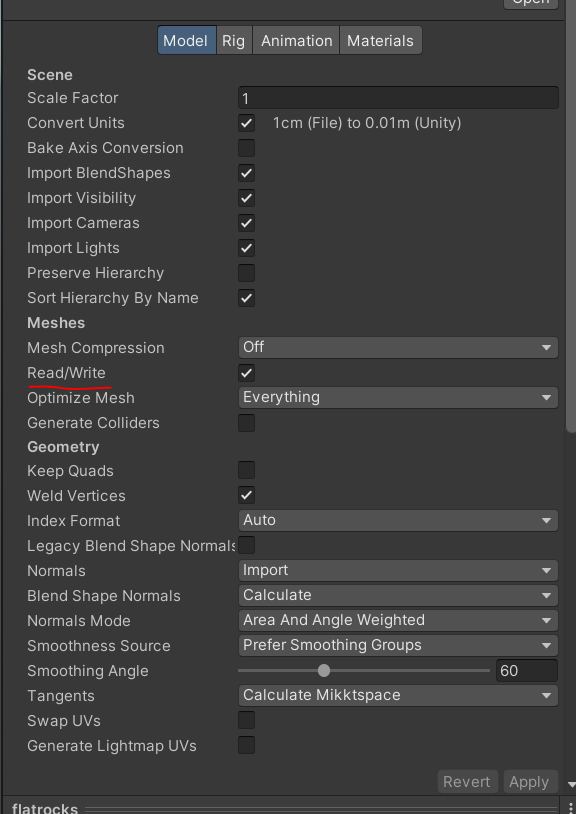
For anyone in the future, my issue was due to the mesh’s import settings not having “Read/Write” enabled. After enabling, it worked for me.