200k…!!
But how…?
You have that many trees…!
Anyway thanks…
And… Trailer is Awesome…
1 Like
Thanks - the new story update is coming in August too:)
I dont know about the verts - i think i grew up on flash, so its like in my DNA to just temper EVERYTHING in this mindset of performance. Its kind of like i make a judgement call with each and every thing i add, and “run” it inside my mind to get an idea how it will interact with the system before i add it to the scene.


1 Like
A really neat game art trick to optimize trees on mobile: Create a lumpy low poly blob to represent the bulk of your tree canopy, and to create a little 4 quad piece of geometry with a leaf texture on it.
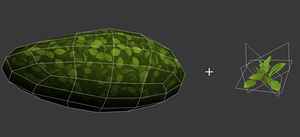
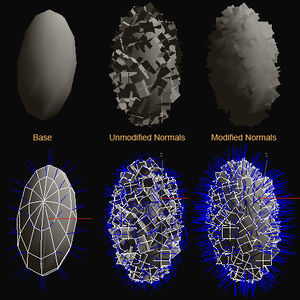
Now duplicate and snap that little leaf texture geometry all around the lumpy blob’s surface like such. You can also average the normals on the little leaf geometries so that you don’t get any real hard edged face shading (makes a face appear almost black when not in direct light).
You’ll then get trees that look great like this example here (using this exact technique).
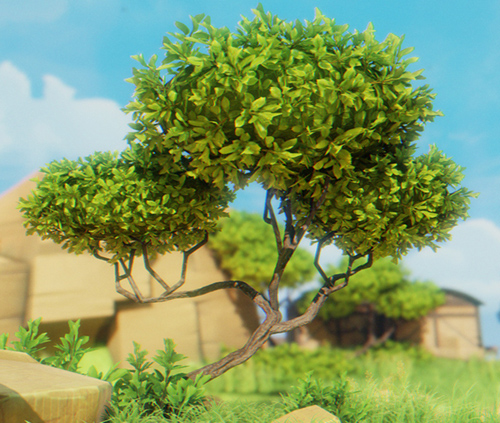
The best part of this technique is two-fold: You use less geometry because less “leaves” are needed to fill out your tree canopy. You also dramatically cut down on the transparency overdraw on the screen as the tree is mostly comprised of a solid/opaque mesh! Hope you find this technique helpful.
11 Likes
Neat idea, I feel like it fails possibly when trying to create more realistic foliage/trees though. Your tree looks likes a blend of realistic/toony, if that makes sense?
1 Like
I’ll have to get some screen grabs of my own work using this technique in a realistic setting. It holds up to realistic as well. In my usage I just make the lumpy geometry ball in the center less like an oval and more like a natural clump, very deformed and extended in spots. I also don’t use such saturated and brightly colored textures as seen in the example.
I just grabbed these from a project of mine. Now this specific project isn’t mobile, it’s a PC game. The technique works so well I use it in any project I can. The top is seen as it is under the night time lighting of my first scene and in the second image I’ve removed the tiling texture on the geometry lumps and shaded the material red to expose where the lumps are. The lumps have a tiling texture based on the exact same texture for the leaves, so the transition is seamless. On PC builds I use multiple lumpy geometry bits all over the inside of the tree branches. Not as limited as mobile.


I wouldn’t even worry about it with these types of trees. They aren’t very broad or bushy. You could however create a tall more narrow chunk of geometry for the center. You would need some artistic talent getting it blend seamlessly with the alpha planes.
wow that looks so cool:) I feel like i just got some insider developer information here. I don’t know if it would work with unity’s tree motion, but i can think of quite a few instance where i could use this - garden bushes for example. Also i hear you bout how it depends on how you do the textures and shaping exactly, but this ‘toony’ kind of stylized look wold be very useful in today’s environment, where a stylized look (limbo, warcraft, firewatch, abzu, rime, inside (which is an incredible game)…etc…) is very popular for a variety of reasons. Thank you:)
1 Like
Well it’s generally an optimization that is intended for limited platforms like mobile, so you most likely wouldn’t be using advanced tree shaders with motion. On PC, you might use these more advanced foliage shaders and there is really no need for this technique on high end PC development.
1 Like
I just submitted version 3 to the app store - hopefully Apple will approve it.
I wonder how it will look on an iPhone 7
Ive worked more than 5 years on this game and although i am planning one last update for polish and little extras, im really glad it is basically what i set out to create now that it has story mode.


5 Likes
Android version?
2 Likes
Thanks for asking. I do plan on the Android version once the IOS version is finished.
I have a prototype running on my Nexus 5:

Its straightforward except i ought unity pro ios and android basic back before subscriptions. So i dont have access to render textures in android (it uses the old license) so i noticed the filters and rflections are not working. ill have to figure this out - my perpetual licesne expires in march 2017, then i will switch to sunscription that will give me access to parity on android, but i dont want to wait that long so i have to decide if i can afford to go on subscription 6 months early or if there is another way. anyways all to say i am working on it in the background and i want to see BrightRidge in android:)
2 Likes
Cool will keep on the lookout for the Android build. My wife and I moved away from iOS devices a while ago.
1 Like
Take two:) BrightRidge storymode has been re-submitted to the App store. Here’s the trailer

3 Likes
When the Android version will appear ? 
A tiled terrain system could have helped on lower devides , as using billboards.
Anyway great insight on using terrain on mobile.
1 Like
Can I ask you a few technical questions? If so: What did you use for post processing, bloom, light shafts, etc?
Did you use fog or some other more optimized trick?
2 Likes
The post processing is partly the default Unity Bloom etc, and part Colorful FX for color processing etc
I used regular unity fog and Global fog - i cant remember where i found that one but i THINK its part of the unity effects
Thanks:)
I have an android version almost ready.To upload it to the Google Play store you need a way to split the files into 2 because its bigger than 100mb (Unity can do that) but the problem is it looks like you need a way to host the second part of the file on your own server in case the download fails, and that’s something i don’t have the money to do. I don’t know if its a hard requirement or not because for me the instructions are very complicated, so that’s the main reason i haven’t released it yet. I am trying to find time to figure it out, and once i do ill release the android version.
1 Like
@protopop You don’t need to host the obb yourself, you upload it with the APK on Google.
2 Likes
thank you:) I did read this thread, but it seems to me like it is unresolved about catering downloads for people with a failed obb downloader. The only thing i dont get is are we expected to host the obb ourselves for cases where the initial downloader fails? cause it seems like that in the google docs. I bet i could just upload it and it would mostly work, but the terms and conditions are beyond what we can understand so i dont know the penalties if we dont cater for an alternate download in case of those failures.