I have object1.transform.position = object2.transform.position. Thing is some objects are set center of objects 2 position and some are super far off. My other question is, how come the values dont match on object 1? I thought seting the position of object 1 to object 2s transform position would copy the transform values to object1 but none of them are the same. Even the objects that are centered correctly have different values. How exactly does transform.position work then if its not setting the values the same?
In the inspector the values are off or just visually? Are any objects moving during the frame?
1 Like
visually, some objects are off on the y axis and all objects wether they are at the correct position visualy or not, have no matching values of object2. this is confusing me as to how transform.position works then if the values can be different.

that object is centered to object2’s “position” in world space in the above snapshot which to me, looks like its in the right spot. I basically need object1 to center at the exact position in world space as object2 which most are working but others are off center position of object2. I cannot solve this issue logically since, the values do not match anyways on object1transform.postion = object2.transform.position
Can you post your code and screenshots of the actual objects? Are any objects moving? Do any objects have colliders?
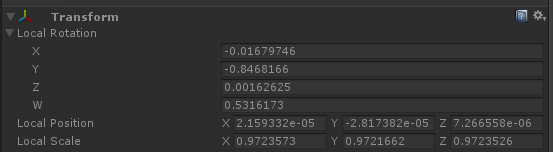
Your rotations and scales are radically different between the two objects, so that probably explains the visual difference, but the positions should be exactly the same in the inspector.
1 Like
void OnMouseDown ()
    {

        Object1.transform.position = FPSTargetHand.transform.position;

        Object1.transform.parent = FPSTargetHand.transform;
}

this one is fine, the half read sphear is where the transform values of the bottle is suppose to be the same. But it goes to show you that its confusing why the transform values are not being copyed the same to the bottle.
Since you’re parenting it to another object, it’s going to use that transform as an offset when you’re done parenting. Try setting transform.localPosition = Vector3.zero after you set the parent.
1 Like
it does not work to change any values. I noticed that I am unable to move the object at all in the scene view when the game is playing after it is parented and after the animation plays on it.
Well there’s your issue then - something else is forcing the position to change every frame.
1 Like
it has to do with the model that was imported from maya. I redid the model and lowerd the y-axis position in maya and its working fine now.