My team and I decided to upgrade to the latest final version of the Unity 2019 engine and we’ve noticed quite a few horrible things which make working in the editor a real nightmare and has never happened before.
When the editor is lagging, it some what piles all the inputs and then release them all in a matter of a few frames causes issues where we get catapulted across our scene and doesn’t stop moving even when we just tap the keys (Editor Scene Camera). This also happens in the game view (Playmode) as well but doesn’t affect our Standalone builds.
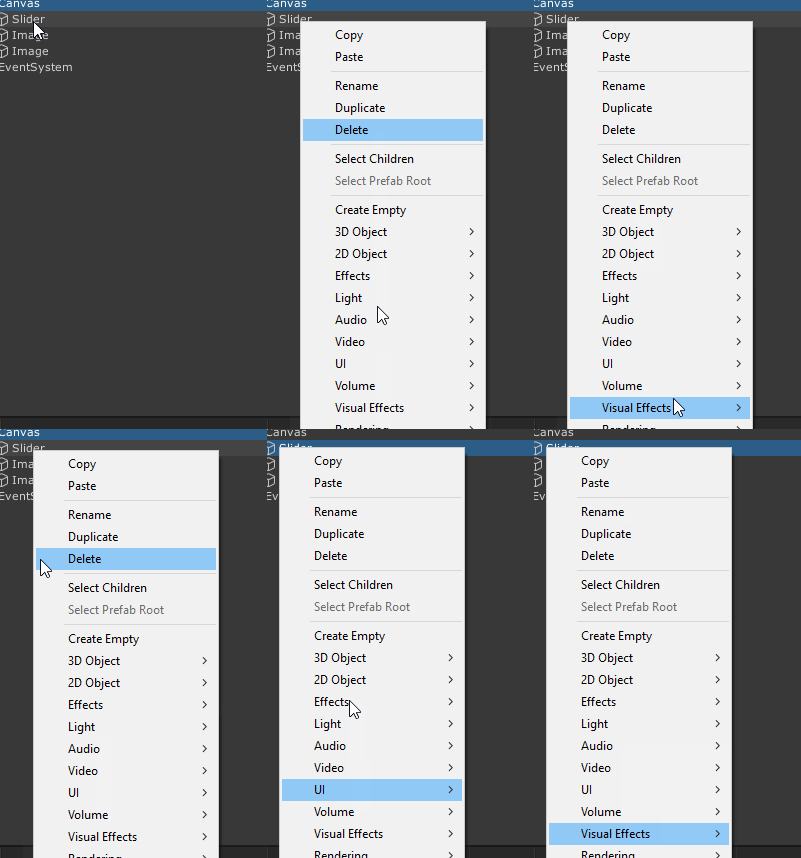
The whole Unity UI sometimes works and sometimes doesn’t, for example I want to change a material in a MeshRenderer, I click the little circle next to material and it brings up all the materials in my project, the issue is when I click on a material the materials window just closes like I’m not focused on the editor or something, this also happens to buttons for example Applying a prefab, the button just does the same as the materials window and closes.
Not sure what’s going on here, any advice would be grateful.
I think I have the same issue as #2. Not sure when it started happening, a few months ago I think. It seems to affect every sort of dialog box in the editor. You open the dialog (color picker, material picker, etc), and you click and the dialog doesn’t register it. The editor instead thinks you clicked outside the dialog box and closes it. I sometimes have to reopen it 10-15 times before the click finally registers. It’s infuriating.
I tried using a different mouse but same result. Both Razer, though…
I’m also having experiencing both #1 and #2 issues. But also been experiencing an #3 issue that I think is linked with the #1 where the inspector massive slows down the editor and game (in playmode) this happens in the particle inspector, on the animation window (when I have too mutch key frames), in the amplify shader editor window, or any other inspectors with lots of fields. Both profiler and frame debuger seams to work fine.
I had the issue #3 since they upgrade to the their UI system, the #2 was introduced in the 2019.3.13f1, (on 2019.3.5f1 the “asset picker” worked fine). Can’t quite remember If #1 was present in the later 2019 editions.
After upgraded my project to use the AssetPipeline v2 and deleted my project library folder I no longer can reproduce #2.
It has made the editor a complete nightmare to work in, we upgraded because the previous version had issues where duplicating objects made all scenes in the hierarchy dirty which for us we use a lot of scene
I didn’t really consider the sluggish performance in editor to be unity’s fault, but I do recognize the symptoms in #1 as well. It’s been that way for a while though (for me). Especially with heavy editor tools, like Archimatix Pro #2 is my biggest gripe at the moment, and again - has been for months. I did fire up 2018.4 to confirm that it’s not an issue there.
If this was a common problem, I’m sure it would have gotten more attention by now… so I wonder if there’s anything we have in common that could be the source of the issue?
Personally I’m running:
CPU: i7-4930K @ ~3.9ghz
RAM: 32 GB @ 2133mhz
GPU: 1080TI
Mouse: Razer Mamba (dunno if relevant)
Monitors: Acer predator x34 with gsync 3440x1440 + some philips 27" 1440p
HDD: Both unity and projects on samsung 850 evos
CPU is due for an upgrade but otherwise I think performance should be fine. As for software that might be interfering, too much crap installed to even start listing…
Yep same here. Upgrading my editor to 2019.3 from 2019.2 absolutely killed it. It has something to do with how many editor windows you have open. I typically work with a dual monitor setup, with my scene, hierarchy, project, and inspector open on my left monitor, and my game and a few other tools on my right. This absolutely KILLED 2019.3’s performance, causing input to slow down like #1 described. As soon as I dropped down to the default setup, things improved, but I feel totally gimped not being able to open more than 5 editor windows…
I feel the need to reiterate: This setup worked fine in 2019.2. The input lag makes it completely unworkable.
Edit:
I sent a bug report with a repro project and steps. It shouldn’t be hard to notice. For anyone else here who wants to try and repro:
Open and maximize your Game view on your second monitor, and open a few probuilder windows and snap them wherever.
Now try flying around (Hold right click in the scene view and use WASD). Hold your movement keys for more than a few seconds and you should see them “stick” for almost double the time you held them for.
If not, try opening more windows and/or inspecting something with a complex behaviour, like a large set of arrays.
I have issue #1 as well. Didnt have it in 2019.3.0f3, but do have it in 2019.3.13f1
Seems like holding down keyboard keys causes input to be accumulated, mouse movement is also affected.
I was having the same issue with #2, but it seems “long-clicking” whatever UI button that opens the dialog “solves” the issue, as suggested here: https://discussions.unity.com/t/595217/19
Pretty odd, but it might give some insight. It seems to work for me.
Any updates on issue #1? I submitted a bug report with a repro, but I haven’t heard back at all. I’m beginning to suspect this is a fundamental issue with the new UI system…
I made a video, repro project, and bug report for issue #1 (The Input accumulating in the editor).
Bug report Case #1254428
-Only happens in the editor
-Happens in 2019.4.0f1 and 2019.3.13f1, did not happen in 2019.3.0f3, unsure about other versions.
This is the script in the project
Click for code
using System.Collections;
using System.Collections.Generic;
using UnityEngine;

public class EditorInputAccumilationBug : MonoBehaviour
{
    public Camera myCamera;
    public float mouseSensitivity = 4f;
    public int framerate = 10;

    void Start()
    {
        Application.targetFrameRate = framerate; //Easier to see the bug at low framerates.
        QualitySettings.vSyncCount = 0;
    }

    void Update()
    {
        myCamera.transform.Rotate(0, Input.GetAxis("Mouse X") * mouseSensitivity, 0);
    }
}
Maybe this guys post is talking about this issue and they already have a fix for it?
Playtesting in the editor is painful because of this. If there is anything else I can do to get this fixed faster, please let me know.
 .
.