Unity CCD and Addressables (RemoteProviderException : Unable to load asset bundle)

Hello,

I am using Addressables and Unity Cloud Content Delivery, i have created 5 groups
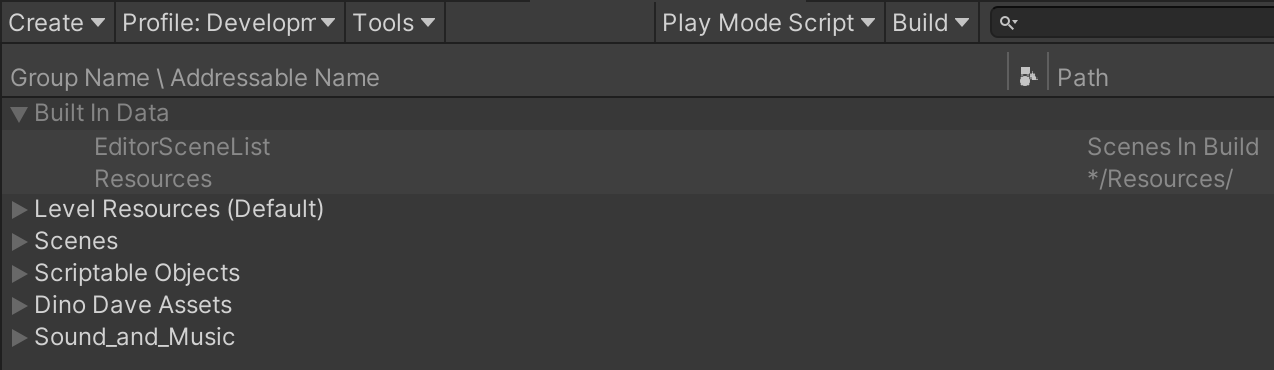
I have created a bucket in CCD and Updated android folder which contains asset bundles respectively.

created a new release in CCD and used the badge link to addressable remote load path in profile.

when my code runs, It throws following errors.

Errors :
RemoteProviderException : Unable to load asset bundle from : https://0f75bfb2-df18-4246-b95d-e3c2a059ede5.client-api.unity3dusercontent.com/client_api/v1/buckets/6b955d2f-fecf-49c6-9a2a-95f024feea53/releases/10d22d39-63b8-4242-b8db-bf28c677080e/entry_by_path/content/?path=/Android/scriptableobjects_assets_all_cadeed6e49058054854367b99b8e6baf.bundle
UnityWebRequest result : ProtocolError : HTTP/1.1 404 Not Found
ResponseCode : 404, Method : GET
url : https://0f75bfb2-df18-4246-b95d-e3c2a059ede5.client-api.unity3dusercontent.com/client_api/v1/buckets/6b955d2f-fecf-49c6-9a2a-95f024feea53/releases/10d22d39-63b8-4242-b8db-bf28c677080e/entry_by_path/content/?path=/Android/scriptableobjects_assets_all_cadeed6e49058054854367b99b8e6baf.bundle

RemoteProviderException : Unable to load asset bundle from : https://0f75bfb2-df18-4246-b95d-e3c2a059ede5.client-api.unity3dusercontent.com/client_api/v1/buckets/6b955d2f-fecf-49c6-9a2a-95f024feea53/releases/10d22d39-63b8-4242-b8db-bf28c677080e/entry_by_path/content/?path=/Android/levelresources_unitybuiltinshaders_52ba17a865cfd02b81b180160256c001.bundle
UnityWebRequest result : ProtocolError : HTTP/1.1 404 Not Found
ResponseCode : 404, Method : GET
url : https://0f75bfb2-df18-4246-b95d-e3c2a059ede5.client-api.unity3dusercontent.com/client_api/v1/buckets/6b955d2f-fecf-49c6-9a2a-95f024feea53/releases/10d22d39-63b8-4242-b8db-bf28c677080e/entry_by_path/content/?path=/Android/levelresources_unitybuiltinshaders_52ba17a865cfd02b81b180160256c001.bundle

both errors says that it is unable to load asset bundle. Hope you will find possible solution for this one and why this is happening.

Code Snippet:

private void Spawn_Player_Predator_LevelPlayables(AsyncOperationHandle obj)
{
Level_Adderssables.GetDinoDave_ref().LoadAssetAsync().Completed += (DinoDave_Asset) =>
{
Loading_Screen.SetActive(true);
Loading_Progress.value = ((AsyncOperationHandle)DinoDave_Asset).PercentComplete;
Level_Adderssables.GetDinoDave_ref().InstantiateAsync(PlayerSpawnPoint.position, PlayerSpawnPoint.rotation).Completed += (dino_dave_ref) =>
{
dave_Controller = ((AsyncOperationHandle)dino_dave_ref).Result.gameObject.GetComponent<Dave_Controller>();
Loading_Progress.value = ((AsyncOperationHandle)dino_dave_ref).PercentComplete;
Dave_Spawned_Flag = true;
Level_Adderssables.Get_Dave_Camera_ref().LoadAssetAsync().Completed += (DaveCam_Asset) =>
{
Loading_Progress.value = ((AsyncOperationHandle)DaveCam_Asset).PercentComplete;
Level_Adderssables.Get_Dave_Camera_ref().InstantiateAsync(PlayerSpawnPoint.position, PlayerSpawnPoint.rotation).Completed += (dave_cam_ref) =>
{
Dave_CineMachineCamera = ((AsyncOperationHandle)dave_cam_ref).Result.gameObject.GetComponent();
Loading_Progress.value = ((AsyncOperationHandle)dave_cam_ref).PercentComplete;
Dave_CineMachineCamera.Follow = dave_Controller.transform.GetChild(2);
Dave_CineMachineCamera.LookAt = dave_Controller.transform.GetChild(2);
dave_Controller.Dave_CineMachineCamera = Dave_CineMachineCamera;
dave_Controller.transform.GetChild(2).transform.localRotation = Quaternion.Euler(-10f, 180f, 0f);
};
};
};
};

currently i am using addressable version 1.18.19 which is verified version as of now.

Hi @kvitala could you confirm that those bundles have been uploaded to CCD? The hashes in the requested bundle names may be slightly different than what was actually uploaded.

Also would be worth checking that the new catalog.json file was uploaded as well (and potentially the catalog.hash file if using the Content Update workflow).

Hi

I am also having the same issue, i have rebuilt the addressable groups several times, deleting and rebuilding the project build, i found local links are working fine but when i switch to http link its has this error message. I currently using a http://localhost/ but this isnt working either, have there been any progress solving this issue

Thanks

Hi, similar issue here. I have two test projects: Secondary - to build shareable addressable Scene_01 and Primary to load this scene as an addressable bundle from my asp.net server w/o reference in project (using loadcatalogasync). I checked that files are present and available on server static content wwwroot/Secondary. I can see them in browser if i go for example to: http://192.168.1.40:50179/Secondary/. I also can download .json or some .png file via Postman, but i cant do the same for .bundle file.

The error is in RemoteProvider:

The error repeats also for builtinshaders, but it happens afterwise and they are also present on server.


UPD: It was my mistake - level .bundle files were not provided properly from static content in my asp.net core server, same error 404 Not Found was returned by Postman too. Fixed the server side to return them as application/octet-stream and it works now! May be it can be of help for someone, because i did not found any tutorial for how to host addressable assets on custom server, especially if you want to make bundles in one project, then export them to server and use in the main project.

Same situation here, four exceptions were triggered. I followed the UnityCCDWalkthrough, but failed to load assets from the Unity content delivery service.
https://docs.unity.com/ugs/en-us/manual/ccd/manual/UnityCCDWalkthrough

RemoteProviderException : Unable to load asset bundle from :
OperationException : GroupOperation failed because one of its dependencies failed
ResourceManagerException : ProvideResources failed
OperationException : ChainOperation failed because dependent operation failed

Fixed:
rebuild and reupload

1 Like
  1. Check Remote Load Path

Go to:
Window → Asset Management → Addressables → Profiles

Ensure your RemoteLoadPath is set to:

text

CopyEdit

https://.client-api.unity3dusercontent.com

:white_check_mark: This must match your CCD bucket’s URL.

Tip: Click the “Inspect” button next to the profile to see what variables resolve to.


  1. Verify Group Build Settings

Go to:
Window → Asset Management → Addressables → Groups

Click on your remote group, and check:

Build Path: RemoteBuildPath (typically ServerData/StandaloneWindows64 or Android)
Load Path: RemoteLoadPath
Bundle Mode: Should be “Pack Together” or “Pack Separately”, not “Do Not Pack”

  1. Build Content for Cloud

From Addressables window, run:

Build → Clean Build → All
Then Build → Build for Content Update

After building, use:

bash

CopyEdit

unity-ccd-cli upload <bucket-id> -r release-name

OR use Unity Dashboard to upload bundles to CCD.


  1. Release a CCD Version

If you’re testing and haven’t released your CCD content version:

  1. Go to Unity Dashboard → CCD
  2. Select your project & bucket
  3. Create a release
  4. Assign it to the correct badge (like latest)

Your app fetches data based on badge (e.g., /latest path).

  1. Play Mode Script

In Addressables → Groups → Play Mode Script, use:

Use Existing Build (requires build)

Don’t use Use Asset Database or Simulate Groups when testing remote loading.

  1. Enable Exceptions for Debugging

To get more detailed error logs:

csharp

CopyEdit

Addressables.ResourceManager.ExceptionHandler += (handle, exception) =>
{
    Debug.LogError($"[Addressables] Exception: {exception}");
};


7. Check Build Target Match

Make sure:

The build target (e.g., `Android`, `iOS`, `Windows`) used when building the asset bundles matches your app’s current platform.
Asset bundles are platform-specific.

---

8. Test Bundle URL Manually

Copy the asset bundle URL from the Unity console and paste it in a browser. It should download the `.bundle` file.

If it gives a 403/404 error, the file is missing or not publicly accessible.

Refrence site https://nullsbrawlapkz.com.tr/#google_vignette