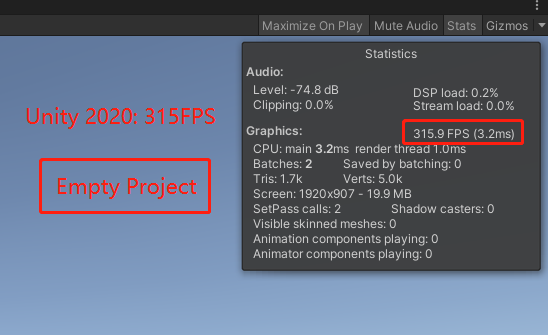
I updated my project from 2019.4.17f1c1(LTS) to 2020.3.5f1c1(LTS), and the FPS dropped to 15 from 90. Then I created three empty projects of three unity version( 2019 / 2020 / 2021 ), and press Play Button. In such a empty scene, the 2019 version is 9 times faster than 2020 !!
Would be a lot more helpful to attach profiler information, detailed and unparented (open the top 2 to find the culprit) with this.
Oh, and the way FPS is calculated was changed to be more accurate in 2020, forgot which exact version, so I bet that’s why you don’t see 2000 FPS anymore.
Also, you should try this with a project. Maybe an asset demo if you have. I actually might test it out right now.
In my real project I get totally different FPS between Unity2019(Around 90FPS) and Unity2020/2021(Around 20FPS).
I tested on a Low-End PC, also on a High-End PC. On High-End PC, it shows no differences between unity2019/2020/2021. But In a Low-End PC, the unity2019 is several times faster than 2020/2021(not only in the Editor, Even in a Build, 2019 is bloody fast than the other)
Considering my game’s player may not have High-End PC, for now, I Switched back to Unity2019. If you guys have different test result or if you can fix this, please let me know. thanks.
First of all, no idea if the profiler information is the giving correct/similar information between the two versions.
2019 LTS, and 2020 LTS (First version)
All scenes are the exact same between versions, PP isn’t setup but installed.
There’s a huge difference in render thread between the two versions, also no idea why or if it has something to do with FPS/stat changes and how they’re calculated. Culling in 2020 seems to be more expensive, consistently. No idea why.
In terms of MS/FPS, 2019 has a small small edge. I didn’t try to get an average over time, but I can tell 2019 performed slightly better (prob average of 1-6 FPS), most of the time though 2020 version was hovering around the same FPS as 2019. This is without graphic jobs since this is in editor. Which maybe performs better in 2020.
PS: I ran them both on the same machine so the total FPS was reduced for both, but I also checked running them separately and the results are the same from what I could tell.
2020+ editor is vastly slower on my end as well, using URP make it even worse and using HDRP make it a lot worse.
Generally the overall experience with Unity 2018 and Standard Pipeline comparing to anything else newer is like comparing Pegasus with a Slug.
Sometimes i just open a 2018 project that i have reworked in 2019 and the projects loads so fast and all inspector stuff is such faster that is extremely noticeable and a breath of fresh air comparing to working with latest Unity.
In 2020+ i get those editor hangs and windows with progress bars all the time, all making it like i watch a slide show of things happening that i have to wait long time for, even for the simplest of tasks, things that were 100% instant in previous versions.
Imo Unity must stop adding anything new at this point and optimize everything they made already, really the optimization work they have to do is already behemoth and should absolutely halt any new action before make Unity completely unusable. The 2020 experience is really really bad right now and will only get worse if keep adding than optimizing.
When people say this I feel like they’re forgetting a fundamental fact of large scale software development. Unity has more than one team working on the game engine. The SRP, HDRP, and URP teams are not involved with the Unity editor team which is not involved with the DOTS team.
Unity doesn’t need to stop working on new and upcoming features to improve performance. They can do both of these at once and have in fact been introducing optimizations.
In my opinion the major reason for this is that we’ve moved from an immediate mode UI system to one that is very heavily influenced by web technologies like HTML and CSS.
Moving away from a system where you simply specify position of components directly to one that is based around stylesheets will always be much slower but will allow for both more advanced editors and less time developing them similar to how moving from C++ to C# results in less performance but faster development time.
There’s no value in comparing the performance of empty scenes. There’s plenty of stuff which might be happening behind the scenes with a logarithmic (or other) performance cost:
Your worst case empty scene there is still running at over 300 FPS. It’s 5 times faster than a standard monitor, and in the ballpark of twice as fast as most high-refresh-rate monitors. You need to have a pretty ridiculous specialty monitor for the difference between 2000+ and 300+ FPS to make any difference. And you’re looking at the Editor - builds are faster.
What really matters is how performance is impacted as you add stuff to the scene. It could well be that the newer versions start “slower” but scale better. And that’s absolutely what our tools should be optimised for. I want my engine running well when under load, not when the scene is empty.