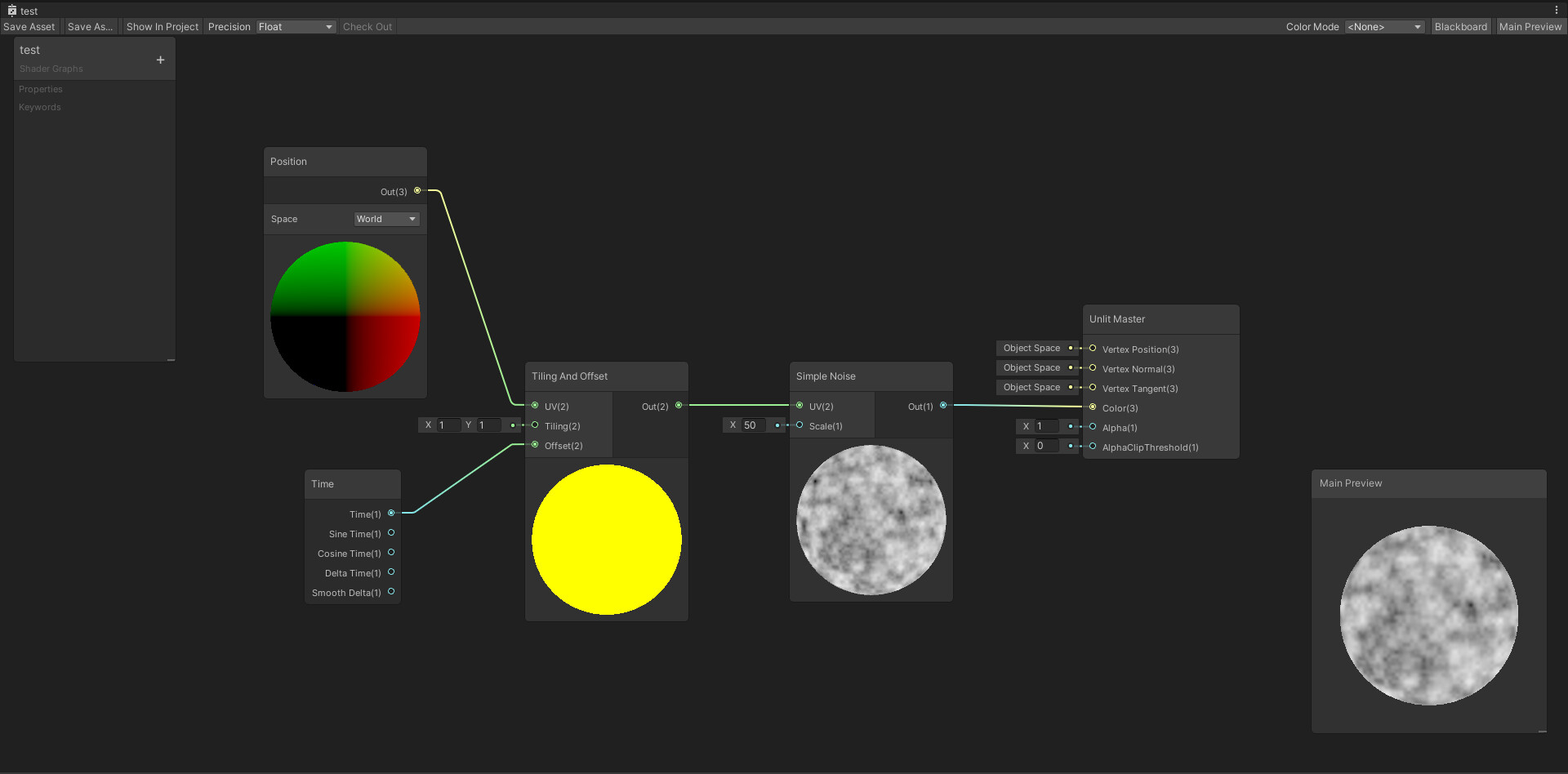
I’m working on a “fake” sun shaft shader for URP with Shader Graph in Unity 2019.4.0f1 (but also tested in 2020.1.6f1).
I need help understanding why my shader is not using the “world” position in scene while it’s working in preview.
I tried putting the object in XYZ = 0,0,0 for scale, rotation and position (same as in the preview) but it’s still not working.
It’s doing the same effect as if the position node was set as Object.
Let me know if there is a proper way to do this or if there is any workaround.
Well in my preview I’m not seeing the deformation of the texture like in the second screenshot. The texture is supposed to be world spaced but it’s streched.
That is because Tiling and Offset working with 2D space. So in result you clamped z axis. You could fix it by creating your own tiling that will work with 3D vector. You can do it different ways:
Add new subnode that will do it
Split vector3 and work independently
Use some code with custom function node (Code sample: Position * Tiling + Offset)
You are right ! Why did I not thought about it !
I’ll test this and hope I can close this thread.
But still I don’t understand why it’s working in SG preview then.
Or use an Add node, since that is quite literally all the Tiling Offset node is doing here; adding Time to the world position.
But that won’t fix the problem, since the Noise node is also 2D. Shader Graph does not have a built in 3D noise node. There are some online that other people have made, but there’s no guarantee any of those will work with the version of URP you’re using since Shader Graph keeps changing and breaking stuff.
What you see in the preview and what you see in the scene is identical. The difference is the Shader Graph preview uses an unrotated camera view. Basically it’s a nearly orthographic 2D view of a sphere mesh. If you had your camera’s rotation zeroed out and aligned with the sphere in the scene you’d see the same thing.