When i rotate the object, the texture needs to rotate with it, whilst still remaining in world space for position. How do i apply a rotation to it to match the rotation of my gameobject ?
There’s a number of ways to skin this cat, depending on exactly what you need. But it mainly comes down to this:
The unity_ObjectToWorld is a transform matrix that transforms the vertex positions from local object space to world space. The matrix holds rotation, scale, and translation, with with a little (or a lot) of work can be extracted to use as much or as little of those components as you need.
However world space position and object space rotation is one of the harder ones. Not because the code is hard, but because it’s potentially impossible. Depending on exactly what you’re envisioning, there’s no perfect way to reconcile object space rotation with world space position.
So there’s three ways to go about it. The two easy ways are to scale object space UVs by the object to world scale and then either offset the UVs by the world to object offset, or not. The hard way is to have world space tiles that are individually rotated and blend between them.
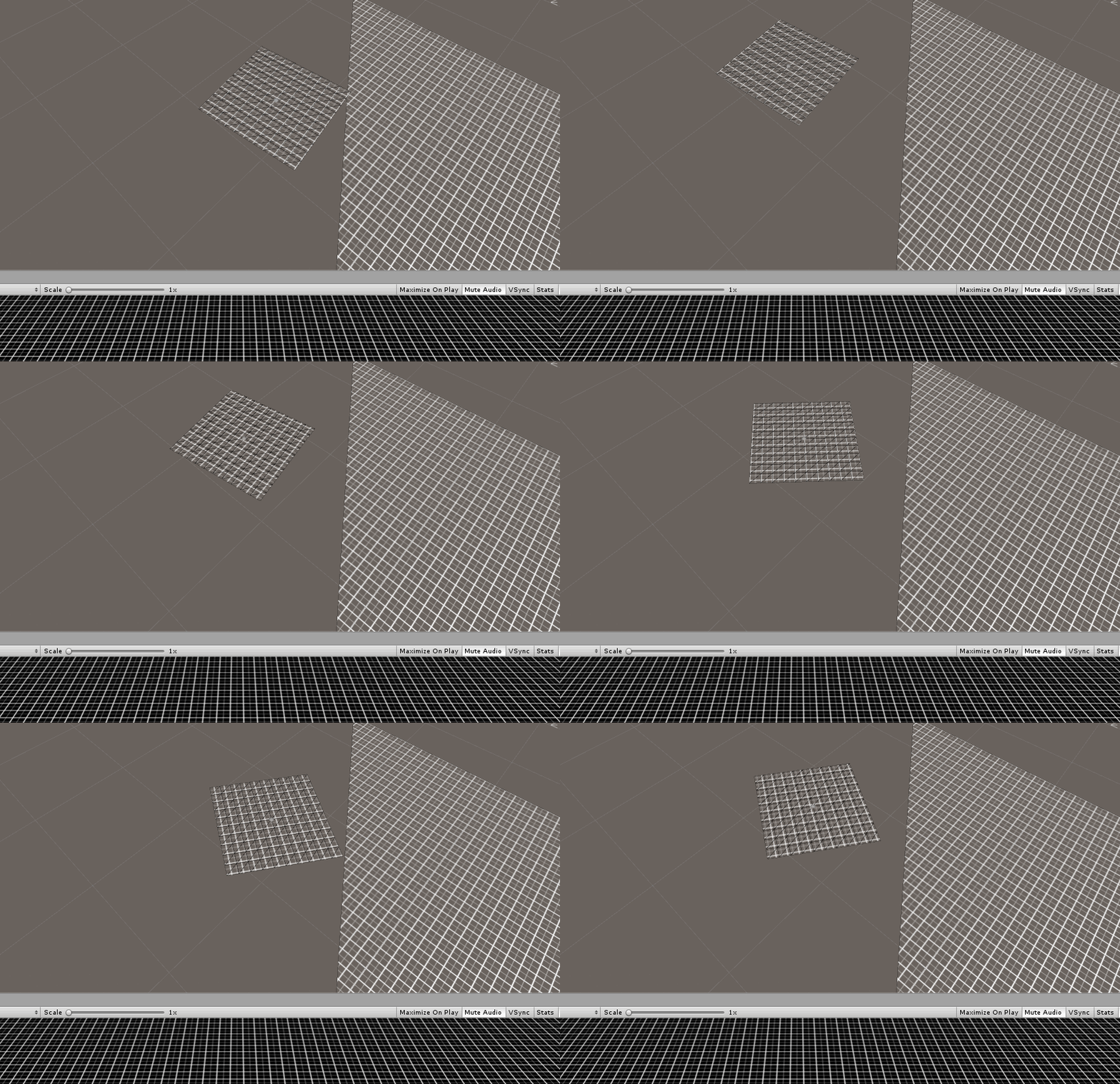
Thanks for the reply, this works (see the little square in image), though one thing i was wondering, is it possible to pass in data from another game object to the shader to translate/rotate the texture to match rather than use the object its tied to?
For example i have a script on a particular object that has a matrix TRS that tells me the rotation of it, and its translation (scale is always 1) and i want to update the output texture (which you see on the right hand side in the big mesh) to match the little object without moving vertices so that the grid lines up.
This is a visual of what i am trying to do, the little object is some random object with a local grid, the big object follows the camera, but the grid texture for it needs to match the little object’s translation/rotation, but only its texture, not its vertices:
The vertices of the big grid mesh only move based on where ever the camera moves.
I manipulate the little object with my TRS matrix:
My first guess was to iterate through the mesh uv’s in C# and transform each point by the matrix, but i’d rather do it in a shader for performance gains.
// shader
// outside of function
float4x4 _WorldToUVMatrix;

// in vert function
float4 worldPos = mul(unity_ObjectToWorld, float4(v.vertex.xyz, 1));
o.uv = mul(_WorldToUVMatrix, worldPos).xz;
I can see two issues. First is the “world to UV” matrix is for transforming from world to “UV” space. The position in the v.vertex isn’t in world space, it’s in local space, so you were applying the matrices out of order. In some cases that might still work, but there was also a second issue here. Matrix multiplication of a position is a float4x4 multiplied with a float4 value, not a float3 value. If you use a float3 you’re only getting the rotation and scale, but not the translation. So even if the matrices were applied in the correct order, you weren’t ever getting the position offset meaning your grid was probably rotating around either the world origin or the mesh’s own pivot (rather than the other object’s pivot).
Ah okay the world space i understand, though the vertex requiring a w = 1 i did not expect.
If i always have a transform scale of (1,1,1) can i reduce the amount of data past to the shader by using a 3x3 matrix from the transform some how which only has translation and rotation as an optimisation ?
I mean you can pass in a 3x3 matrix and a float3 position as 3 float4 values, but really you’d be wasting time in the c# breaking the matrix up and in the shader reconstructing it. The extra float4 of data is inconsequential unless you’re planning on doing this for thousands of objects.
@bgolus you are full of love… the “easy” it’s perfect for me, and now I’ll take a moment to understand it, but if you have some links that make it more fully understandable, that would be even more lovingly
Shader Graph and Amplify both have Object Scale nodes that get exactly the same scale information as above. And transform nodes for converting between different spaces. The description of the steps the code is doing should be enough to replicate it in either.
thanks for your quick answer! I agree, guess I have to be more specific. I am asking myself what these ._m00_m10_m20 for example behind unity_ObjectToWorld mean. is this x and z?
This problem is giving me a headache for at least a week now. Whatever I try, I can’t get the wanted result. I am not a shader expert
Like you. I would really appreciate a bit more assistance.
Here’s a recreation of the original example in Shader Graph. This assumes you’re using a mesh that’s aligned like the default plane mesh. You can get rid of the transform and subtract nodes if you just want the texture to scale with the object’s size.
 ?
?
