Hi all,
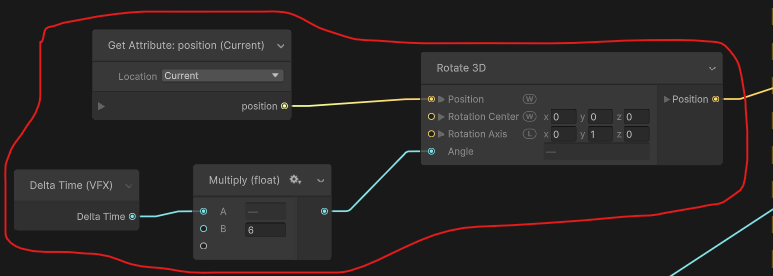
I have some graphs set up to use Rotate 3D > Position (update block) for a spiraling effect to ‘wrap’ characters in trails/particles for spell effects. This setup works great when the target is stationary, but not when moving. I am not good at figuring out very technical things though, so I have come here for help 
The ‘problem’:
- World space position / local space rotation center: when the character moves quickly, the particles swing out wildly trying to keep up with the new rotation center
- World space position / world space rotation center: The center stays at the same point in world space, so the particles always rotate around it
Solution needed:
- How to make the rotation center for each particle stay at the location it was at, when the particle was spawned? The effect I intend is that the particles fall behind the moving character, but continue their rotation/orbit in world space as they finish their lifetime, not trying to chase the currently moving rotation center. So somehow, I need to tell it to grab the ‘Rotation Center’ that existed at the moment the particle spawned, and use that?
- Or if this isn’t possible using Rotate 3D, what should I do to get the desired spiraling effect that gets left behind in world space?
Thanks!
Here’s the Rotate 3D setup I have been using