I have a simple question. I’m building for WebGL and I have a really high file size. When I check my build report I see that %89 of the build size comes from the “Other Assets”. What are these other assets and how can I optimize build size ?
Hey LukeImmersive, I found out that the files taking space were video files that are not used but somehow got into the build. The video files (.mp4 etc.) are shown under other “Other Assets”. Also as @mgear mentioned above, you can check the files under “StreamingAssets” folder if you have any and also “Resources” folders of unused third-party assets.
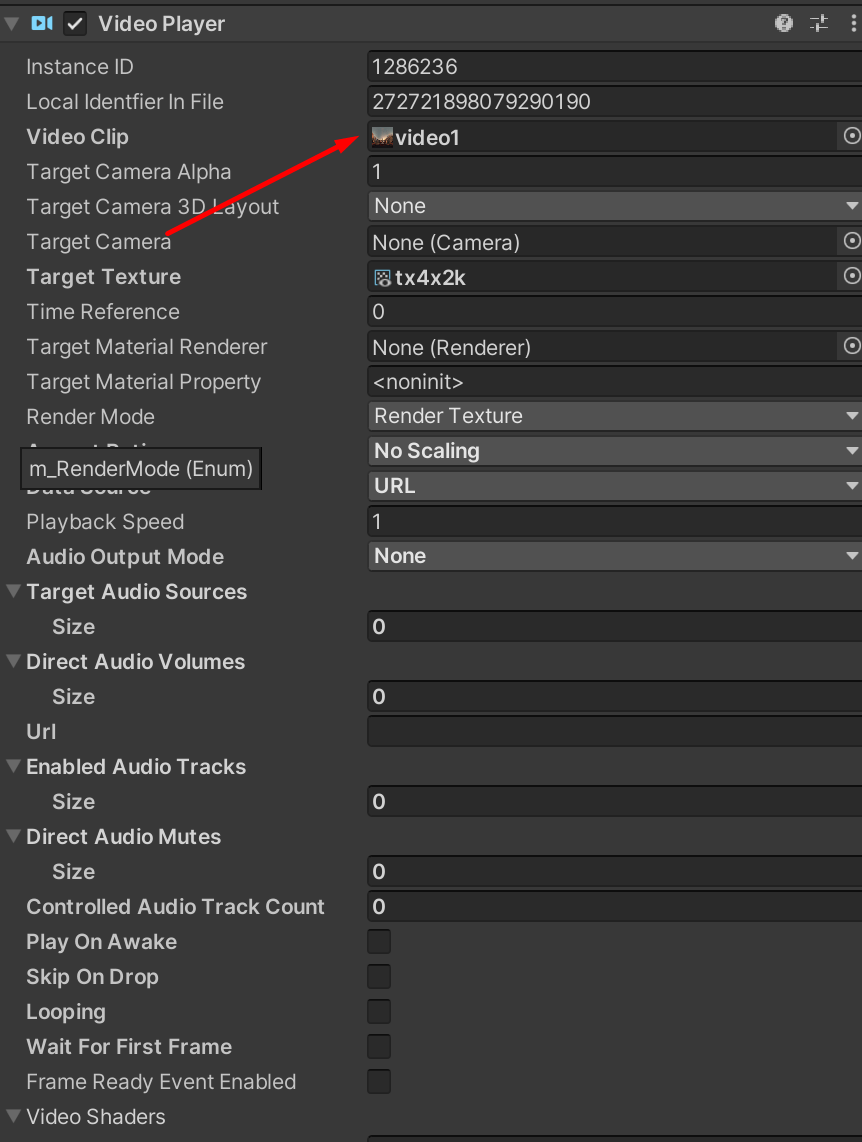
Careful when you test videos and links and then switch in editor, the asset will remain bound and serialized with the scene. Always check in debug mode for hidden serialized fields like in VideoPlayer component
Thank you so much. I had an old video in my resources folder that accounted for the entire ‘other assets’ portion in my build report. It wasn’t showing in the size-sorted list for whatever reason (technically unused I guess?), so I was completely at a loss.
I would highly recommend using BuildReportInspector package to identify which assets take up the most space in your build. Just place com.unity.build-report-inspector folder in Packages/ and then go to Window > Open Last Build Report. Look at SourceAssets and Calculate.
For me, it was my VideoClips having “Generated” files (probably due to Transcoding) which bloated the overall build size. They were labeled as Other Assets.