The 3D ones suggest that the are between 0 and 1. The 2D Physics Materials don’t list them.
Seriously Unity needs to up their documentation game. Their examples and documentation are seriously spartan.
The 3D ones suggest that the are between 0 and 1. The 2D Physics Materials don’t list them.
Seriously Unity needs to up their documentation game. Their examples and documentation are seriously spartan.
You mean the documentation doesn’t say ‘A value of zero indicates a surface with no friction while a value of 1 indicates maximum friction (eg, rubber).’. 
These are the recommended ranges you refer to. Of course, as you could easily see in the editor, it does allow you to go above 1 as some users want to do that. In this case, like every 2D physics value that is not allowed to go to infinite, it is clamped at 100000.
Fair enough. The Manual to the Scripting API is just inconsistent. The 3D materials list the range but the 2D materials do not. And a values between 0 and 1 are generally absolute scales so what does it mean to go above 1? Does the co-efficient reflect the kind of table found in this chart? Would including this chart in the documentation be useful?
I am under the impression that a coefficient is a relationship of two materials rather than the value of a single material. If I create a coefficient value to reflect “glass” and one to reflect “rubber”, how do I ensure that they interact correctly with each other?
I mean to provide “PhysicsMaterial.friction” is the “A value of zero indicates a surface with no friction while a value of 1 indicates maximum friction (eg, rubber).” is kind of the minimum definition without providing enough information on how to use it correctly or effectively. One ends up having to experiment. Heck, having the underlying code’s formulas for how the functionality is derived would at least provide some context.
Also, why is the Networking API in the Manual section and not in the Scripting API section?
I don’t think my criticism is without merit.
Unity uses Box2D and most properties directly correspond to equivalent properties.
The friction coefficients are mixed using the function here: inline float32 b2MixFriction(float32 friction1, float32 friction2)
Wow! I would love to have that mixing function in 3D as well (the closest setting is plain Multiply).
@MelvMay : I second @Edy 's sentiment! It would be fantastic to see the 3D friction coefficient function as well!
I’m not on the 3D physics team but I did a quick Google search and found it here: nVidia PhysX docs
I think the material doc explains it well though.
PhysX doesn’t expose a callback for combining friction values.
What scenarios do you have where the PhysicMaterialCombine is not enough?
I don’t have a specific scenario. Just saw that the friction combine method in Box2D is sqrt(ab). We don’t have that in PhysX (we have ab).
As Erin Catto has chosen sqrt(ab) instead of ab as global friction combine function in Box2D, then I’m pretty sure that he has very good reasons for it. I would love to find out why. Maybe this approach is closer to what happens in reality?
Comparing the plots of the functions, sqrt(a*b) seems to provide more friction overall:
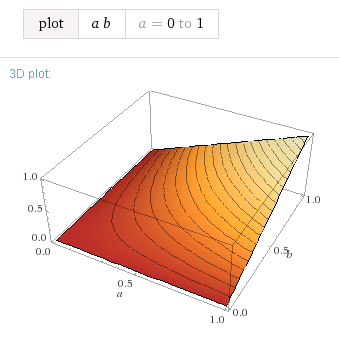

It’s simply a curiosity, I’m not really dying for a new 3D friction combine method. But maybe PhysX might want to consider adopting it in a future version.
it looks cool, but I prefer not to make changes to PhysX unless we have some hard pressed usecases.