Hi, I don’t know Unity yet but I know C#. I read that Unity is the most productive game engine.
I’ve long had an idea for a 3D story-driven detective game, but didn’t think I’d ever be able to do it (for lack of help to create all the assets), until I looked into Daz. Daz would let me use ready-made models (customized to my desires using “morphs”) and animations that look absolutely amazing, saving me a whole lot of effort, seemingly without requiring any 3D modeling/animation experience. If I could easily reuse Daz models, clothing and animation in Unity, that would allow me to do the whole game on my own!
I saw comments saying it’s not easy, that there’s always issues you have to fix by hand. But they’re from 2 years ago. How are things now?
Here’s the sort of things I’d like to be able to do, are these easily fone nowadays:
Import Daz model, animations, clothings
Play any desired animation for the given model
Cancel the given animation at any time
Change clothing for a given model
I’m also wondering if I can join multiple Daz animations in Unity, for example: I have a “holding telephone” arm animation, could I combine it with “walking” leg animation to have a model talking on the phone while walking? Or would I need to create a third walking+telephone animation in Daz and import that?
Similar to the previous question, the main character needs to show injuries on his face/body, and Daz has texture packs for that. Would I be able to just import an injury texture and apply it to the Daz character model, or would I have to import a brand new “injured main character” model into Unity?
I believe Character Creator 3 has a Daz import (and Unity export) and is the recommended up-to-date workflow for creating game characters from Reallusion content.
I’m a novice and haven’t used it much yet though, but certainly the export to Unity was easy when I tried it and I think there are up to date tutorials on importing Daz characters and clothing (although I’ve not tried that bit specifically myself).
CC3 has some really good features for creating game ready (lower poly) characters from hi-res Daz content. But as I say I’ve only just scratched the surface with it so far, but I do recommend it from what I’ve learnt.
One thing to be aware of is you need to ensure you have the Export license for Daz content you intend to include in a game, because as I understand it, the cheaper of the two licenses doesn’t allow you to do this and is for renders only.
If you dont already own Daz content you can also purchase assets ready made for use in CC3 as well, which makes the workflow even easier.
Those are all totally doable within Unity, yes. How doable they are for you depends on how much game development experience you have, and how much you understand Unity workflow and game dev workflow.
Daz models can indeed be imported into Unity. We used them as a starting base for characters on some of our more recent games. What I mean by starting base is that they required a ton of work to get them usable in the way that we needed for those (3D) games.
Not sure how much research you’ve done on it, but it’s not just a matter of exporting characters from Daz and popping them into a ready-to-go game framework.
Also due to DAZ licensing and the cost of the software you can expect yourself north of $400-600 to start. AFAIK the base licensing at Daz does not allow real time rendering, you need to buy license extension for that. CC3 content usually allows it or you can buy a version of them with it for a reasonably price.
CC3 is good, I like it and own it, although I wouldn’t use it for main characters or characters which may become ‘iconic’, because of license issues. You can forget secondary works altogether (merch and such).
My experience was the the Daz3D models come in as seperate skeletons for hair, clothes and the body. The body was 70K of polygons, all of which was covered by clothing. It may be the person exporting didn’t know what they were doing, but it was barely usable.
The bigger issue was that you could not make the character a Humanoid avatar for Unity’s animation system. Makes sense, humans only have one skeleton, not 3. This meant that you could not combine animation from other sources at all and would be a huge limitation.
I think you are wrong. Unity autorigging system is the best in all game engines. You can apply any humanoid animation to any Daz model (G2/G3/G8) - it fit almost perfectly.
In latest versions of Unity only need to “reset” animation to T-pose.
Also there’s a method do import separately body and other components like hair, clothes, etc. and copy bony hierarchy with special script. For example you can look at videos tuts on channel: https://www.youtube.com/channel/UCxg4xZU61iP7cV-I0zEzFIA
Second approach to change clothes in daz model imported into Unity is add all clothes into model in Daz Studio, then export as fbx and import into Unity. Then you can enable/disable any clothes by hand in editor or in runtime by the prepared simply script.
You can combine the meshes into one skeleton at runtime via code, or do it ahead of time in a separate 3D program, before exporting to Unity. As far as the polygon count, Daz offers a Decimator plugin that helps with that, or, again, you could do it in a separate 3D program before exporting to Unity.
So yup, Daz is usable in Unity, but to do it right requires a decent amount of game development knowledge and external tools. Your average person asking about using Daz in Unity is coming from Daz and thinking, “hey, I heard Unity can allow me to do whatever I want with these amazing characters!” which is technically true, but true in the same way that thinking “if I simply learn Japanese, I can talk to Japanese people” is true.
I’ve done some work with Daz to Unity lately. It’s perfectly workable, but it’s not easy.
To start with - the Genesis 3 body is down around 30k polygons. That’s not what we’d call ‘optimized’ for a game, but most hardware can handle a handful of those at a time. Daz clothing and hair, on the other hand, is often very inefficiently modeled - since the typical Daz user doesn’t seem to mind spending hours per frame on a still render. So, plan to spend most or all of your decimating time on those details… and they’re tricky. When you start reducing the poly count of hair and clothes, the perfect fit they had to the underlying body starts to break down and you get a lot of pieces popping through. With clothes… you can often compensate by turning off slices of the body… but hair’s a pain. You’ll fall in love with a hair asset and then realize it’s got 400,000 quads in it… and then add in that you may be thinking about using a double sided shader with transparency… and…the hair should scare you. If you’ve got any inclination towards learning to create your own hair, or are willing to adapt made-for-game-asset hair, you’ll be a lot happier with how your game runs.
By number -
Importing Daz Models and animations is easy. It essentially just works… you set it as a humanoid rig, enforce T-pose, and it does it’s thing. The hard part is optimizing the model before you leave Unity for the best performance.
To do multiple animations and recall the one you want is pretty easy too. If you’re trying to use a bunch of DAZ animations… I’d add them to the model’s timeline sequentially and take note of the frame numbers that each starts and stops at. When you bring the model into unity, you can split that long animation into all of the smaller ones and name them each.
Stopping animations will be easy enough too. You probably want to watch some tutorials on basic animator use and basic character controller setup to understand how animations are started and stopped via Mechanim.
Not that bad. If you only need a couple of outfits, you can put them all in the same model before exporting from daz… and just enable and disable the parts you need at any given moment. If you want something more complex and/or flexible (i.e. - the ability to add future outfits without redoing everything associated with the character) it’s not that hard either. You can export each outfit individually with “export base figure as skeleton only” enabled in the export dialog and you get just the clothes, no duplicates of the body. And you build some sort of wardrobe management system that will instantiate the outfit, set the character as it’s parent, and then copy the parent’s skeleton to the child… and then they behave like clothes, following the base character whatever it does.
None of that is hard… but it’s not an easy first project either. I’d definitely encourage you to start with some game-ready assets and play around. Use the standard asset character and animations to get comfortable with moving a person via script and animator. You want to really understand how it’s all SUPPOSED to work before you try to bring a model that wasn’t made for this purpose into Unity and get that to behave perfectly.
I’ve found a solid workflow to import daz characters into unity and with a nice skin shader, you can really get very good characters in unity. Here is the Genesis Michael 5 in Unity:
@Harekelas Those look fantastic. Would you mind sharing your workflow from DAZ to Unity and what shaders you’re using in Unity for skin, eyes, & hair? Also, from Genesis thru Gen 8, is there a preferred one to work with in Unity – does one work better than the others?
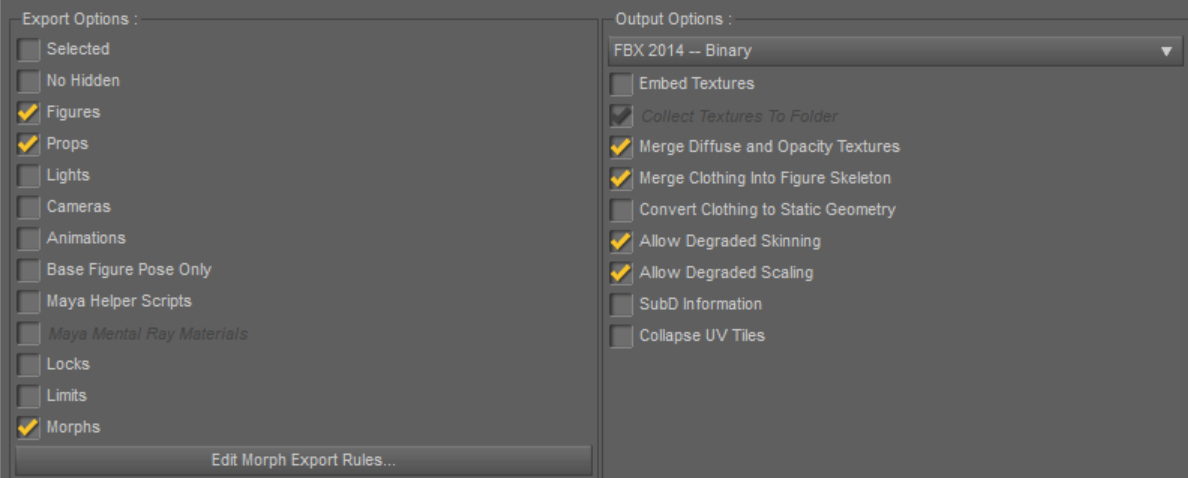
Export daz model to fbx from daz studio.
You’ll need to copy the original textures manually by using browse in the surface editing tab to get all of them into unity.
And make sure only export the blendshapes you need by editing the morph filter, or it’ll be a pain in the ass to clean them up in blender.
Import them into blender:
You’ll need to tweak the import settings:
uncheck Use Pre/Post Rotation in the Main tab.
check Force Cnnect Children and Automatic Bone Orientation in the Armatures tab.
once imported, select all and reset their rotation and scale to one by alt+a.
Combine materials that use the same textures:
For the genesis 1 character, you’ll need at least 7 materials: Cornea, Eyelash, Eyes, Mouth, Face, Torso, Limbs
And if you need the genital parts, male character will need one more material for that.
Clean up shape keys:
A lot blendshapes can crash unity when importing the fbx, so better keep them around 100.
I tend to combine the left and right half face keys to one key: like the BrowDownL and BrowDownR to BrowDown
And some opposite direction keys like JawIn and JawOut, you may find a negative value of JawOut is quite the same as the JawIn key, so I just delete one of them.
Some body shaping keys like BodyBuilder and BodyBuilderDetails, I tend to combine them too.
Export fbx from blender for unity:
Export settings that need to be tweaked:
Select only Armat and Mesh in the Main tab,
uncheck Add Leaf Bones in Armature tab
make sure the Forward is -Z forward and Up is Y up.
Import fbx to unity and setup the materials:
I use Preintegrated Skin Shader for the skin, by far the best skin shader I’ve seen in the asset store.
And you’ll need a lot of tweaks on the textures:
The shader requires a depth map for subsurface scattering, you can use the _TL map from daz textures for this purpose, but you may need to change the brightness of the image in PS to make the final result applausible.
The glossiness map from daz is usually too dark, you’ll need to bump up it’s brightness to have believable skin lookings.
As for the eyes and mouth I used standard specular shader for them. But I intend to use a modified EasyEyes shader to better simulate the eye. Haven’t tested it yet, it works on sphere eyes but don’t know if it also work on daz character eyeballs.
For clothes:
You can use the same process to transfer daz clothing into unity, but to put them on the character and make them follow the character’s bones, you’ll need to transfer the bone references on the clothes skinned mesh renderer to the character’s bones.
I’ve wrote a small script to do that. See the attachments.
Now the issues I’m having with daz characters are that they are too high-poly and reducing their polygons will loose all blendshape effects on the model, so until this can be solved, I still don’t think it’s a good idea to use the models in games.
Genesis 8 models contains less polygons than genesis models, and gen 8 got better textures, they can look really good without any texture modifications in unity.
Here is a V8 model in unity:
But Gen8 models don’t have an all-in-one package for different ethnicities, if I want to let my players choose from different ethnic presets, I’ll spend hundreds of dollers to buy at least one G8 character for each ethnicity and their interactive license. But with Genesis 1, I only need to buy the ethnicity pack and its $50 interactive license to get 9 different face presets for both gender.
Thank you very much for sharing this. I’ve played a bit with DAZ figures in Unity and have experienced a lot of ups and downs with it, so I really appreciate your advice (and the scripts). While I’m not well versed in Blender, I’ll work through some of this and see what I can do. By the way, your V8 looks great in Unity. At this point, I think I’ll be content to get that level of quality in my game prototype. Very good work.
Daz has become way more Unity-friendly in recent years under the hood, but you need to use Genesis8, and still forget 90% of any given Daz hair models.
“Now the issues I’m having with daz characters are that they are too high-poly and reducing their polygons will loose all blendshape effects on the model.”
That’s why Simplygon and other decimators are not the route to go. You obviously want to export Daz’s suberbly elaborate blendshapes. And for desktop games, you can get away with Genesis8, you don’t even need to translate them to Blender first.
In my usage case, I’ve had (what I see as) a need to use blender, mid-workflow, between Daz and Unity --specifically for making corrections via CATS Blender Plugin, for VRChat avatar creation. I also use Blender to make corrections to texture transparency and CATS handles the merging of armatures (though, I’m wondering lately as to how effectively in certain instances).
That said, I agree with your post. From my own experience, it is possible to bring things directly from Daz to Unity, and in the right use-case, I can see where that might be preferred. But, I also see where it can still be necessary to use Blender (or something like it) in between Daz & Unity for the purposes of rapidly building in support for particular environments in terms of the intended target SDK (in my case, being the VRChat-SDK).
So far, I’ve had pretty decent luck with this workflow setup --although I’m always looking for ways to improve and refine my techniques, which is why I find myself here today. I’ve recently ran into issues with clothing and hair tending to stay still when the character’s body is moved, effectively causing the body to lean through clothing, with the hair staying in-line with the clothing. I figure it has something to do with a change in a configuration setting somewhere either in Daz or Blender, but I’m having a devil of a time working out where it’s occurring from.
Mirroring what seems to be your own experience too, I’ve ran into major problems trying to bring any Dforce hair that uses strands over into Unity through Blender. It seems that as soon as it’s loaded in Blender, the outline of the skullcap is there, but the strands are all missing --which makes me question whether it’s the selections on export or the format itself (FBX). The best working hair systems have been the ones that were the most simple in design, that didn’t have a ton of polys (which tends to always be the case with the more advanced hair packages). I’ve built a few avatars for VRChat that far exceed recommended performance specs, that are upwards of 0.25 Million polys each, using Daz as the starting point for character design, and in each case, well over half of the geometry was originating from the hair. In spite of all of that though, the performance has been utterly amazing when I get it right. The avatars I’ve produced are far more realistic than any of the average custom VRChat models, with life-like eyes with eyelashes, coupled with eye-tracking and visemes (lip-sync) for (mostly) accurate speech mimicry in real-time. A few are so far past the uncanny valley when used with full body tracking that it’s like staring into the eyes of a real sentient being that’s completely alien from ourselves.
Anyways… now that I’ve read your posting, it has me curious if I might get more solid results without using Blender as a middle-stage in my workflow --so I’ll try that out and see how it goes. But that said, I think with the SDK I’m targeting may benefit strongly from continuing to use Blender as a middle step, if only for the sake of efficiency in handling the merging of armatures and rapidly fixing up the bones to Unity specifications for the VRCSDK. That’s my thinking anyway… I could be wrong though.
Yep, and I’m sure you already know the gist of it: Merge Clothing into skeleton is a must for Daz-to-Unity performance, and also using the 2014 variety.
Tuning and decimating with Blender is only essential for mobile games in my opinion, and again, Daz blendshapes are then shot. But 3rd party Daz expressions are the best thing about Genesis8, native Unity solutions just don’t compare. Once you’d use Blender or even Simplygon as a middle man, these expressions are compromised.
Thanks everyone for the very helpful information in this thread. I was able to bring a Genesis 8 character straight from DAZ to Unity and hook up some Mecanim animations. Does anyone know if Victoria 4 can go to Unity like this? I would test it but I don’t have her, and I don’t want to buy her if it won’t work
@ChrisHorrigan Yes, I’m using V4 in Unity 2019 because she came with some cool custom clothes (several years ago I mean). But it needs to be Victoria 4.2, a seriously updated version.
If you don’t have a good reason to use V4.2 in Unity, I don’t recommend it: it’s obviously much more limited and less impressive looking than Gen8.