I’m transitioning from from LandingPage scene to ItemFocusTest scene with a singleton script that uses Scenemanager.Loadscene called from a button.
When Unity loads up the ItemFocusTest scene, certain scripts/gameobjects seem to fail to get references to other objects and components in the scene, preventing the scene from working properly.
It’s important to note that ItemFocusTest works correctly when loaded manually in the Unity Editor - meshRenderers are found, their material.colors set to color.clear and a reference is cached to the TileClicker script on the Main Camera. (Look for all-caps below)
void Start () {
         tapTiles                            = tileParent.GetComponentsInChildren<TapTile>();            // Get an array of all the tiles
         oneOfTheTileRenderers               = tapTiles[0].GetComponent<MeshRenderer>();                 // Get the meshrenderer of one of the tiles
         tileMat                             = oneOfTheTileRenderers.sharedMaterial;                     // Find the shared material of all the tiles - so when we fade the material, it fades on all the tiles
         tileMat.color                       = opague;                                                   // Make sure the material is fully visible when the scene loads
         touchIcon                           = GameObject.Find("TouchIcon");

         imageFaderMat                       = GameObject.Find("ImageFader").GetComponent<MeshRenderer>().sharedMaterial; // **THIS REFERENCE ISN'T BEING CACHED!**
         imageFaderMat.color                 = Color.clear;

         tileClicker                         = GameObject.Find("Main Camera").GetComponent<TileClicker>(); // **NEITHER IS THIS ONE!**
     }
On loading ItemFocusTest from LandingPage, I get the following error message:
At a certain point in itemFocusTest, using enough items SHOULD trigger a set of fades and turn off clicking interaction. Instead, I get the following error…
Again, all this works when the scene is loaded in isolation in the Unity Editor.
What’s going on? What’s stopping the script from finding the correct gameObjects and/or components? Is there a later event than Start that I can use for initialization? I’m baffled.
You don’t even need to throw in null-checks at each step, but just separating them out this way means that the warning and errors thrown will have better context.
I’m a bit confused about where this script is that you’ve copied here. If it’s on an object that’s being loaded in the new scene (created when you change scenes), and the object it’s trying to reference (ImageFader) is also being created in the new scene, then you should just make a public reference and drag it in rather than using GameObject.Find at all in my opinion.
If, as seems to be the case, the ImageFader object is being carried over from the old scene, make sure that the object is set to DontDestroyOnLoad or that the scene is Additive, or else it’ll just get wiped out with everything else when the scene changes. What’s the scene hierarchy look like in the editor when the error happens? Is there only one copy of the ImageFader object, and if there is, does it have the correct components attached or is it just an empty GameObject?
I also wonder if GameObject.Find isn’t working because it’s trying to locate a gameobject that hasn’t had it’s Start routine called yet. Maybe when you’re loading the scene, that other object hasn’t yet been loaded which is why it can’t be located. Things may work a bit differently in the editor.
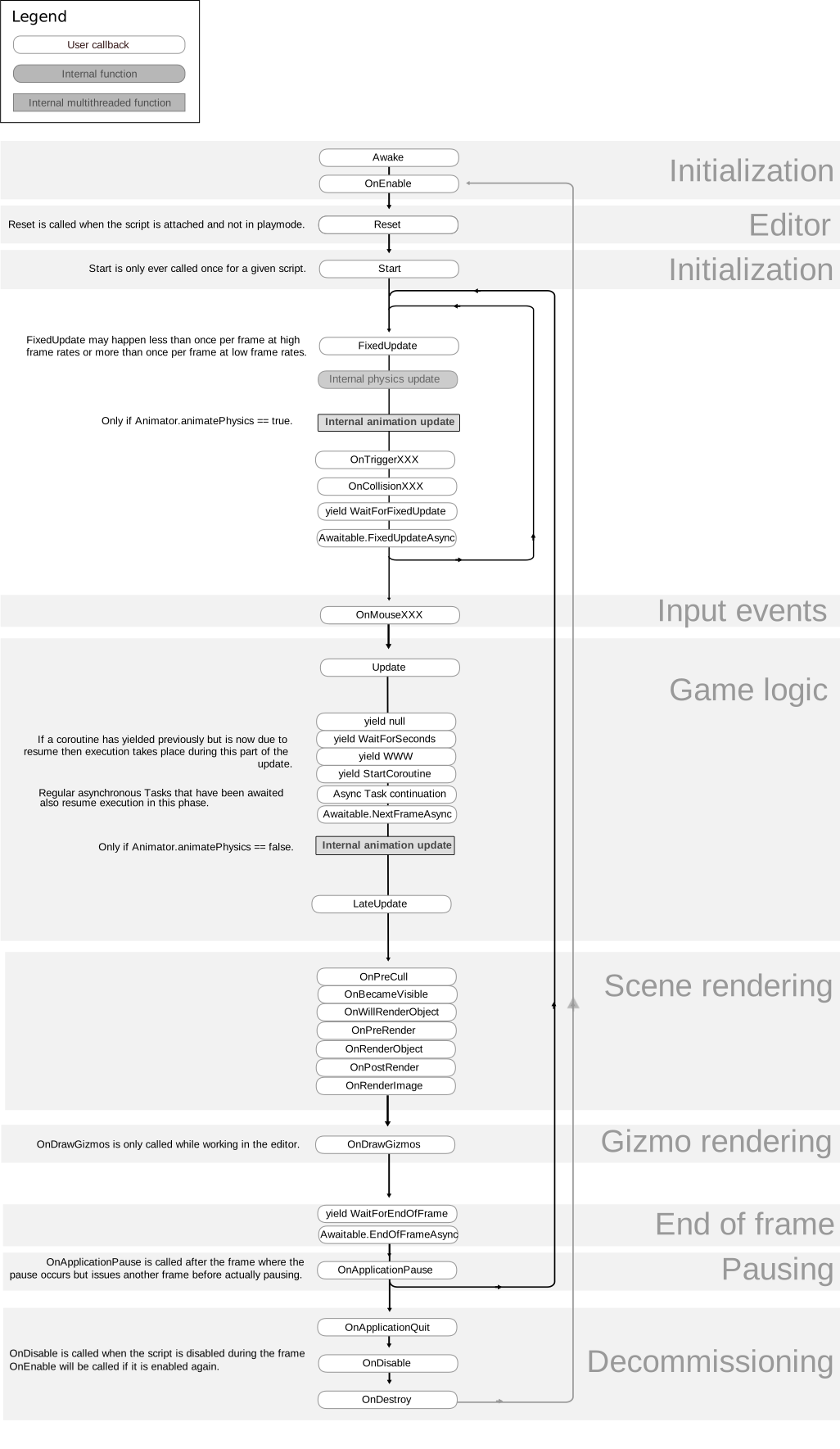
As a quick note, because it just occurred to me, but you should do all of your initialization in Awake, or at least the stuff that you CAN properly initialize with only the data within this script. Start should, as a good practice, be reserved for things that require other scripts in order to initialize properly. This way, if you’re referencing something in ScriptB from ScriptA in Start, you can be absolutely sure that the Awake function has run in ScriptB- if you initialize everything for both scripts in Start, then you can’t be sure that the Start function in ScriptB has run before ScriptA tries to reference it. Does that make sense?
Every Awake function is called at the scene start, then when those are all done, every Start function is called, but one component’s Awake function is not normally guaranteed to be called before any other other component’s Awake function (the order is not quite random, but it’s not reliable either), and the same for the Start function.
In situations where you need more precise control and ScriptB’s Start function really does have to run before ScriptA’s Start function does (or something in ScriptA’s Update function is relying on ScriptA’s Update function already having been run this frame, etc…) then look into Script Execution Order.
I’m only bringing this up because it has a small chance of being relevant here, if ImageFader’s Start function is placing the MeshRenderer on the GameObject, and this script is trying to grab a reference to the MeshRenderer before ImageFader has had a chance to place it, this kind of problem can happen. It’s also just good stuff to know :).
@Reverend-Speed I’ve always had issues with GameObject.Find in Start().
They most likely haven’t been initialised yet, and thus cannot be found. Any time I’m looking for GameObjects in a scene startup, I use a co-routine.
So move your code into a co-routine, and use WaitForEndOfFrame().
Something like this…
void Start()
{
  StartCoroutine(InitCoroutine());
}

IEnumerator InitCoroutine()
{
   yield return new WaitForEndOfFrame();

   // Do your code here to assign game objects
}
@Dustin-Horne - Yeah, that was sorta my initial thought, but as you’ll see further down this post, the GetComponent is attempted again well into the runtime of the scene. Many thanks for your input, though!
@DonLoquacious - Thank you so much for that thoughtful response! This might as well be printed on the inside of my eyelids (I just about have it memorised nowadays), but it’s so damned easy to miss one thing and slip up. Appreciate your eyes and input on the problem.
The Meshrenderer in question is set as a component on the ImageFader object in-editor, and so doesn’t rely on a script to add the component on the gameobject. Maybe I should look into somehow getting a reference to the tilecounter from the ImageFader and… then… use that to set a reference from the tileCounter to the ImageFader…? Nah, surely that’s crazy…!
@Meltdown - Just. Golf. Clap. That is an EXCELLENT solution and I’ll be sure to use it in future. Unfortunately, it doesn’t appear to be helping with this issue (which is baffling). Currently, this is what I get shortly after switching to the second scene…
using UnityEngine;
using System.Collections;

public class TileCounter : MonoBehaviour {

    private int         tileClickOnCount    = 0;                // The number of tiles clicked on thus far
    public Transform    tileParent;                             // The game object which contains the (currently hex-shaped) tiles
    private TapTile[]   tapTiles;                               // An array of TapTile scripts constructed from the children of tileParent
    public int          tileClickOnMax      = 0;                // The number of tiles to click before all visible tiles begin to fade out

    private Renderer    oneOfTheTileRenderers;                  // The first tile renderer of the tileParent children, used to get the material shared between tiles.
    private Material    tileMat;                                // The material used on all the tiles - located through oneOfTheTileRenderers.
    private bool        startFading         = false;            // Flag/bool which is prevent the Update method from fading the tiles until tileCount exceeds tileClickOnMax
    private Color       opague              = Color.white;      // Making a single name for a fully white, fully visible color
    public  float       tileFadeSpeed       = 1.0f;             // The speed at which the tile material fades to transparent
    // public  float       tileFadeDuration    = 1.0f;             //
    // private float       tileFadeTimer       = 0.0f;
    private GameObject  touchIcon;

    private AudioSource audMovieTrack;
    public  float       fadeSpeed = 4.0f;

    private Material        imageFaderMat;

    public TileClicker     tileClicker;

    void Awake ()
    {
        audMovieTrack = GetComponent<AudioSource>();
        audMovieTrack.volume = 1.0f;
    }

    // Use this for initialization
    void Start () {
        StartCoroutine(InitCoroutine());
    }

    // Update is called once per frame
    void Update () {

        if (startFading)
        {
            imageFaderMat.color = Color.Lerp(imageFaderMat.color, Color.white, fadeSpeed * Time.deltaTime);
        }

        //if (startFading)//&& tileFadeTimer < tileFadeDuration) // If startFading is true...
        //{
        //    // tileMat.SetFloat("_Mode", 3.0f);
        //    FadeTileMaterial();
        //    // tileFadeTimer += Time.deltaTime;
        //}
    }

    IEnumerator InitCoroutine()
    {
        yield return new WaitForEndOfFrame();

        tapTiles = tileParent.GetComponentsInChildren<TapTile>();               // Get an array of all the tiles
        oneOfTheTileRenderers = tapTiles[0].GetComponent<MeshRenderer>();       // Get the meshrenderer of one of the tiles
        tileMat = oneOfTheTileRenderers.sharedMaterial;                         // Find the shared material of all the tiles - so when we fade the material, it fades on all the tiles
        tileMat.color = opague;                                                 // Make sure the material is fully visible when the scene loads
        touchIcon = GameObject.Find("TouchIcon");

        GameObject imgFader = GameObject.Find("ImageFader");
        MeshRenderer imgRend = imgFader.GetComponent<MeshRenderer>();
        imageFaderMat = imgRend.sharedMaterial;
        imageFaderMat.color = Color.clear;

        tileClicker = GameObject.Find("Main Camera").GetComponent<TileClicker>();
    }

    public void AddOneToCount()                 // Called from a tile when it's clicked on, increments the tileClickOnCount and checks to see if it's more than tileClickOnMax
    {
        if(tileClickOnCount < 1)
        {
            Debug.Log("Turning off icon");
            touchIcon.SetActive(false);
        }
        tileClickOnCount++;
        if(tileClickOnCount >= tileClickOnMax)
        {
            tileClicker = GameObject.Find("Main Camera").GetComponent<TileClicker>();
            tileClicker.TurnOffTapOnTile();
            StopMovieTrack();
        }
    }

    //void AllFallDown()
    //{
    //    startFading = true;                     // Starts the fade in the main Update loop
    //    // tileMat.SetFloat("_Mode", 3.0f);
    //    //for (int i = 0; i < tapTiles.Length; i++)
    //    //{
    //    //    if (tapTiles[i] != null)
    //    //    {
    //    //        tapTiles[i].DropTile();
    //    //    }
    //    //}
    //}

    public void PlayMovieTrack()
    {
        audMovieTrack.Play();
    }

    void StopMovieTrack()
    {
        StartCoroutine(FadeVolumeDown());
        imageFaderMat = GameObject.Find("ImageFader").GetComponent<MeshRenderer>().sharedMaterial;
        startFading = true;
    }

    IEnumerator FadeVolumeDown()
    {
        while (audMovieTrack.volume > 0.0f)
        {
            audMovieTrack.volume = Mathf.MoveTowards(audMovieTrack.volume, 0.0f, fadeSpeed * Time.deltaTime);

            yield return null;
        }
    }
}
Note the additional attempt to get the reference in StopMovieTrack() - This is called wayyy after the scene initialises, but it just gives me the same error…
I’m sure this has to be a small thing that I’m just not seeing - I appreciate the time you folks are giving to this… Hope you’re more observant than I am!
If everything works, then we know its an issue with stuff not being initialised on time.
Is it possible instead of using GetComponent to rather assign the component to your script in the editor? I try to assign as many references as I can in the editor, instead of using GetComponent or GameObject.Find etc.
@Meltdown : Great minds think alike, it seems. Quite late on Weds night, I remembered that I could just assign the MeshRenderer as a public variable and presto, everything worked perfectly for the next morning.
The issue is still annoying, though. Unlike yourself, I’ve been lucky enough to have been treated fairly well by Awake/Start/GetComponent/GameObject.Find in the past, so this seems like an sudden and emotionally scarring betrayal. I’ve always thought that getting references to private vars was the proper way of doing things - will have to think about this, now.
For yucks, I ran WaitForSeconds (5) on the script and it still crashed and burned (Meshrenderer not found). I’m starting to suspect my menu singleton is interrupting stuff, somehow… but for the moment, the scripting problem is fixed*!
Are you using a GameObject singleton pattern but not using DontDestroyOnLoad? It’s possible that destroy is getting called but you have a game object that isn’t really going away because you have a reference to it elsewhere.
Hey, just saw your response. I have to admit ignorance here, as I don’t know what a ‘cameo next’ singleton pattern is - however, I am using DontDestroyOnLoad. Here’s the code…
Gah. I’m a combination of baffled but also relieved that I’ve got a workaround for this. Might just drop the issue, tbh. But thank you so much for your time on this!
I’m sorry, I corrected it. I meant GameObject singleton pattern… autocorrect got me as I was replying from my phone. In your Awake you’re checking _instance but calling Destroy(gameObject). What is the value of gameObject? Shouldn’t you be destroying _instance and then resetting it’s value?
Uh… hang on. Let me walk through the logic of this…
if(_instance != null && _instance != this) // IF the private static variable of the class is NOT empty AND it ISN'T this game object...
        {
            Destroy(gameObject); // ...THEN this must be a new instance of the class (w/gameobject) (probably a new version or prefab in the new scene that's just loaded), which we DON'T want - get rid of it. (There should only ever be one version of a Singleton, the first instance of it to be loaded when the project runs)
        }
        else // OTHERWISE - if there's no gameObject running DocManager currently occupying the _instance variable...
        {
            _instance = this; // Make the static variable refer to 'this' (ie. the DocManager running on THIS gameObject)
            DontDestroyOnLoad(gameObject); // ...and mark the gameObject 'DontDestroyOnLoad' so when the next scene is loaded, this gameObject and the data on it is retained, thus preserving some runtime data throughout the course of the project.
        }
That still seems to make sense, I think? I’m about ready to throw my hands up at this thing and mark it down as the opposite of a learning experience. =) At least the project works!