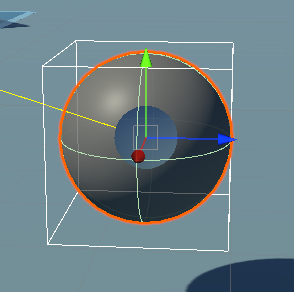
“The bounding box for any mesh is always a cube, which is large enough to contain the mesh regardless of what shape it is. When you rotate the mesh, and therefore the bounding cube, the world-aligned volume that you’re creating with DrawWireCube changes appropriately.”
A renderer bounds is a world axis aligned bound enclosing the underlying model bounds, which is a box, no matter the actual shape of the model.
When you rotate the model, the model bounds rotate with it, resulting in larger extents for the world-aligned bounds :
Bounds are only guaranteed to fully enclose the model, they aren’t guaranteed to be of the minimal possible size, and in any practical application will never be.
If you really need minimal world axis aligned bounds, this is only possible with very computationally intensive methods by checking the position of every vertex of the model.
But whatever reason makes you think you would need this is likely a bad idea, as the whole point of bounds is to provide an approximate (but fast) way to compare the volume occupied by a mesh.