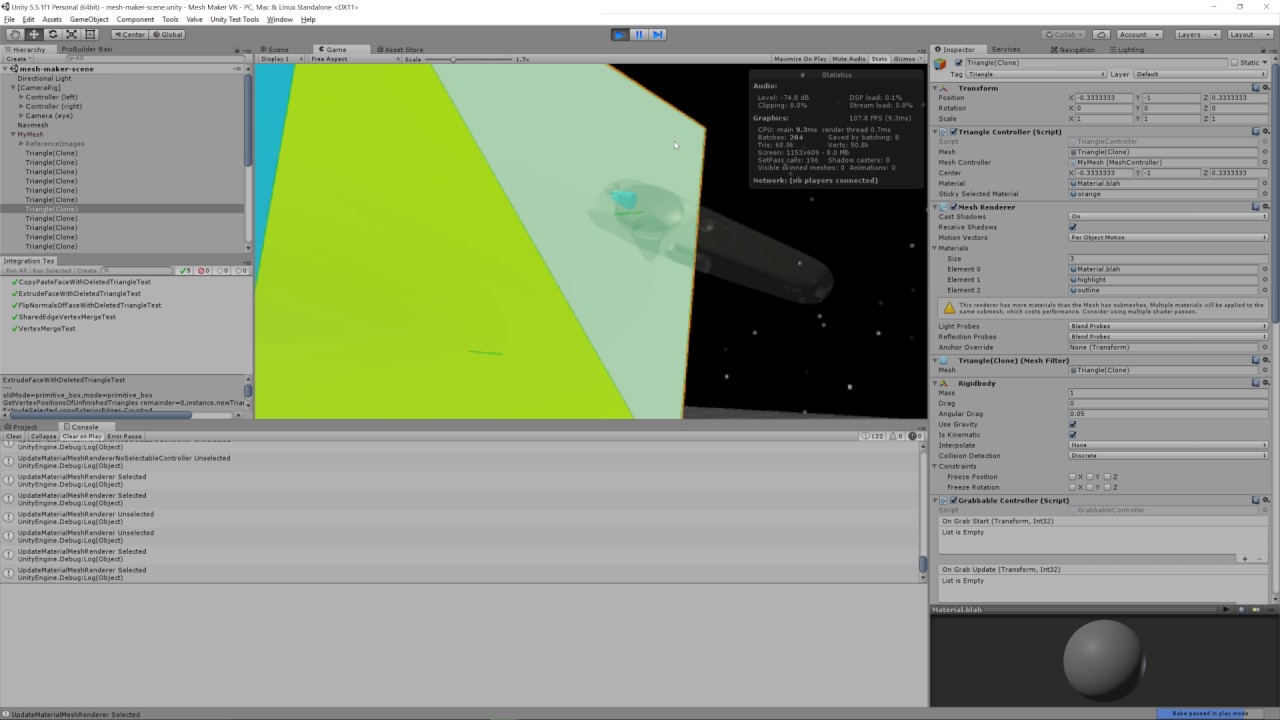
I’m running Unity 5.5.1f1 and I just switched from using one material on an object to using three materials on the same object. I have:
Base standard shader with _Color set, generated programmatically.
Base standard transparent shader with _Color set to something else - tints the first color - from Assets/Materials.
Outline shader to draw outlines around selected objects - from Assets/Materials.
I’m programmatically swapping my materials array out from just #1 to an array that contains #1 - #3.
If I remove #2 it works fine.
If I remove #2 and #3 it works fine.
If I remove #3 I get what looks like z-fighting.
If I leave it alone I get what looks like z-fighting.
As far as I can tell, this isn’t actual z-fighting in the traditional sense. My mesh is extremely simple. It’s a pyramid. 4 verts, 4 tris. It’s not overlapping another mesh.
Made a quick video demonstrating the problem:
Can anyone tell me what is going on here? I don’t understand why I’m having this issue.
Could be the material being continually swapped, or repeatedly added and removed, if the problem is related to something done in script.
Another possibility is the outline shader you speak of. Some outline shaders, if not all, have a duplicate mesh. It could be Z fighting between the object and it’s outline from the shader. This would depend entirely on how your outline shader works.
I checked for that and didn’t see anything. Those log statements you see in the console are written whenever I change the material. I only see two log statements per state change and I would expect to see a constant stream if the material was being constantly swapped. I admit I’m not sure why I’m seeing two logs rather than one though.
I ended up working around this issue last night by manually merging the colors from the original material and the highlight material together and then adding just the outline shader to the material array:
Not sure what effect that will have on performance, but running using three separate materials isn’t great for performance either. I’m still curious about the WHY though.