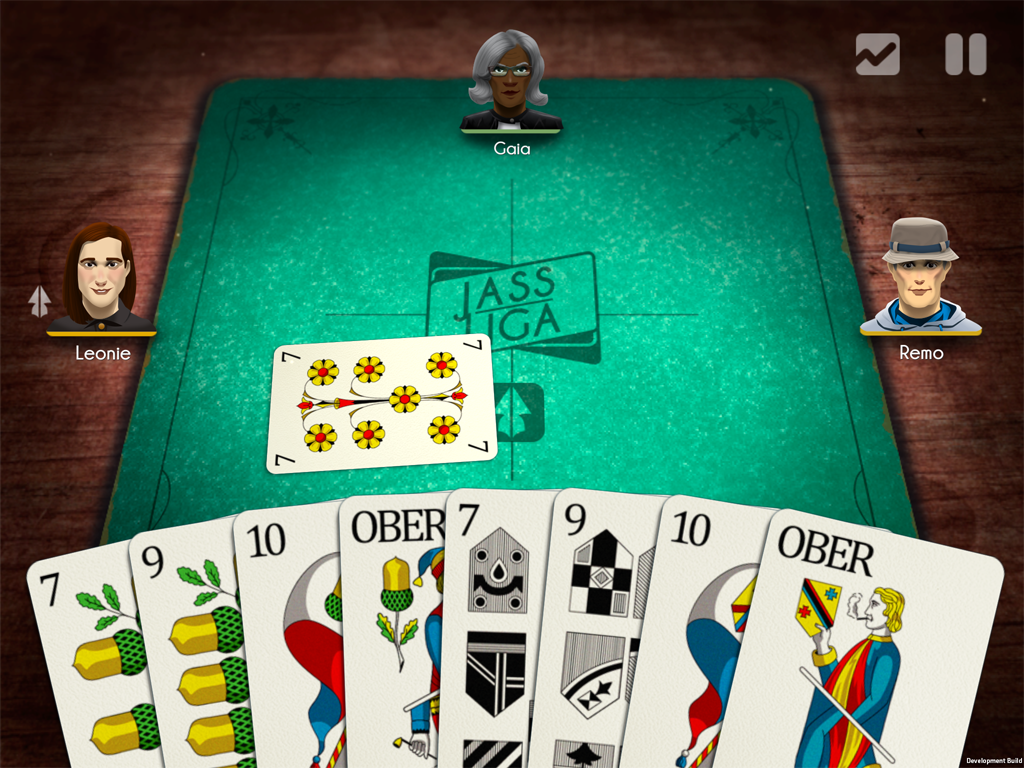
We are experiencing strange rendering problems with the latest Unity Version 5.3.1 running on iOS devices.
On some devices it runs fine and on others it’s broken.
It should look like this
It works on these devices:
iPhone 5 with iOS 8.1.3
iPad 3 with iOS 8.4
It renders incorrectly on:
iPad Air2 with iOS 8.4
iPhone 6+ with iOS 9.2
Looking at the iOS versions it seem to be a hardware related issue. Everything worked perfectly fine before updating to 5.3.1
In the incorrect rendering what you see is static old data from the buffer, not an actual rendering of the background camera. Sometimes it show the splash screens, sometimes the main menu etc. There are 3 cameras, the background camera with the wood (clear skybox), the front camera with the green carpet and the cards (clear depth only) and the UI ortho Camera from NGUI.
So far we have no clue what could cause this. We’re still doing some tests to find out more. Any hints are welcome.
Just wanted to let you know that you are not alone. We are experiencing the same issue, in our case with an iPhone 6. It triggered after updating the device to iOS 9.2. iPad mini is rendering correctly with iOS 9.2. Hopefully we will find some more information in the next few hours.
I also just experienced this same issue after making a build and installing on an iPhone 6s with iOS 9.2. The 2D GUI cameras all render fine, but the 3D perspective cameras layered below render nothing. Like mentioned in the original post, there’s just a static image that appears to be from the buffer of those cameras.
i can bet you have automatic api selection (in player settings), so you somehow manage to break metal (which will be picked on new device). You can try forcing gles to check.
We had a similar issue to this as well and the solution for us was to turn off “Disable Depth and Stencil” which we had inadvertently enabled in Player Settings.
iOS Player Settings > Resolution and Presentation > Disable Depth and Stencil > [off]
I had what was probably the same issue. What worked fine with Unity 5.2.4 broke with 5.3.1 on iPhone 6 and 6 Plus. After spending two whole days on it, I couldn’t figure out what actually causes “metal to break”. I stripped down my game to what was basically two cameras, and one of the cameras would not render. But if I make a new scene with basically the same set up, both cameras did render.
For now forcing GLes 2.0 seems to fix the issue, but it would be good to know what actually caused “metal to break”.
honestly i’m tired of repeating - msaa on metal is complicated. I saw similar bug report involving 2 cameras with shadows rendering to MSAA-ed RT/backbuffer
what happens is when you update camera’s shadows (happens before rendering camera) you need to switch to different RT (to, you know, render shadows) and that will do AA resolve which is destructive.
We are thinking about ways of solving it but it is worth saying - doing otherwise is SLOW. When i was running this repro project on gles it was 33ms per frame for rendering JUST plane (because aa store/load is slow)
I guess we all know that Unity 5.3.x and metal rendering is the culprit, just to confirm that it’s happen with us as well and work around by forcing to Open GL 2.0.
I’m not totally clear on what that feature actually does; however, some of the symptoms we experienced were similar to the original poster’s. In our case the skybox was rendering on top of scene game objects, but NGUI was rendering correctly on top of all of it. The game still worked correctly on iPhone 6 but not on 5S, 4S or iPad2. We could see that the rendering order was messed up using Xcode’s frame debugger. Disabling metal and double-checking camera setup was not the solution, but disabling “Disable Depth and Stencil” did work.
I downgraded to 5.2.4 and the problem is still there.
Forcing OpenGL2.0 breaks my shader somehow, I only see the backfaces rendered.
Disabling depth and stencil also didn’t work. I guess I’ll have to sit this out. ugh.
When you force OpenGL2.0, do you still have same problem with devices below iPhone 5 ( including iPhone 5 ) ? If it so, “Metal API” is not the real problem for you.
I’m dealing with a similar issue on Unity 5.3.4p4.
A little about my project:
I have 2 cameras, one is for Game view that is orthographic and has a solid color, the other is for UI and is also orthographic and has camera flag set to depth only.
I’ve tried forcing GLES2.0 and while it did solve some of my shader rendering problems, it did not fix the major problem which seem to be happening on iPhone 5. Basically, everytime my main camera (game) renders an object that has Mobile/VertexLit shader on, the camera starts to act weird flipping the game view and distorts the game view.
I will post some screenshots:
I wanted to open a bug report but it’s too much hassle at the moment.
Let me know if you have any ideas, I’m kinda in a dead end.
Me too on iPhone 6+, Unity 5.4.0.f3. Switching to GLES over Metal fixed it.
Had to buy an iPhone 6+ to find the problem, expensive for a one man indie dev! Only occurred after the player finished their first game, a scene re-load. Then wouldn’t go away even if they stopped and re-loaded the app.
I also met a strange rendering problem, Unity Version is 5.3.5f1, using UGUI. the same UI(standard reference size is 750 * 1334) on IPhone5 or IPhone 6 plus, is rendering correct. but in IPhone6 or 6s, in rendering incorrect. but the Widget’s touch can handling, yes, just rendering incorrect.And I use OpenGLES2.0.
One day I do some test, change the standard canvas reference size is 745*1330(not match IPhone 6 Screen Size), and it give me a surprise, it works correctly…, but why??? I think is UGUI’s bug
Is this the same issue? This affects Android though not all devices. My Nexus 6P was fine up until I upgraded from Marshmallow to Nougat. A HTC-10 device running Marshmallow doesn’t work. Other devices may be affected. It runs fine in the editor.