(most decidedly not Polyspatial related despite the tag - there was no tag for VisionOS / Metal and selection is mandatory)
Hi folks,
I recently had the chance to take the Metal rendering pathway for a spin:
Post Processing seems to be a nonstarter with passthrough (getting the background color instead) - guessing that’s unlikely to change due to apple-side limitations, right? Is there any possibility at all of a passthrough-ignoring PP stack? Selective bloom or color grading, for example, would be incredibly useful even if just on unity scene objects.
Similarly, Visual Effect Graph. Less certain here since it does compile to Metal on certain iOS platforms - will it ever be possible to use it via the Metal rendering path?
EDIT: apparently doable with Stereo RTs; haven’t had a chance to look at the Stereo RT examples yet.
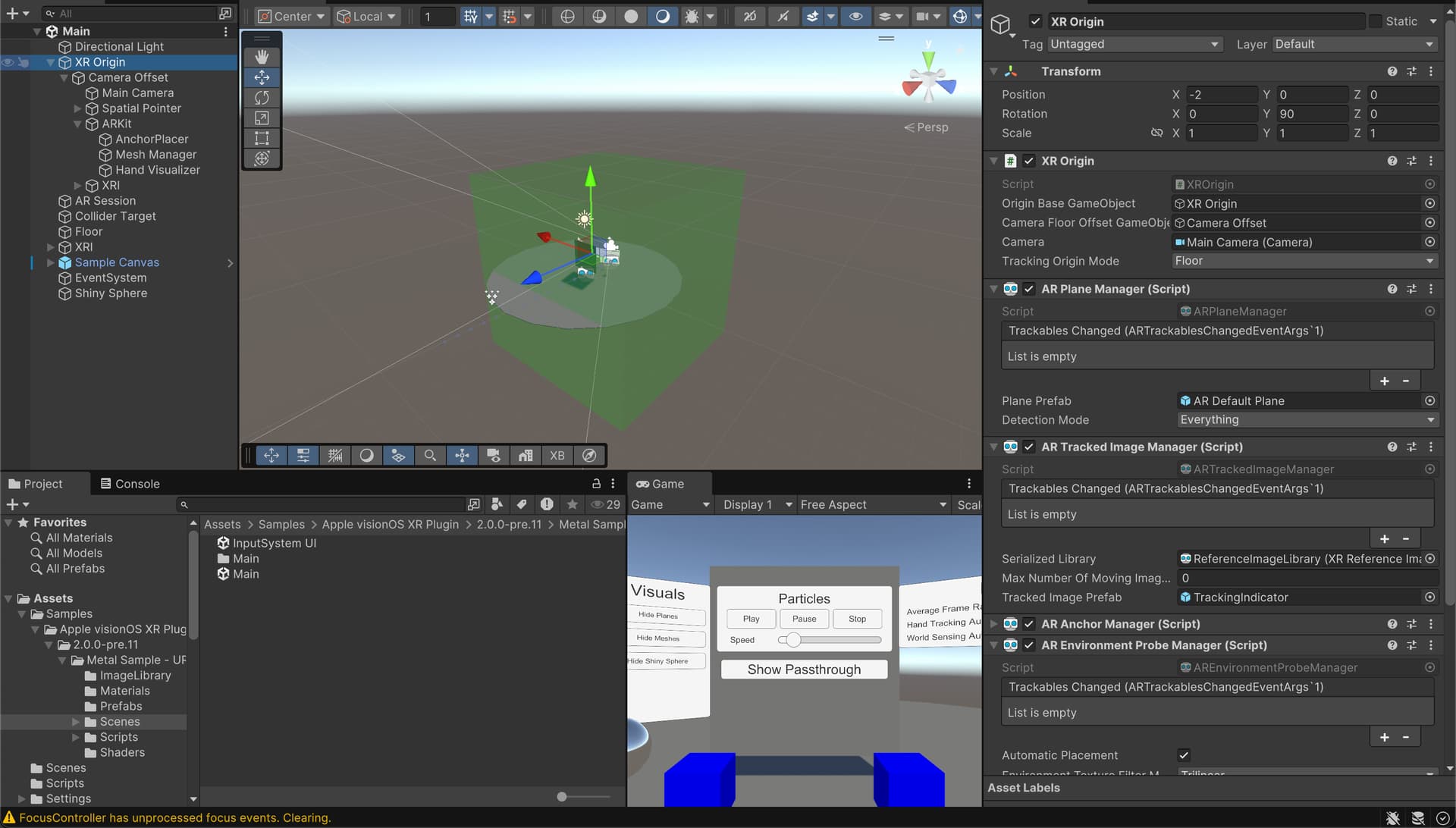
The metal samples are… curious. To the best of my understanding, most ARKit / world reconstruction features are not accessible when using Metal. If that’s indeed the case, why does the sample scene include plane detection, image tracking, meshing etc? Is the intention to show a hybrid-rendering scene? As it is, things are a bit unclear in that sample…
As a piece of unsolicited documentation feedback, passthrough via metal is DOA in URP due to the default URP renderer settings - aside from turning off HDR, which was in the docs and helpful indeed, I had to remove the SSAO Renderer Feature from the default PC_Renderer Data File. Took me a couple of hours to debug.
the metal sample scene “Main” actually seems broken - no buttons work and something very off is happening with raycasting. (looks like headpos not properly tracked?) As noted in the previous message, plane detection does work, which tells me this is either hybrid or… a secret third thing? (I don’t even have PS installed in this project!)
the “Input System UI” scene is functional, at least, but [passthrough 00[']
doesn’t work. In the same project, simply creating a brand new scene with a standard XR Rig and solid color with 0 alpha (per the docs’ instructions) does indeed provide passthrough🤷♂️
Regarding you not being able to get the passthrough working, are you running VisionOS2 beta, as I believe the ability to have passthrough in Metal was recently added.
On a side note, I am unable to get anything to show up when I select the metal pipeline. I used the template project latest beta of Unity, latest beta of all of the plugins, and have the latest beta of Vision OS and xcode. Everything else works except for the Metal renderer selection. The scene loads, but I can’t see anything in the headset. Its like nothing is being rendered. Any pointers would be great.
As I’d mentioned, I’m able to get passthrough working - the problem is with the sample scenes, specifically.
Your issue almost certainly stems from not grabbing the latest prerelease package which isn’t installed by default and has to be manually upgraded (the telltale is not seeing the “metal + compositor services” option). Check out the VisionOS Package docs, they go over how to do this.
(Once that shows up, remember to turn off any renderer features as mentioned above - another cause of silent failure)
Really appreciate the quick reply. Actually I do have the latest prerelease packages of all of the necessary ones (Polyspatial, Apple Vision OS XR, Polyspatial XR and Polyspatial Vision OS), I do see the metal + compositor services and have that turned on. Have the template project and the Metal sample scene loaded up, I add the metal main scene to my build profile scenes, Change platforms to Vision OS, Build, Open Xcode, Build successfully and deploy to the headset, everything launches without a problem except I literally see nothing in the headset except passthrough. Again, everything works fine when using the Polyspatial reality kit stuff, play to device etc, I just can’t seem to get Metal working for some reason. When changing it to Windowed Mode it worked perfectly fine also.
Its using URP and there are no render features turned no, just the vanilla setup that is in the VisionOSTemplate from Unity.
Also, is it safe to update to the latest vision OS 2 that released Sep 4th, I am currently running the beta that released just before this one?
Thanks for the advice.
Edit:
One thing from the xcode log that might not mean anything, but stood out to me was this warning:
CCPipelineWrapper.mm(109):CreatePipeline:
Pipeline (render) binary archive lookup failed for 'CC_ApplyStencilVertexFunction': Error Domain=AGXMetalG14G Code=3 "Unable to find function "CC_ApplyStencilFragmentFunction" (render pipeline) in binary archives.
 Expected <MTLBinaryKey: 0x30212b1d0> Key:
 7D728AC1509BC773C3845CE2961D7CA2DCD3630EA4231A1EE0C9B304E4CB79A3 Function hash
 0000000000000000000000000000000000000000000000000000000000000000 air-nt
 94C247712038C4872E8E59EC07EC249E3916F0410439854EF64AD2069EB8875E air-nt plugin
 8A9571052238BA403487587532BABF664F572361CEE5ACCA7BC20E77167DC80C metal framework
 " UserInfo={NSLocalizedDescription=Unable to find function "CC_ApplyStencilFragmentFunction" (render pipeline) in binary archives.
 Expected <MTLBinaryKey: 0x30212b1d0> Key:
 7D728AC1509BC773C3845CE2961D7CA2DCD3630EA4231A1EE0C9B304E4CB79A3 Function hash
 0000000000000000000000000000000000000000000000000000000000000000 air-nt
 94C247712038C4872E8E59EC07EC249E3916F0410439854EF64AD2069EB8875E air-nt plugin
 8A9571052238BA403487587532BABF664F572361CEE5ACCA7BC20E77167DC80C metal framework
 }
Nope, sadly nothing works. When I say I can see passthrough, I mean that the app is displaying nothing. Its almost like the metal renderer is just not happy about something. I don’t know if there are any special settings that are off here. My headset is on OS2.0 beta 7. I might try upgrading it. Also I just tested it on the simulator and it works, so I am thinking it’s my device…
Would it be possible for you to confirm your headset version?
I got it working finally after updating to the latest Unity beta. Completely weird bug that didn’t make sense. Now I’m in the same boat as you, trying to figure out how to get post processing working at the same time as Passthrough. I might have got close by adding a render feature that clears the frame buffer, but it still isn’t quite right.
I managed to get post processing working with passthrough. Here are the steps.
Enable post processing on the main camera
Open your render features section of the URP asset and add a full screen render pass feature. make sure bind stencil buffer is checked.
Apply a material which I will include in the post here. It basically takes the stencil buffer and chops it out of the post processed image. Ignore the parameters in the shader, they do nothing and I was too lazy to remove them
Take the other material the other material that I will include here and place it on an object that will act as your passthrough mask.
hey, that’s fantastic, @benjaminacct ! Realy impressive work - especially as AFAIK VisionOS has no concept of stencil buffers; would have never occurred to me to check that box or take a stencil-based approach. Looking forward to giving this a try, thank you for sharing your solution!
 (I don’t even have PS installed in this project!)

