Hi,
I’m working on an animated shader and I have this option enabled for the scene view:
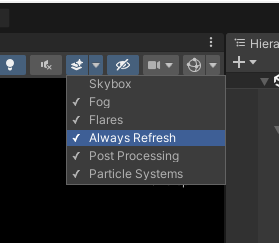
The mesh in the scene only updates when I move the cursor. This is super annoying because I have to continuously move the cursor in circles to see my shader animating.
Is this something other people have experienced? Am I missing something? I labelled this question as a bug but I’m not 100% sure if it’s a bug or not.
Cheers!
Edit>Preferences>General, make sure “Interaction Mode” isn’t set to “Default”, as that does a dynamic refresh of the viewport only when GUI changes happen.
Change it to Monitor Refresh so it always updates with every update of your monitor refresh rate.
You absolute saviour.
Had to use the “custom” option and turn frame throttling down to 0 but yeah that’s exactly the setting I needed. Thanks a tonne
I originally replied here because my setting didn’t seem to work (I want the opposite - for the scene view to only refresh when I’m NOT touching it). This was in Unity 6. If anyone else has my problem, my culprit was that the little new “tools” overlay window (which default to on) would cause hundreds of scene repaints per second even when not interacting with it. hiding it will fix the problem…lol