As per topic, I’d like to know why normals are different in shadergraph (urp 7.1.8) and the urp lit shader. The only node I am using is Sample Texture 2D set to Type Normal with space tangent. This is then plugged into Normal.
This isn’t rocket science but there are subtle issues such as being able to slightly see topology.
Is this a known issue? I think it is, according to google and I’m wondering if anyone has data or workarounds please.
Sample seems blue and not shaded (as expected for unpacking) so URP Lit must be doing something else that shadergraph is not. Does the platform matter? I am targeting WebGL for testing but eventual platforms will be basically all of them.
Any ideas? It’s stopping us from using shadergraph and is a ship stopper with a build required by our partners soon…
Unity is in the middle of converting the SRPs from MikkTSpace tangent space with per vertex binormal reconstruction (which is what Unity’s built-in rendering paths use, and xNormal defaults to), to MikkTSpace tangent space with per pixel binormal reconstruction, which is what the HDRP uses, along with UE4, Blender, Marmoset, Knald, 3DCoat, Houdini, Modo, and most other applications that use MikkTSpace default to.
In the 7.2.0+ release of the SRPs, all Shader Graph shaders will use the per pixel version, but URP’s built in materials are still per vertex. That will be fixed at some future date.
In all version before 7.2.0, Shader Graph’s normal map calculation is flat out wrong. There’s no fix you can do on your side. Technically they fixed it in LWRP 2.0.8 to at least match the default URP & built-in pipelines as I mentioned in the other thread, then immediately broke it again in LWRP 3.0.0.
TLDR: Shader Graph’s support of normal maps has always been totally broken, but will be fixed for 7.2.0, at which point the URP built-in and Shader Graph shaders still won’t match.
Yep. At which point you’ll need to generate your normal maps with per pixel binormals/bitangents. Most tools default to that, and those that don’t (Substance & xNormal) have an option to switch to it.
Also, I should note, HDRP’s Shader Graph shaders do seem to work correctly, at least in 6.9.0, so presumably those have either always worked or got fixed back around the 2.0.8 / 3.3.0 versions, but the fix didn’t stick for LWRP for some reason.
Hi to give an update to this. We recently changed URP stock shaders to generate bitangent in fragment. We will look into backporting this to 8.x and 7.4.0 so content authoring is consistency between URP and ShaderGraph.
As of 8.2.0 in 2020.1.3 just plugging normal map to the normal slot of the pbr graph gets me this
that is probably the same persistent bug @bgolus was talking about. @phil_lira Any hopes for getting it fixed in the following update?
Is there a way (even hacky one) to convert the spaces to get correct normals?
How to use bitangent node?
Doubt it. The bug discussed in this thread is very subtle, and would only be obvious when using a normal map on geometry it was intended for, not when previewed on a sphere. And if the intended geometry was a sphere, it probably wouldn’t be noticeable at all.
That looks like you’re using a map not set to be a normal map in its import settings, or using a Sample Texture node not set to output normals. Or what you’re using isn’t a normal map at all.
Actually I can confirm this bug is resolved as far as I’m aware with URP 8.2.0. Unity 202.1.8f1. Lit and Shadergraph normals match perfectly now, and the shadergraph material renders the normal properly on a fairly distorted smoothgroup.
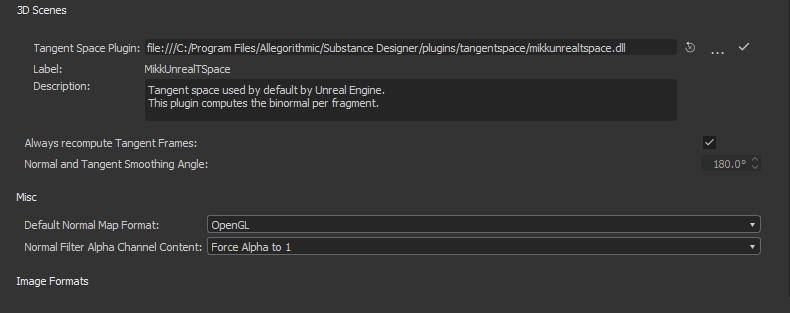
That said it requires you to be rendering out your Hi-Lo Poly map bakes using the MikkTspace Per Fragment method. I used Substance Designer for this test thus the image below
That said, as long as you can use a per fragment calculation in the software your using, this should still work.