I’m a really really truly beginner. I’m an Artist in video game for 5 to 6 years now and I’ve decided to spend some of my sparetime working on my own video game. I know nothing about code.
I’m making a Top View 3D game with a little red plane.
I’m trying to write a script for the camera to follow my “Player”.
So, thanks to some tutorials I was able to have a camera really following my “Player” without any delay. It was nice.
Then I had the idea to add some “delay” to the camera so the camera feels like it’s following the “Player”.
Then I got some feedbacks from friends who said to me that it would be better if the camera wasn’t after the player but a bit more ahead so we can see what’s coming in front of us.
And here I am. I absolutely don’t know how to make this or even what to look for. Maybe someone could help me here ?
Here is where I am at the moment with my camera : 4pqe7l
And here is the code I have
using UnityEngine;

public class CameraFollow : MonoBehaviour {

    public Transform target;
    public float smoothSpeed = 0.125f;
    public Vector3 offset;

    void Update ()
    {
        Vector3 desiredPosition = target.position + offset;
        Vector3 smoothedPosition = Vector3.Lerp(transform.position, desiredPosition, smoothSpeed * Time.deltaTime);
        transform.position = smoothedPosition;
    }
}
Here is the type of camera I really want to have (at t=1451):
Thank you so much for reading me guys ! Have a good day
Didn’t watch the videos. But for camera stuff you could try cinemachine package from Unity. Watch some tutorials about it wether you prefer doing it this way.
As for the ahead point you could just parent an empty game object under the players/planes GO. Then move it in front of the player and let the camera move relative to and lookat this, not the player itself.
That looks awesome. I want to drop bombs all over your planet!
Everything that @exiguous says is spot-on, as usual. If you want to pause on tackling Cinemachine and just use what you have above, the idea of that empty GameObject childed ahead of the player is a big win. I use that a lot. You can also move it farther ahead of the player when the player is moving faster, which can help the gameplay.
ANOTHER cool technique to help is to pull the camera up when the player goes faster, which makes the player smaller but gives the player more seeing room.
Thank to both of you. (and thank you for your kind words haha)
I will give a try to Cinemachine. I just have one question about that; Don’t you think Cinemachine is a bit “too much” compare to a “simple” script ? I feel like droping a huge bomb to kill an ant.
That being said you’re totally right Kurt. I was planning to pull the camera up as in the video of Black Skylands when the player goes faster. I like the feeling of the Camera just going away and discovering everything around “me”. It’s a really cool addition to the camera farther ahead of the player.
I’ll just take a look at Cinemachine during the week. If someone wants to help me with the script way, I’m all hears.
Give yourself another month or two and your “simple” script won’t be so simple suddenly.
Camera scripts aren’t simple, especially when you arrive to the polishing phase, when you’re going through your game/video and start to make it more exciting. You know, “it should shake here, because a bigger plane is flying too close”… “it should drop altitude here because there is a canyon down there” or whatever.
Using Cinemachine makes your life easier, you gain a lot of tools at the first place and you can polish away without making your initially “simple” camera-script an entangled mess at the end.
And Unity won’t compile all Cinemachine into your end product, only the parts you’re using.
Yeah you’re right. I guess month after month of production you can have some problems with the camera script. I guess the more time you spend on polishing and adding features to the camera the more you get closer to a tool like CineMachine but less user friendly.
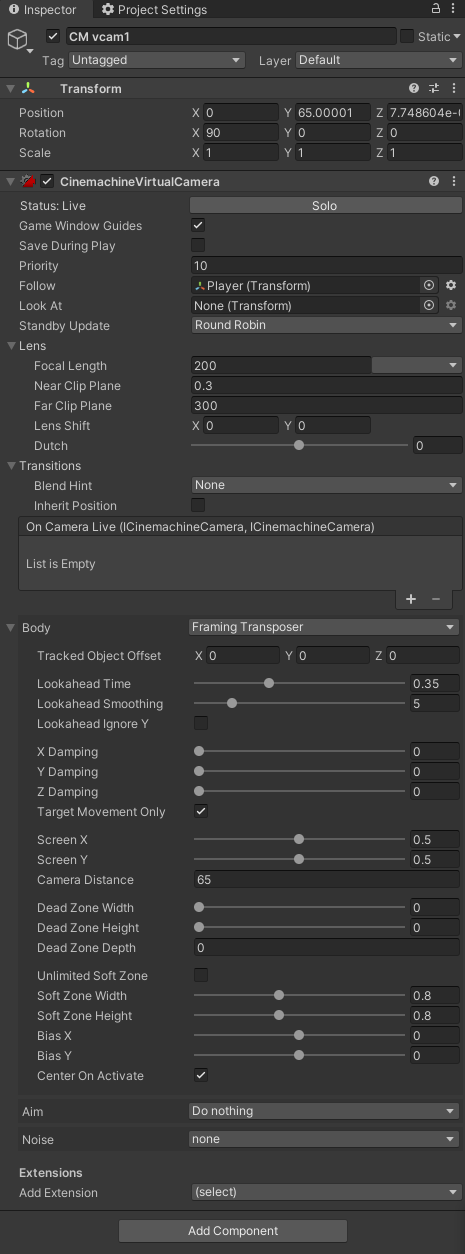
So I’ve downloaded Cinemachine and give it a try. I now use a 2D virtual camera from Cinemachine so the virtual camera isn’t rotating. For now I prefer staying with my default rotation camera axis. I find it pretty difficult to understand where you are in the world if the camera is rotating when you are constantly changing directions.
There is still one thing I cannot find on Cinemachine. It’s how can I choose if I want the camera to go higher in the Translation Y axis when the plane is moving. (or going down, closer to the plane when this one isn’t moving). If anyone can help me on that it would be AWESOME.
I’m not sure of your setup and there may be a property you can directly manipulate in Cinemachine that would give you the dolly-back distance of the camera, but if I was just doing it with plain old Transforms in a hierarchy, here is how I would do it.
I would set my Transform hierarchy up like this:
DollyBackAnchor (I am also empty)
TheActualCamera (or maybe the Cinemachine VCam spot?)```

Now when I had that set up, if my camera was looking straight down (negative Y axis):
public Transform DollyBackAnchor; // drag the above in here
And make this method:
void SetDollyBack ( float speed)
{
// calculate Dolly up-lift based on speed
float back = 10 + Mathf.Abs( speed) / 5; // play with these numbers
DollyBackAnchor.localPosition = new Vector3( 0, back, 0); // lift!
}