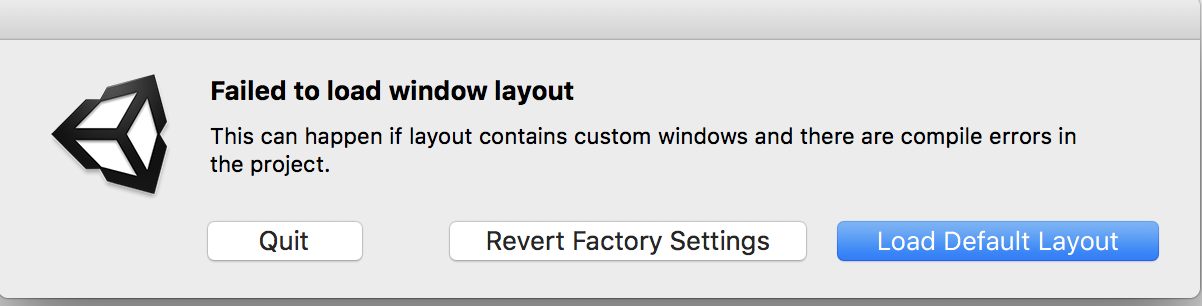
System:
macOS High Sierra
MacBook Pro ( 13-inch, 2016, Two Thunderbolt 3 ports )
I installed Unity 5.1.2f1, 5.5.2f1, 2017.2.0f3, when I open Unity it show the above window. On “Failed to load window layout” window only can quit, when press other it always return to “Failed to load window layout” window. But Unity 2017.2.0f3 can press “Load Default Layout” or “Revert Factory Settings” to open unity.
I have reinstalled all unity, delete “ProjectSettings” or “CurrentLayout.dwlt”, create a new Unity project, neither have effect. I have tryed Delete the following folders or files:
/Applications/Unity
~/Library/Application Support/Unity
~/Library/Caches/com.unity3d.*
~/Library/Logs/Unity
~/Library/Preferences/Unity
~/Library/Preferences/com.unity3d.*
~/Library/Unity
~/Library/Preferences/com.OverTheEdge.BugReporter.plist
~/Library/Preferences/dk.Otee.*
/Library/Application Support/Unity
(License file is here…prolly best to
leave it alone, or return your license
first before deleting)
/Library/Application Support/PACE
Anti-Piracy
Don’t solve my problem.
Editor.log
error getting directory contents
/Applications/Unity/Unity.app/Contents/Resources/ScriptTemplates
error getting directory contents
/Applications/Unity/Standard Assets
error getting directory contents
/Users/linjieli/Library/Preferences/Unity/Editor-5.x/Layouts
at UnityEditor.ContainerWindow.Show
(ShowMode showMode, Boolean
loadPosition, Boolean
displayImmediately) [0x000a3] in
/Users/builduser/buildslave/unity/build/Editor/Mono/ContainerWindow.cs:91
at
UnityEditor.WindowLayout.LoadWindowLayout
(System.String path, Boolean
newProjectLayoutWasCreated) [0x001e0]
in
/Users/builduser/buildslave/unity/build/Editor/Mono/GUI/WindowLayout.cs:540
UnityEngine.Debug:Internal_Log(Int32,
String, Object)
UnityEngine.Debug:LogError(Object)
UnityEditor.WindowLayout:LoadWindowLayout(String,
Boolean) (at
/Users/builduser/buildslave/unity/build/Editor/Mono/GUI/WindowLayout.cs:561)
(Filename:
/Users/builduser/buildslave/unity/build/Editor/Mono/GUI/WindowLayout.cs
Line: 561)
Reference: https://forum.unity.com/threads/uninstalling-unity-on-mac.395154/
Is your project using any of the features added in 2017.1? For instance, if you're using timeline in the project, then Unity 5.6 wouldn't be able to open it since timeline window doesn't exist in that version.
– Mike-Geig