Hello guys, I’m trying to understand how is this behavior tree supposed to be used.
If I’m trying to create multiple types of enemies like: melee, ranged, boss. I reckon it could be done by simply changing behaviour graph asset for each of them?
2)how are blackboard variables supposed to be used? for example: should I include all configurations for my npc in one blackboard?
it gets so cluttered if I have like 15-20 variables and maybe even more if you count private ones.
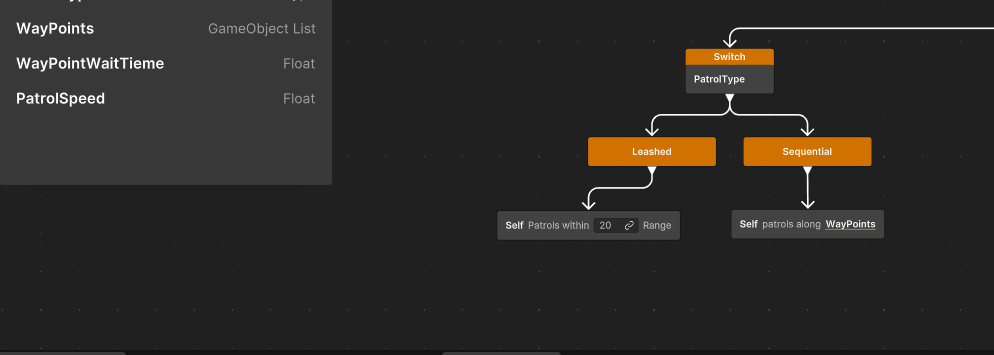
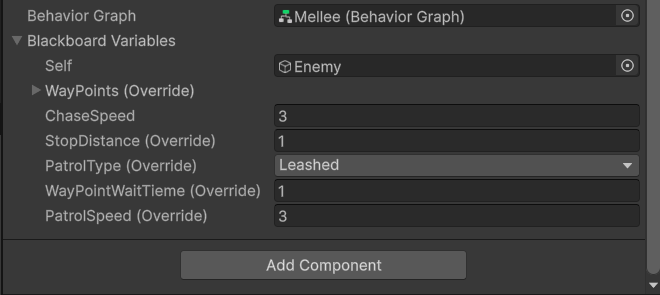
3)If I have enemy where I could choose like patrol type with enum, then exposing variables for one type of patrol would not make sense if another type is selected. for example in my photo, leashed patrol doesn’t need to know about waypoints and vice versa
I will group and try to answer your questions together:
Behavior graphs and subgraphs
1, 3, 5, 6 and 7
Creating one behavior graph per enemy type is an option if they are simple and don’t share a big variety of logic. But this might not scale well if they have complex behaviors or in case you want them to share common traits.
One option you can explore is to create a main “Brain” graph that will act as shared interface for all your enemy and then inject specifics behavior through subgraphs.
Subgraphs are also behavior graph, they are run inside of a graph from one of the RunSubgraph variant (documentation):
Static/Default - when assigning a graph asset directly
Dynamic - when assigning a blackboard variable of type Subgraph to the RunSubgraph node.
This allows you to for instance create such state machine with behavior injected in form of subgraphs “Death” and “Hit” behaviors (or a more interesting “Attack” behavior):
If you haven’t already, I would recommend you to have a look at the Behavior Demo (in particular the behavior graphs B_StateMachine_Character and B_Brain_Patrol).
Splitting your behavior responsibilities into smaller behavior graphs might help alleviate this issue, but we understand that this might just not be enough for some larger and more complex graph.
This sounds like a regression, could you send a bug report for it please?
Blackboard Assets
5
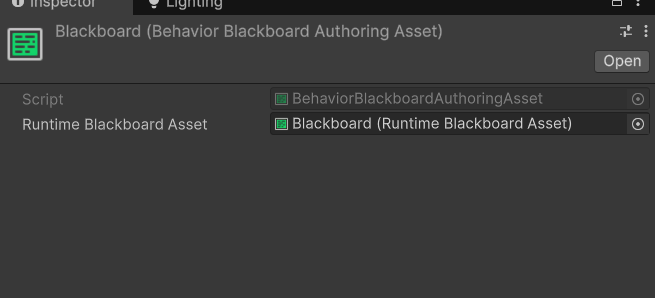
You “Behavior Blackboard Asset” (or their class name BehaviorBlackboardAuthoringAsset) are a special type of BlackboardAsset that are directly embedded inside of a Behavior graph asset.
You might also have noticed that it is also possible to create “Blackboard Asset” from the create item menu. They are blackboard that are not bound to a specific graph and can be referenced in behavior graphs.
There are 2 main benefits out of it:
It is possible to pack shared variables on them instead of recreating them in every graph blackboard.
They can be use to interface Dynamic subgraphs (with Run Subgraph Dynamically node - see documentation linked above).
However, they are not displayed in the inspector, so they are really meant to be used as local/private or shared variables container.
This is the blackboard from the B_Character_Attack_Simple graph, and you can see at the top the blackboard variables of the embedded blackboard (in this case they are all local). Below are BB_Character_Attack and BB_AudioSourceReferences which are 2 independent Blackboard Assets referenced by the graph.
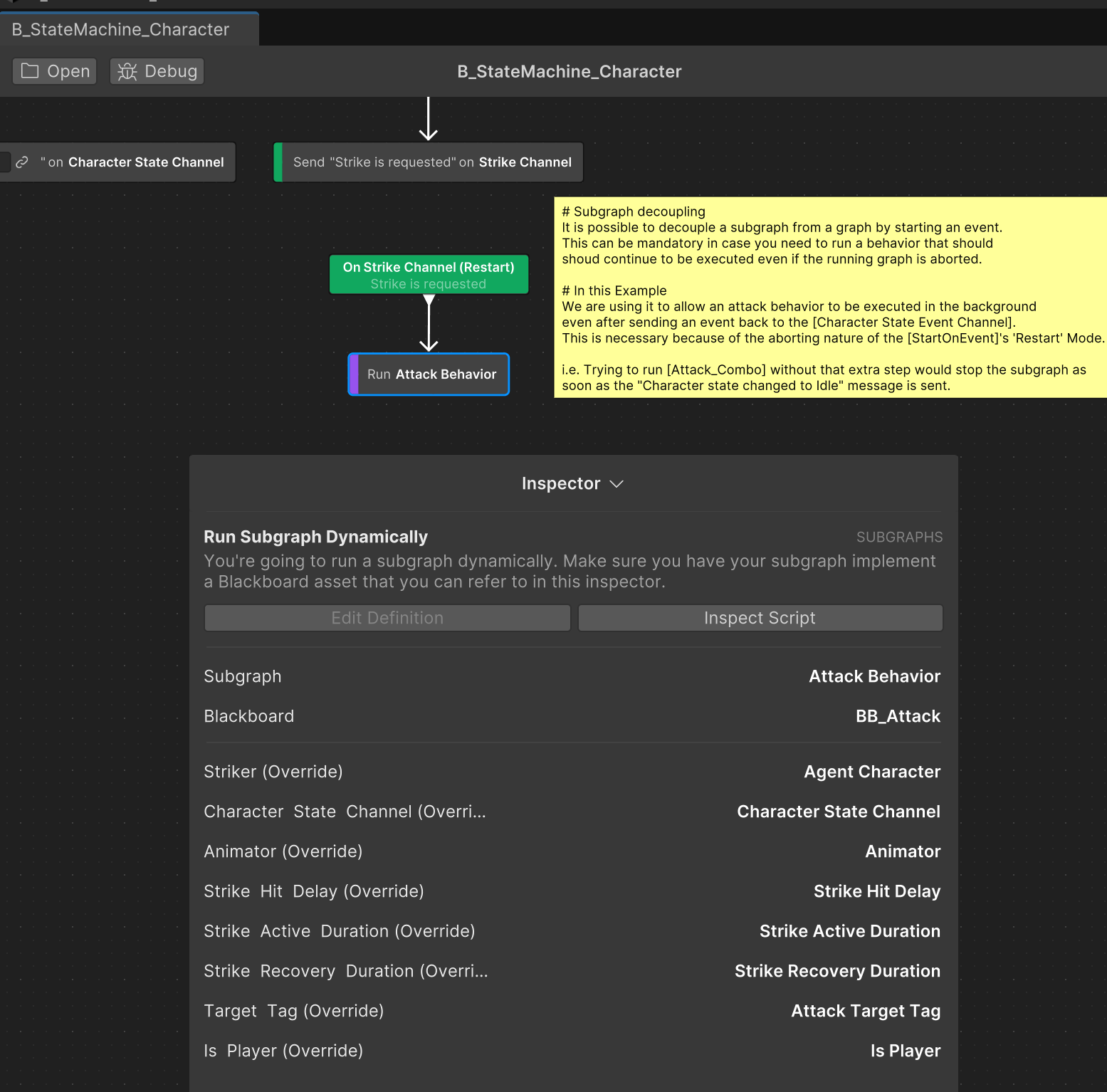
Going back to the B_StateMachine_Character where this subgraph would be called from:
You can see that on the Run Subgraph Dynamically node, the Blackboard variable “Attack Behavior” (of type Subgraph) is being assigned along with the BB_Attack blackboard asset being used as an interface. This is the way the main graph blackboard variables are being passed down to the subgraph.
FSM vs BT
Not at all, the behavior package doesn’t yet have features parity with either traditional Behavior Tree or Finite State Machine, but it is flexible enough to allow to take advantage of both approach. I usually recommend the hybrid BT-FSM to users trying to achieve any graph with a certain level of complexity - using FSM for decision making and BT for behavior execution.
Final words
Sorry for the long thread, there is a lot being covered here and I would like to be able to provide more guidance directly in the documentation in the future.
Don’t hesitate if you have more question in the future.
Thanks you so much for such a great answer
what kind of workflow would you recommend If I’m trying to code AI
where I have certain types of enemies like melee, ranged, healer and also boss?
Their states would be something like chase, idle(patrol) and attack and also maybe some abilities.
I have some idea based on your suggestions but would like to see what professional thinks.
thanks again
It really depends on what your are trying to achieve and your needs for you specific project.
In terms of workflow, always starting by defining a clear design for each AI archetypes. Breaking down into states and tasks will give a better idea of what behaviors are shared and unique to each one of them.
From there I’d build my architecture - abstracting the common tasks into a single graph and injecting archetype behavior with abstracted subgraph.
Finite State machine are excellent for describing state and transition while Behavior Tree are made to describe sequences of actions. So using them is tandem will generally give you the best outcome when it comes to designing and maintaining game AI. At least that is my recommendation with the package
Ultimately, Behavior is your decision graph and bridge with other game systems.
If you haven’t already, I’d recommend having a look at the demo project (import in an empty project). For instance, there is a patrol AI that is using 2 graphs, a “Brain” and a generic “Character state machine” handling the character abilities. It also shows how to communicate between graphs and C# game systems.
I did check out demo project yesterday and it was little too complicated for me to grasp everything, but still helpful.
actually the reason that pushed me to stop exploring demo project was that, when moving with middle mouse button in behavior graph everything was lagging. it wasn’t lagging while zooming with scroll tho.
Thanks again. I hope behavior package gets more updates🤞
We are aware of some performance issue with the drag functionality. Please do upvote the following issue tracker if the issue is bothering your experience with the tool.
Hello, I’ve looked through the demo project and learned a lot so far. But I was looking specifically for an example of swapping subgraphs in a Run Subgraph node at runtime with code. In your example above, the Attack Behavior graph is set in the inspector. But is it possible to change that in code based on game events? Seems like it should be as simple as calling SetVariable on the Subgraph blackboard variable? Given that, what’s the best way to maintain references to multiple graphs in memory that can be hot swapped in code (like if there were multiple attack graphs)?
You can use the SetVariableValue API (you need to assign an object of type BehaviorGraph) to set your BlackboardVariable Subgraph at runtime.
Using the demo as reference, you can add the following component to the Character in the Player prefab and swap the attack subgraph on the fly:
ChangeBehaviorSubgraphAtRuntime.cs
using UnityEngine;
using Unity.Behavior;
using UnityEngine.InputSystem;

[RequireComponent(typeof(BehaviorGraphAgent))]
public class ChangeBehaviorSubgraphAtRuntime: MonoBehaviour
{
    private const string kSubgraphBBVName = "Attack Behavior";
    [SerializeField] private BehaviorGraph m_SimpleAttack;
    [SerializeField] private BehaviorGraph m_ComboAttack;
    [SerializeField] private BehaviorGraph m_ChainAttack;

    BlackboardVariable<BehaviorGraph> m_AttackSubgraphBBV;

    // Start is called once before the first execution of Update after the MonoBehaviour is created
    void Start()
    {
        BehaviorGraphAgent agent = GetComponent<BehaviorGraphAgent>();
        if (!agent.GetVariable(kSubgraphBBVName, out m_AttackSubgraphBBV))
        {
            Debug.LogWarning($"Agent doesn't have a bbv<subgraph> named '{kSubgraphBBVName}'");
        }
    }

    // Update is called once per frame
    void Update()
    {
        if (m_AttackSubgraphBBV == null)
        {
            return;
        }

        if (Keyboard.current.digit1Key.wasPressedThisFrame)
        {
            m_AttackSubgraphBBV.Value = m_SimpleAttack;
        }
        else if (Keyboard.current.digit2Key.wasPressedThisFrame)
        {
            m_AttackSubgraphBBV.Value = m_ComboAttack;
        }
        else if (Keyboard.current.digit3Key.wasPressedThisFrame)
        {
            m_AttackSubgraphBBV.Value = m_ChainAttack;
        }
    }
}
Please note that changing a subgraph while it is running will stop it. If a parent graph is depending on a subgraph to continue it’s execution, this might stall the parent graph. It is users responsibility to make sure the dynamic subgraph swapping is handled properly.
Thanks, this helps and is pretty much what I figured. One follow-up question, in your example you have referenced three behavior graphs that are set in the editor. What if there were, say, 10 different behavior graphs. And add to that a variable number of agents that could all use these behaviors. A simple solution would be to create agent prefabs with the 10 graph references. Would that be the best way? Is it possible to, say, to have a global registry of behavior graphs that can be accessed, cloned (or pooled?), and placed on the blackboard for real-time use, disposing of the previous graph, with a rinse and repeat?
Behavior graphs are runtime representation that should be used as original that needs to be cloned (and never directly used). When a new graph is assigned, the Run Subgraph Dynamically node is creating a new instance (clone) of the runtime graph to work with. You can inspect RunSubgraphDynamically.TryInitialize to see what is happening.
To be more explicit, the RunSubgraphDynamically node handles several steps:
Every time the node starts, it calls TryInitialize and will determine if it needs to clone a new instance of the Behavior Graph.
While the node is running, it is listening to the SubgraphBBV OnValueChanged event. If the value change during that time, it will call TryInitialize.|
So you can use the same Behavior Graph reference for several agents and the Run Subgraph Dynamically nodes will handle the lifecycle of their own instance.
At least, this is the case starting 1.0.8, where we fixed an issue related to agents sharing the same graph instance:
Run Subgraph (Dynamic) wasn’t initializing a copy of the graph asset correctly, causing data to be shared amongst agents sharing the graph and corrupting the graph asset.
But this version has a bad regression that is affecting Run Subgraph (static). If you don’t use any, you (should) be able to use this version without further issue.