Hey, I was trying to build a practice game to familiarize with the Unity program. I keep getting a graphical change everytime my blue cube character shifts to the next level. the second level becomes a lot darker than the first. It has the same exact color and lighting. Its the same level copied and paste, but when i hit play and i go to the next level the colors or lighting darkens. This only happens in Unity editor but when I build and save the game this does not happen. Plz help me ASAP. I want to continue learning the program but i cant do that until this problem is resolved. Heres the pics below. First level is the bright one, then when going to next level it gets dark and dull.

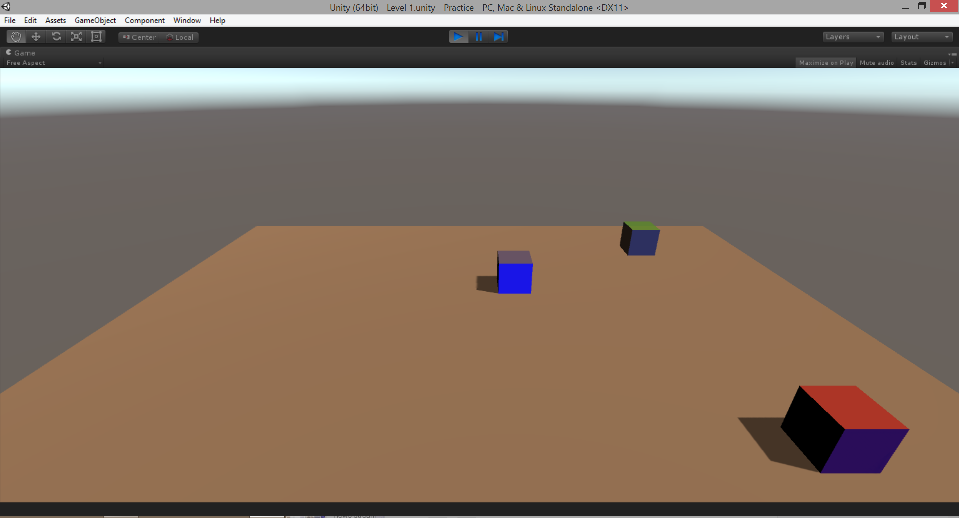
Different scenes have different Lightmapping settings are you sure they are the same? It also might be some kind of bug since it’s okay at runtime.
I copied and paste lvl1 and made a lvl2
I don’t think it’s enough for lightmapping settings to be copied. Just check and rebake lightning settings on both scenes separately.
exactly the same, hey check this out, maybe theres a bug in my script to shift to next level.
using UnityEngine;
using System.Collections;
public class GameManager : MonoBehaviour {
public static int currentScore;
public static int highScore;
public static int currentLevel = 0;
public static int unlockedLevel;
public static void CompleteLevel(){
currentLevel += 1;
Application.LoadLevel (currentLevel);
}
}
Well code doesn’t show anything interesting, the only note I can give is that try not using static methods and variables. Especially if you are new in programming.
Oh, wait i got it, it was the lighting option/ambient source was on skybox, i made some adjustments and i got it. thx anways
1 Like