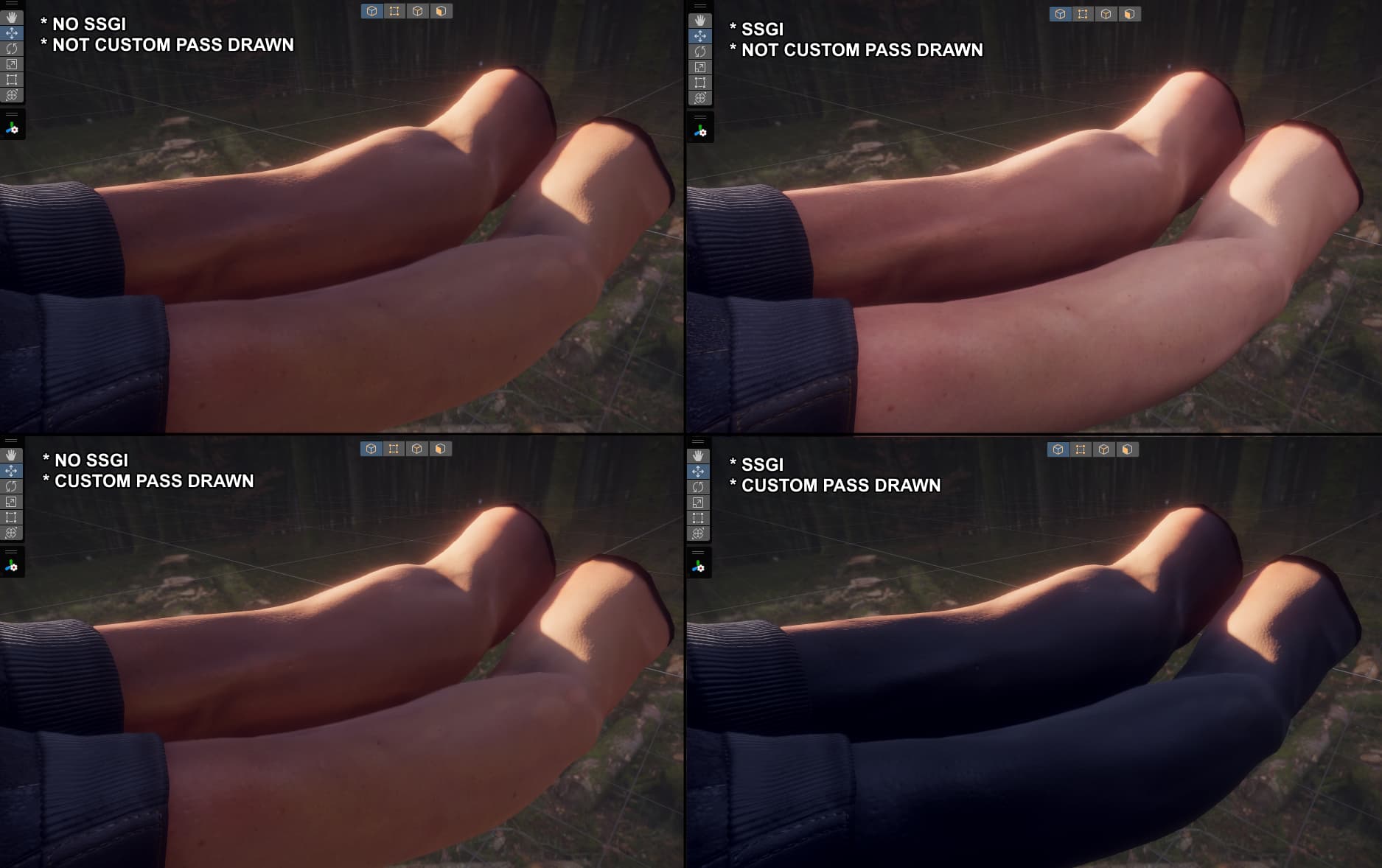
When drawing renderers through a custom pass volume, they appear to not play well with certain screen-space effects, most notably screen-space global illumination and screen-space reflections (using ray marching, ray tracing works proper).
Is this a limitation of custom passes, or is this an issue that can be fixed?
Using:
- Unity 2022.3.48f1
- HDRP 14.0.11
Hello,
Yes, this is a limitation of the custom passes, when rendering an object at a certain injection point, only the color buffer is modified. Screen space effects often need more information than just color (depth, normals, etc.) and custom passes don’t provide such information.
That being said to alleviate the issue you can add a second custom pass that renders your objects in the depth and normal buffers used in most screen-space effects like this: HDRP-Custom-Passes/Assets/CustomPasses/RenderWithNormalBuffer at master · alelievr/HDRP-Custom-Passes · GitHub
And you’ll probably need to do the same for motion vectors if you experience ghosting on those custom objects.
However, I doubt that it’ll be enough for the SSGI.
I see… that’s a shame. Indeed, writing to the depth and normal buffer isn’t enough.
I’m probably reaching here, but I don’t suppose there’s a way to render objects in a custom pass without SSGI? (not including 'After Post-Process" injection point)
Indeed, it’s not possible to render the object while ignoring the SSGI contribution and I believe the same issue will happen with subsurface scattering.
I can check if it’d be possible to add an API to support this case, probably something like a new function to bind camera buffers properly before rendering your objects in the custom pass 
That would be really great! 
So, I took a look at the code and it doesn’t seem possible to expose this functionality without pulling out a bunch of other stuff that we don’t really want to make public.
There is something weird about your example above tough, from my tests SSGI is just ignored by custom passes but doesn’t break the rendering. On the other hand having subsurface scattering on the material result in a black surface like in your screenshot but it’s not linked to the SSGI.
Could you check that the objects rendered with your custom pass are not rendered twice? (culling flags of the camera).
Looks like you’re right - disabling subsurface scattering in the HDRP asset fixed the issue. I’m a little confused as to why though, as my material doesn’t use subsurface scattering, nor is it used anywhere in the post processing volume (or default). Is having it enabled in the asset alone enough to cause this issue?
I also can’t seem to reproduce the issue with SSGI alone anymore… I’m not sure what my original setup looked like, but I’m gonna shrug it off. It probably wasn’t linked to SSGI after all.
Either way, thank you for the insight! I wasn’t planning to make extensive use of SSS, so knowing I can still combine custom passes with SSGI is a relief.