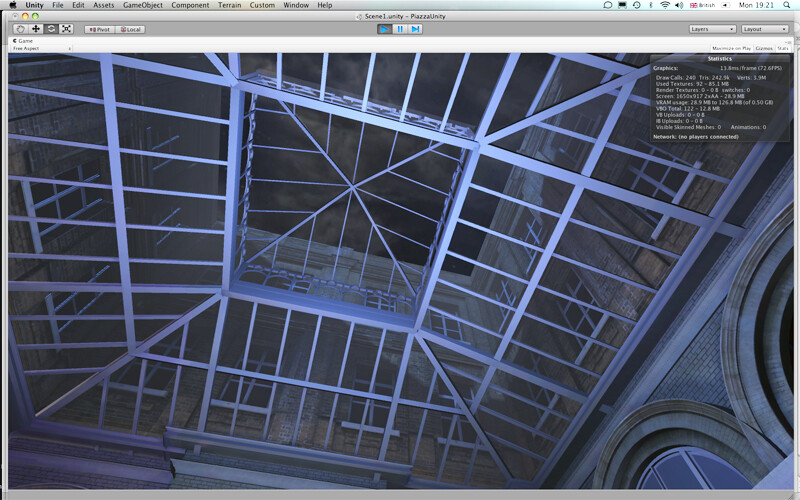
I’ve got a model and the rain is coming down outside the windows which is nice and gives a cosy feel. However there’s also this great big glass roof over the main Atrium and I need to find a way to give a nice feeling of rain coming down on the top of it. Experiments with particle systems aren’t really cutting it from underneath.
With Unity Pro the easiest thing to do would be to use the refractive shader that’s in the Pro Standard Assets and create an animated tiling texture that shows rain drops and water trickling downwards.
You could also get fancy and use this set-up to generate rain effects in real time with particle systems :
With Unity Free (that name is going to stick unfortunately) I’d use the same technique but with a transparent/bump/reflective shader… similar to the one I use for the water effect in this example:
I have only just invested in Pro. The shrink wrap is barely off the download!
I was looking for something like the refractive shader animated tiling/raindrop/water trickle thing now I have the ability to reflect/refract but at the moment I can’t even find a refractive shader. Have installed the Pro Standard Assets and there are more than there were but nothing that says refractive. I’m after glass effects generally as well as the splash/trickle for this affair.
I’ve tried the Blueindigo rain effect but it doesn’t show up at all from underneath. I’ll check out Forest’s rain effect again because it’s gorgeous but am not sure I can replicate it yet with my minimal scripting ability (starting javascript class in january) Plus it may not really be visible with the refractive shader animated tiling thing which I think is the first port of call. However, I need it somewhere else anyway so will have a bash.
Going back to the animated tiling texture shader thing:
Do you have any links/advice on what the refractive shaders look like and how to generate this sort of effect because I’m probably being short sighted but I can’t find them or anything much about them in the manual.
The Refractive shader can be found at “Pro Standard Assets/Glass Refraction/Glass-Stained-BumpDistort”. In the shader drop down it can be found at “FX/Glass/Stained BumpDistort”.
OK, I found exactly the right thing in the wonderful water texture in the Sewer Demo.
I’m having some trouble applying it to my models though and I think it’s a UV thing.
The cube on the right here is a cube made in Unity with a Tiling texture from the sewer demo that animates nicely and is placed how it should be.
The cube on the left is from Cinema 4D via .fbx export with exactly the the same script and shader applied but although it does move the texture is totally out of scale.
The cube behind is from SketchUp and textures applied in Unity always tile out really tiny so that never works.
What exactly is happening though to cause the applied shader to come out at a radically different size in Unity and how do I control it on a model I have made outside of Unity? I guess in C4D.
Can anyone explain the general principle of why the shader texture is applying so differently to models from different programs and how I control the UV’s as I guess that’s the problem.