Hello fellow game developer collegues,
i am currently working on a project, where the player can build walls and windows. I kind of need it to be as generic as possible, so that i can easily scale/translate the windows in runtime. So i had the great idea of using the Stencil Buffer to “cut out” a hole into my wall - which workes very well, BUT (of course) also cuts out all Walls which can be seen through the new build “window”. This is kind of confusing to write, so here two screens to show what i mean:
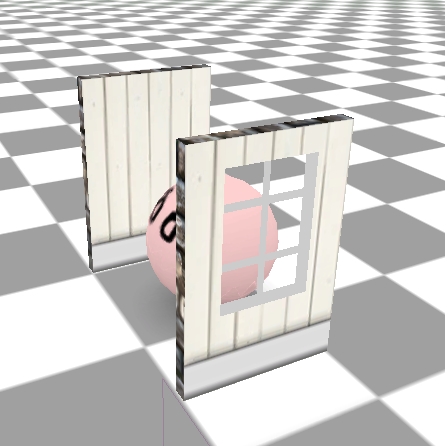

So you see, i can look through my wall and see the pink guy behind it, but it also completely “kills” the second wall in the background.
The window shader sets stencil buffer to 1
Shader "Custom/Wall/WallOccluder" {

 Category {
       Lighting Off
       Cull Back
       zwrite off

       SubShader {

       Colormask 0

    	Stencil {
			Ref 1
			Comp always
			Pass replace
		}

       Tags {
		"Queue"="Geometry"
		"LightMode" = "Always"
		"RenderType"="Opaque"
		"IgnoreProjector"="True"
		}
            Pass {
            }
        }
and the wall shader is checking for stencil 1:
Shader "Custom/Wall/Wall" {
    Properties {
        _Color ("Main Color", Color) = (1,1,1,1)
        _MainTex ("Base (RGB)", 2D) = "white" {}
    }
    Category {
       Lighting Off
       ZWrite on
       Cull Back
       SubShader {

		Stencil {
			Ref 1
			Comp notequal
			Pass Zero
		}

       Tags {
		"Queue"="Geometry"
		"LightMode" = "Always"
		"RenderType"="Opaque"
		"IgnoreProjector"="True"
		}
            Pass {
               SetTexture [_MainTex] {
                    constantColor [_Color]
                    Combine texture * constant, texture * constant
                 }
            }
        }
    }
}
My question is - do you have any ideas on how to build this? I want to avoid cutting real poly-holes in my wall-mesh and i would like to avoid using a cutout texture on the wall. (I think i would try it this way, if there are no other ideas by you guys).
I really would like to know, if there is a smart way of doing this! Thanks in advance