Hello,
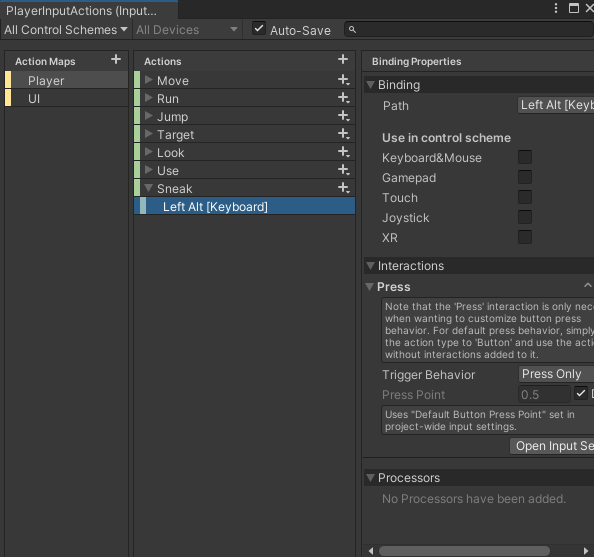
I am using the new Input-System and I had setup some bindings some time ago and I went back to revisit the new input manager script to add a new action called Sneak. This action is set up in the same way as the included Run action.
Here is the beginning of my PlayerController script with some variables shaved down.
PlayerController.cs
using JetBrains.Annotations;
using System.Collections;
using System.Collections.Generic;
using Unity.VisualScripting;
using UnityEngine;
using UnityEngine.EventSystems;
using UnityEngine.InputSystem;
using UnityEngine.UIElements.Experimental;

public class PlayerController : MonoBehaviour
{
    // Player Control Inputs
    InputAction move;
    InputAction run;
    InputAction sneak;
    InputAction jump;

    // Player Control Booleans
    public bool isMoving;
    public bool isRunning;
    public bool isSneaking;
    public bool isFloating;
    public bool isJump;
    public bool isFloatJump;
    public bool isJumping;
    public bool isStillJump;
    public bool isJumpPeak;
    public bool isFloatJumpPeak;

    // Animation
    public Animator anim;
    public float xDirect;
    public float yDirect;

    void Awake()
    {
        playerControls = new PlayerInputActions();
    }

    void Start()
    {
        // Set rigidbody and the playerControls object
        rb = GetComponent<Rigidbody2D>();
        entityScript = GetComponent<Entity>();

        // Set initial Directions (forward being down)
        anim.SetFloat("XDirect", 0);
        anim.SetFloat("YDirect", -1); // (0, -1) = down

        // Set the movement caps
        moveCap = moveSpeed * capMult;
        runCap = moveCap * capMult;

        // Set Temp Variables
        jumpArcTemp = jumpArc;
        jumpArcIncTemp = jumpArcInc;
        moveSpeedTemp = moveSpeed;
        floatJumpsTemp = floatJumps;

        // Set Boolean Inits
        isMoving = false;
        isRunning = false;
        isSneaking = false;
        isFloating = false;
        isJump = false;
        isFloatJump = false;
        isJumping = false;
        isStillJump = false;
        isJumpPeak = false;
        isFloatJumpPeak = false;

        // Set stat counters
        steps = 0;
    }

    void OnEnable()
    {
        // Player movement
        move = playerControls.Player.Move;
        move.Enable();
        move.performed += i => isMoving = true;
        move.canceled += i => isMoving = false;

        // Run increases move speed;
        run = playerControls.Player.Run;
        run.Enable();
        run.performed += x => isRunning = true;
        run.canceled += x => isRunning = false;

        // Sneak decreases move speed;

        sneak = playerControls.Player.Sneak;
        //sneak.Enable();
        //sneak.performed += a => isSneaking = true;
        //sneak.performed += a => isSneaking = false;

        // Jumping
        jump = playerControls.Player.Jump;
        jump.Enable();
        if (!isJump) // only one jump at a time
        {
            jump.performed += y => isJump = true;
        }
        jump.performed += y => isJumping = true;
        jump.canceled += y => isJumping = false;

        // Float Jump
        jump.performed += z => PlayerFloatJump();
    }

    void OnDisable()
    {
        // disable all controls on disable
        move.Disable();
        run.Disable();
        jump.Disable();
        //sneak.Disable();
    }
Here is the error code I receive:
Assets\Plugins\PlayerController.cs(134,39): error CS1061: ‘PlayerInputActions.PlayerActions’ does not contain a definition for ‘Sneak’ and no accessible extension method ‘Sneak’ accepting a first argument of type ‘PlayerInputActions.PlayerActions’ could be found (are you missing a using directive or an assembly reference?)
I have a Sneak action defined in the PlayerInputActions.inputactions file. Even when I delete some of the existing actions they still register as valid in the PlayerController script.