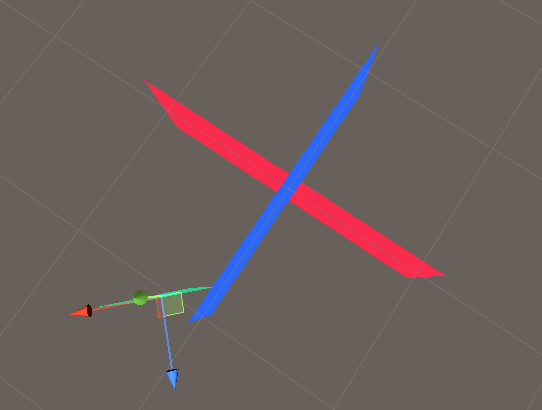
“Sprite Renderer” uses “Order in Layer”, but I would like to achieve an effect so that the sprites behave like 3d objects, and those parts of the sprites that are closer in space are drawn on top
For example, a blue and a red sprite do not pass through each other, instead, there can be only one on top and at the same time entirely.
And you can also see that the green sprite is further, but is drawn on top
The effect I would like to achieve
I understand that this is how Sprite Renderer is designed, for the reason that it was created for 2d, and it does not take into account space as I would like
Grateful for any ideas.
Perhaps this can be done somehow through the shader? Or perhaps there is another component? (not Sprite Renderer)
I read the forum and saw a similar topic, they mentioned that something similar is easy to solve with Universl RP, but without details, so I did not understand what it was about.
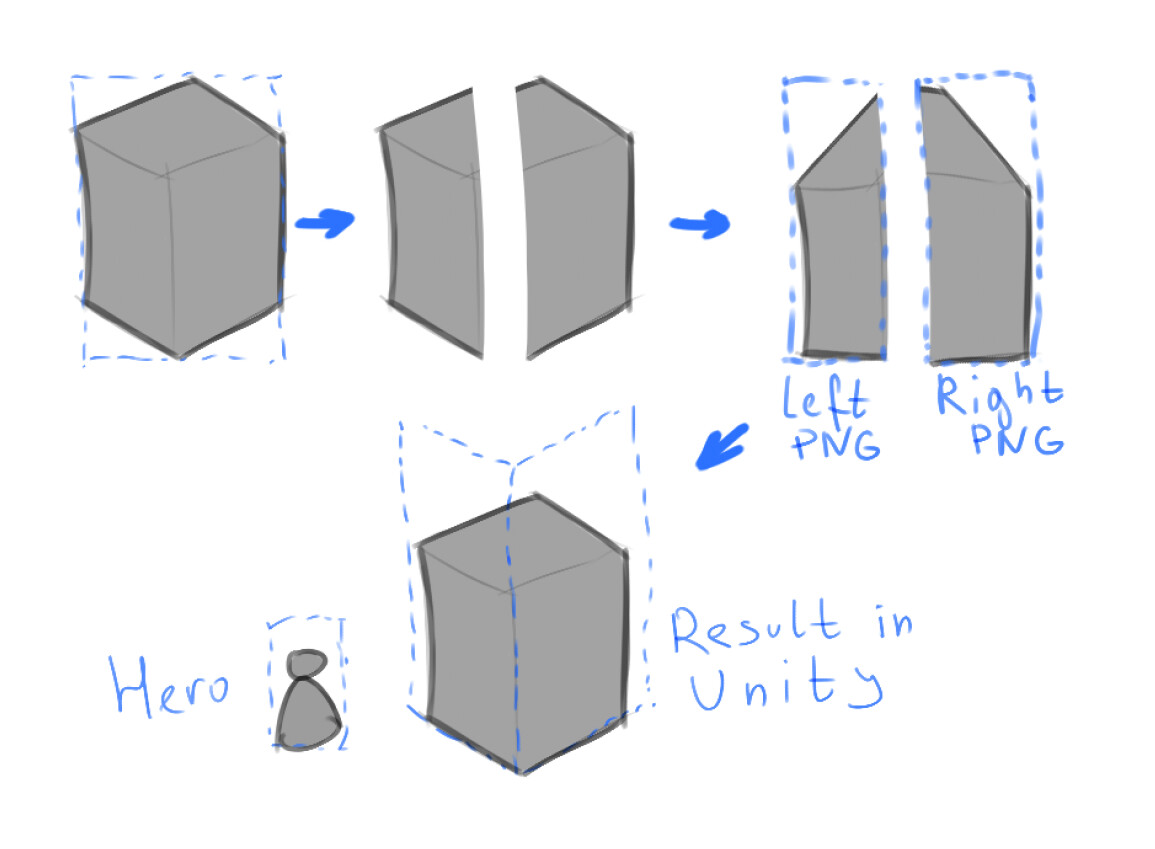
I plan to use a PNG file with transparency (with an isometric image) that is cut and transformed outside of Unity, resulting in 2 PNG files on the left and right side. (On the left and right sprite)
This way I plan to build a scene that will look like a drawing, but for simplicity it will actually be 3D
The character will also be PNG with transparency
All 3 sprites end up with a different orientation (different rotation along the Y axis)
A small draft to demonstrate my words more clearly
If these sprites are arranged as I showed in the first message, they will visually gather into an isometric image (if you set the camera settings correctly). But at the same time, I will be able to work with the scene in 3D (there are several reasons for this)
As Melv suggested you can do this with a simple quad easily enough. You can also do this with a Sprite renderer, you just need a sprite shader that writes to the depth buffer.
Thanks for your reply!
I haven’t worked with shaders yet, would Shader Graph work for that?
Could you explain this idea in more detail, where could I start?
setup is relatively trivial for just starting---- youtube vids can go through constructing concepts
also reading up inside the online Unity manual /tutorials
not exactly - the sprite pulldowns inside Unity are for quick ease of use expecting you do not want/need extended 3D Graphics; they’ve been stripped out for quick/optimized use
to do what you want either means
switching to Mesh renderer + simple quads
make a sprite friendly shader that has 3D features you need
just switch ‘Material’ type to extend 3D concepts you need
either unlit…or lit (but only if you are sure you need dynamic lighting)
Thank you very much for your advice, it helped a lot!
At the moment sprites A and B use the new shader and behave like 3D objects.
The documentation for Depth Write\Test says “This property is only exposed if Allow Material Override is enabled for this Shader Graph.”
Interesting fact that it works even when turned off
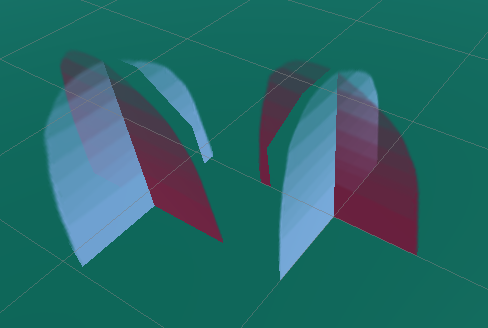
Now there is a problem with transparency
As far as I understand, each transparent pixel equates to either fully transparent or fully opaque, and “Alpha Clip Treshhold” defines this border.
I noticed that this problem depends on the value of “Order in Layer”
In the left option, Blue has a higher value
In the right, Red has a higher value
If the green Order in Layer is set above all
Theoretically, it is generally possible to solve this problem, or their “Sprite Renderer” nature will not allow to do this, and is it worth trying through Quad?
i’m not sure;
you’ve hit the limit of what I technically understand for realtime rendering.
i know that I can not solve the issue in 3D, regardless of 2D sprite construction
sorting VFX is one thing but I work without depth and have to make choices what layer tthings sit on
sorting, depth + softness are afaik not easy; requiring a far more experienced
shader engineer or principal environment artist ( i would assume)
I’m not entirely sure what is going on in those images but it sounds like you want to have semi-transparency. This is usually referred to as Alpha Transparency as it uses the alpha color channel to control the opacity of each pixel. Alpha-transparent objects need to be rendered in a different way from purely opaque objects or objects that only use clipping (they must be rendered in order of furthest from camera to closest) so in this case you will once again need to return to a shader that DOES NOT write to the depth buffer.
Now here’s the bad news: Unity sorts objects to be rendered by their center points which can result in your original problem where one object can appear to pop in front of another and then later behind it. What you probably want is something called Order Independent Transparency which is really tricky, not super performant, and not available out of the box in Unity. However, there is at least one workaround - you could try using the sprite renderer’s ‘Order In Layer’ property to adjust things based on various factors. This would in fact not be too different from how traditional 2D engines sorted and rendered objects in isometric views.
I’m not sure what kinds of performance issues you might run into if you have loads of objects with varying sorting orders but probably unless you plan on having thousands of on-screen sprites it won’t really matter much. Your best bet would be to throw a quick test scene together with loads of randomly placed sprites and change their sorting orders in realtime to see what the impact is and if it’s acceptable for your project.
This method generally works. Even before creating this theme, I tried sorting through a script, but sometimes I notice a drop in FPS in a scene where there are a lot of decorative objects.
Some objects in the scene have a rectangular base (instead of a square one).
Square objects sort nicely when the pivot is set to “base visual center” (by the word Base, I mean the plane of which the imaginary geometric figure touches the floor), no script is needed for that, but the main problem is that I don’t want to cut rectangular base object sprites into square base object sprites. This makes it too difficult to add new content and populate the world. Physics.OverlapSphere is often called in the script, this is probably a performance problem.
In the future, I will still consider the option with Quad, maybe everything is simpler in it, or probably I will try to optimize the sorting script.