How to add to array from an enum? (WHILE IN EDITOR)

I have this code:

  public enum ID : uint
    {
        Step = 0,
        Fall = 1

    }

[Serializable]
    public class variations
    {
        public string Name;
        public AudioClip[] vr = new AudioClip[0];
    }

    public variations[] DB = new variations[0];

This creates an array database for me to store sound clips.

I then intend to use my enum to access the array by doing DB[(uint)ID.Step]

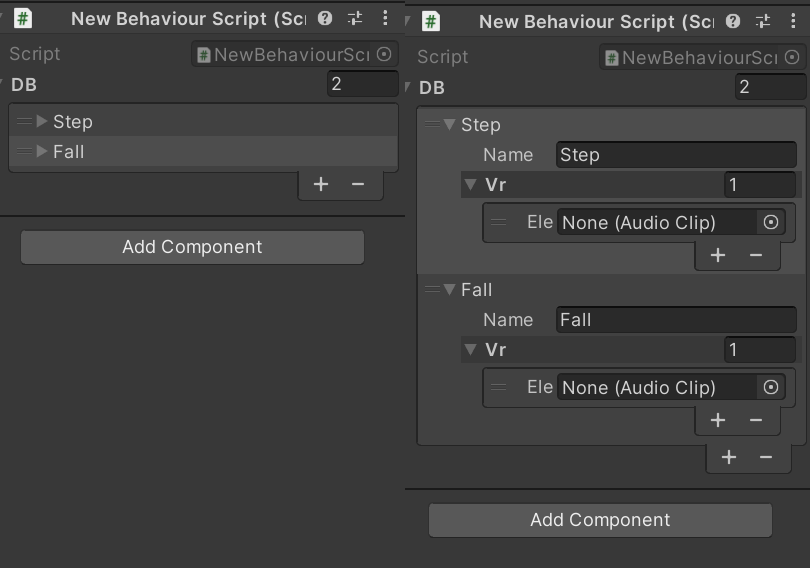
it looks like this in the inspector:
9068245--1254442--Untitled.png

But now I have to manually add the items to match the enum to make it look like this:

its annoying now that everytime I want to add something to the enum I have to go manually into the inspector to go populate the array with the new values. What code can I use to add and populate the array (during editor time), everytime I add a new entry to the ID enum?

So now I add a new entry to the enum like this:

   public enum ID : uint
    {
        Step = 0,
        Fall = 1,
            Fly=2


    }

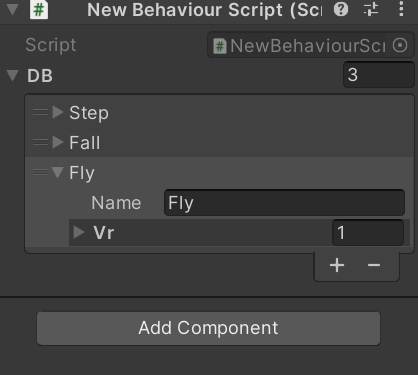
And I want it to automatically increase the size of DB by 1 and automatically assign the string “Fly” to DB[2].Name. Of course it cant just reset the whole array since I might have already added some clips to the previous entries of the array.

expected result:

9068245--1254448--Untitled3.png

Thanks!

Hi, you could maybe try to write editor script like this:

[CustomEditor(typeof(ScriptName), true)]
public class ScriptNameEditor : Editor
{
    ScriptName s;

    public void OnEnable()
    {
        s = (ScriptName)target;

        string[] names = Enum.GetNames(typeof(ID));
        string[] values = Enum.GetValues(typeof(ID));

        //resize array, add elements, etc.
        ......
    }

    public override void OnInspectorGUI()
    {
       base.OnInspectorGUI();
    }
}

You would need to click (or have the inspector open) on the GameObject to populate the array, but it’s still better than doing it manually. Also you could check this to trigger it on script reload: How can i Callback after the scripts compilation - Unity Forum , but it would run every time you change any script.

I usually use an array of structs, where the struct contains a string and value to use in a dictionary.
Might be interesting to look into. Not sure how to add items to an enum in the editor

Enums and arrays have nothing to do with each other, unless you make an enum array.
Unity Inspector has zero obligations to somehow make this work.

Your example is pretty convoluted to begin with. All you do is declare an enum with an underlying type of uint, which is unnecessary (it’s already int by default, and I’m absolutely sure you don’t need more than 2 billion entries). And then you cast these values back to unsigned integers to be used as array indices. Why should Inspector read your mind and somehow automate this on its own?

I’m not even sure what needs automation, but if you want to automatically populate the array, do exactly that: populate the array automatically, as explained by tduriga above.

basically I want to interact with the array by “name” instead of by index

so i want to go for the steps sound its easier for me to remember DB[(uint)ID.Step] than DB[0] or DB[242]

are you implying that I dont need to do (uint) castback?
If I try to do just DB[ID.Step] it says that it cannot be implicitly converted

also im not saying the inspector should obey my thoughts, i was looking for an inspector script

but i agree that this might not be the most efficient

What do you suggest then, lets say I populate the whole array manually, how do I interact with the array?

of course I could just do DB[200] but its gonna be confusing to remember exactly which is the sound 200
My solution was to have the enum, but in this case now I would need the enum to be written out in code

But I guess that is easier I can use the array to write the enum code to a text file and then paste it on the script

However I am open to hearing your best practice, thanks

No, I’m not implying that what you’re doing is necessarily wrong, just stating what you’re doing out loud. Apart from that, there is also very little benefit to be had from casting to uint specifically, because enums are already implicitly of type int.

Of course, there is no implicit conversion, however you might do this with an extension if you’d like your code to be more readable. You can do for example

public enum AudioID {
  Step = 0,
  Fall = 1,
  Fly = 2
}

static public class AudioIDExtensions {
 
  static public void AudioClip Get(this IList<AudioClip> clips, AudioID id)
    => clips[(int)id];

}

And now you can

public AudioClip[] vr = new AudioClip[3];
vr.Get(AudioID.Fall);

But this still doesn’t address your inspector problem.
I can’t really understand what you’re trying to do here, because normally you either use an enum, or you manually set the values in the inspector. Either of these things serve as a ground truth, but it seems that you want one to copy over to the other. And this makes zero sense to me. Where do you connect the actual audio file?

If you start from enum, you have to have an audio file hooked up somewhere.
If you start from inspector serialization, then you can’t build an enum out of that. I mean you can, but you don’t have any access to it outside of runtime, and you wish to program with it!

What you really want is a way to simply refer to inspector data by something other than pure integers.
And this is where comment from DevDunk above fits in.

You make a struct based on key/value pairs, where the key is some name, and the value is the clip.

using UnityEngine;

[System.Serializable]
public struct NamedAudioClip {

  [SerializeField] public string name;
  [SerializeField] public AudioClip clip;

}

You then expose an array of this type

using UnityEngine;

public class MyScript : MonoBehaviour {

  [SerializeField] NamedAudioClip[] namedClips;

}

After you set these fields up manually, you introduce an auto-registration of names in Awake of this script, to be able to access the entries without having to search for them

void Awake() {
  autoRegisterClipNames()
}

static Dictionary<string, NamedAudioClip> _reg;

void autoRegisterClipNames() {
  _reg = new Dictionary<string, NamedAudioClip>();
  foreach(var item in namedClips) {
    _reg[item.name] = item;
  }
}

Now you can reach for any item in O(1) by naming it

var myClip = _reg["Fall"];

But this is prone to errors by mistyping.
Finally, add your enum to match these names as well. The actual values (and order) of these enumerations are irrelevant, which is excellent. The actual names are important!

public enum AudioID {
  Step,
  Fall,
  Fly
}

static public class AudioIDExtensions {
 
  static public void AudioClip GetClip(this IDictionary<string, NamedAudioClip> namedClips, AudioID id)
    => namedClips[id.ToString()].clip;

}

Now you can

var myClip = _reg.GetClip(AudioID.Fall);

Make sure the letter casing is the same in inspector and enum. Also do not use duplicate names in the inspector, because this will only expose one of those names. If you want to make sure that a duplicate is caught early, change this

_reg[item.name] = item;

to this

_reg.Add(item.name, item); // will throw exception on duplicate key

Edit: fixed typos in the last extension

If I want to do something similar I do it like this (the code below is just example). It’s probably not the best solution, but since the Dictionary is not serializable this is probably the easiest way to keep the default inspector UI and not iterate over the array/list every time you want to get something.

You could combine this with the custom inspector to create empty entries for every new enum value you add, but you still have to assign the Audio file manually. If you have few audio files, just do it by hand one by one and don’t risk possible NullPointers… if you have many files then create custom inspector with object field, assign your folder there and parse and assign the files in code automatically.

This way you just call: SpriteDB.SPRITES[SpriteType.SPRITE_RED]; and don’t need to cast one type to another.

public class SpriteDB : MonoBehaviour
{
    public static Dictionary<SpriteType, Sprite> SPRITES = new Dictionary<SpriteType, Sprite>();

    [SerializeField]
    private List<SpriteDBEntry> SPRITES_REF = new List<SpriteDBEntry>();

    void Awake()
    {
        SPRITES.Clear();

        foreach (SpriteDBEntry dbEntry in SPRITES_REF)
        {
            if(SPRITES.ContainsKey(dbEntry.type)) continue;

            SPRITES.Add(dbEntry.type, dbEntry.sprite);
        }
    }
}

public enum SpriteType
{
    SPRITE_RED,
    SPRITE_BLUE,
    SPRITE_TEST
}

[System.Serializable]
public class SpriteDBEntry
{
    public SpriteType type;
    public Sprite sprite;
}

EDIT: this is basically the same thing as orionsyndrome posted above

thanks friends, ye with the dictionary I will no longer need the enum since it already does the job of creating access from a string

I do connect the clips in the inspector, the enum was just a way to verbalize access to the array

Alternatively, you can bypass having to serialize the strings at all, by doing

using UnityEngine;

[System.Serializable]
public struct AudioClipWithID {

  [SerializeField] public AudioID id;
  [SerializeField] public AudioClip clip;

}

However, this has a big issue with how serialization works, as it will break everything if you attempt to reorder or insert new stuff into enum. For that, you might want to check my tutorial on custom enumerations (for which you can also grab the source here ).