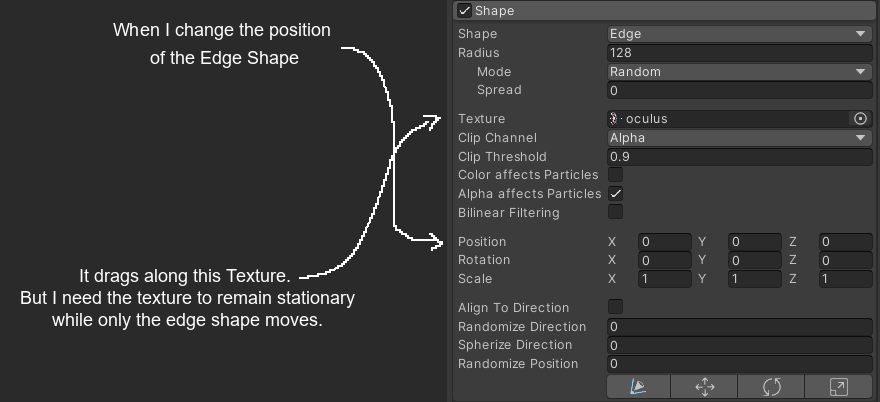
Hello folks! I’m using an edge shape on my particle system to spawn fire particles in a line. I’ve set a texture in the shape module to alpha clip my particles so they’ll only spawn inside the texture. In this example, the texture is an enemy sprite.
What I want to do is move my edge shape over time, making the fire particles seem like they’re burning the enemy starting at the bottom and moving up. The problem is that when I change the position of the shape, it drags the texture along with it. I need the texture to remain stationary for alpha clipping purposes and only the edge shape to move.
Any help will be greatly apreciated!
that position parameter offsets the emitters location relative to the objects local position, it does not move the texture to pan across the emitter shape
you need to offset the texture itself which can be done by keyframing the offset in timeline (i think that will work)
or this requires a shader that has pan/offset logic.
UV tiling and feed a variable into the offset that pushes the texture through UV space driven by the custom vertex stream inside the particle system
(edit this is wrong, you can’t pan a texture bc the shape module does not use materials/uv/shaders)
there is ‘probably’ a logical way to use (3D) mesh info in localized space to smooth step up or down to get particles to emit across the character without panning a texture, rather an alpha value found stored on vertex level of the character
if this is for sprite you can animate the emitter itself in with worldspace emission.
2 Likes
Thank you for your prompt response, Torbach! Unfortunately I’m not trying to offset the texture. It’s quite the opposite. I want to move the edge emitter but it seems that by changing it’s position, I also change the position of the texture used to alpha clip particles in the shape module. Sorry, I think I should have been a bit more clear, so I’ll just explain what I’m trying to achieve as I’m open to other methods of getting there. The picture below should help.
Imagine there’s a sprite representing a paper, and that paper will be burned starting at the bottom. The fire will make it’s way up the paper until it’s all burned. I’m trying to achieve this fire effect by placing a particle system with fire particles spawning in an edge emitter. I’ll change the position of this edge emitter to move it up, giving the impression that the fire is making it’s way burning up the paper.
Since the radius of the edge emitter is larger than that of the paper sprite, I’ll setup the shape module of the particle system with a texture shaped like the paper, then use it to alpha clip any undesired particles that would spawn outside of the paper sprite. The last part of this effect would be to hide the part of the paper sprite that was already burned, and I made a shader for that and it’s working.
My problem is that when I try to change the position of the edge emitter, it also changes the position of the texture in the shape module. My fire particles never respect the shape of the paper sprite, because the alpha clip texture is moving up with the edge emitter.
Again, thank you for taking the time to help. It’s really apreciated.
yes i understand
it is an editor behavior limitation btw… not ‘real’
once you keyframe and play those numbers changing it will work how you want, leaving fire as it moves around
also what I said about panning the texture is wrong, It can’t be used that way since the shape module does not use materials i.e. no shader no material exists to affect a UV concept
1 Like
–It did work when using the animator to move the edge emitter! I was trying to move it using code and the --behavior is just completely different.
–Thank you very much for your help, Torbach78! I would have never figured out this odd behavior on my own.
Edit: Nevermind, I got carried away. I thought it was working but I had setup the animation for the edge collider to end it’s movement exactly where the sprite ended. Manually setting this up every time won’t be feasable because sometimes the sprite will be a different one, with a different height. I then setup the animation to continue moving the edge emitter upwards a certain distance and the particles were not alpha clipped when it got past the sprite.
yes I suspected you need a abstracted programmatic approach
possibly your script needs to somehow operate on animation parameters and pre-compute this on load and apply it to a timeline animation component rather than on the module?
this is outside of my skillset bc it is technical, and technically I am an artist