Imagine a hydroponics room filled with a variable number (1-100) of UV lamps.
To visualize the spaces in the room that do not receive enough UV light, I fill the room with a 3 dimensional grid of particles using “Set Position (Sequential: ThreeDimensional)” and colour them green if they are receiving enough combined UV and red if they are not.
Each particle needs to calculate the combined light from all of the UV lamps.
I can pass the UV lamp positions into the graph using the RGB values of a Texture2D and get each particle’s position using “Get Attribute Position (Current)” but I can’t find a way to loop through the lamp positions calculating the combined brightness per particle.
Of course I can do the maths outside of the VFX Graph and pass the red/green flag (or combined brightness value) in via a Texture2D to correspond directly with each particle but in the interest of performance I want to accomplish this inside the VFX Graph on the GPU.
Is there a way to do iterate through a variable length array inside VFX Graphs per particle?
You need custom HLSL, but this is available from 2023.2 or something like that. Also graphics buffer might be better to pass the lamps you need.
In case you are stuck with older unity versions the only “faster” workaround to kind of raymarch without huge impact would be to use job system, to calculate those things with job threads.
Ah, so not such a simple solution. This does make sense and will hopefully get a lot of others moving in the right direction. I on the other hand am going to cop-out and just copy paste 100 (or maybe 50) exposed Vector3 lamp position variables. But thanks for verifying that there is no easy short cut.
When I hear about copy-paste x100 times and connecting all of them, my guts starts to hurt for number of reasons
Obviously it’s up to you, but I think this task should be trivial. Let’s assume you don’t need any ray marching, just accumulated power of lamps for given point by distance. It would be probably something like this:
float AccumulatedPowerOfLamps(in float3 position, in StructuredBuffer<float3> lamps, in uint lampCount)
{
    float total = 0;
    for (int i=0; i < lampCount; i++)
    {
        total += distance(position, buffer.Load(i));
    }
    return total;
}
This is not tested, valid code, but documentation is here and there. Also if UV power is not just sum of distances you just have to replace that part with your own formula.
The same goes with jobs, it would be more code, but still quite simple.
By custom HLSL I meant custom visual effect HLSL operator/block.
Well well. At first glance I thought you had misunderstood me but in fact your answer is perfect and completely solved my issue.
Huge thanks.
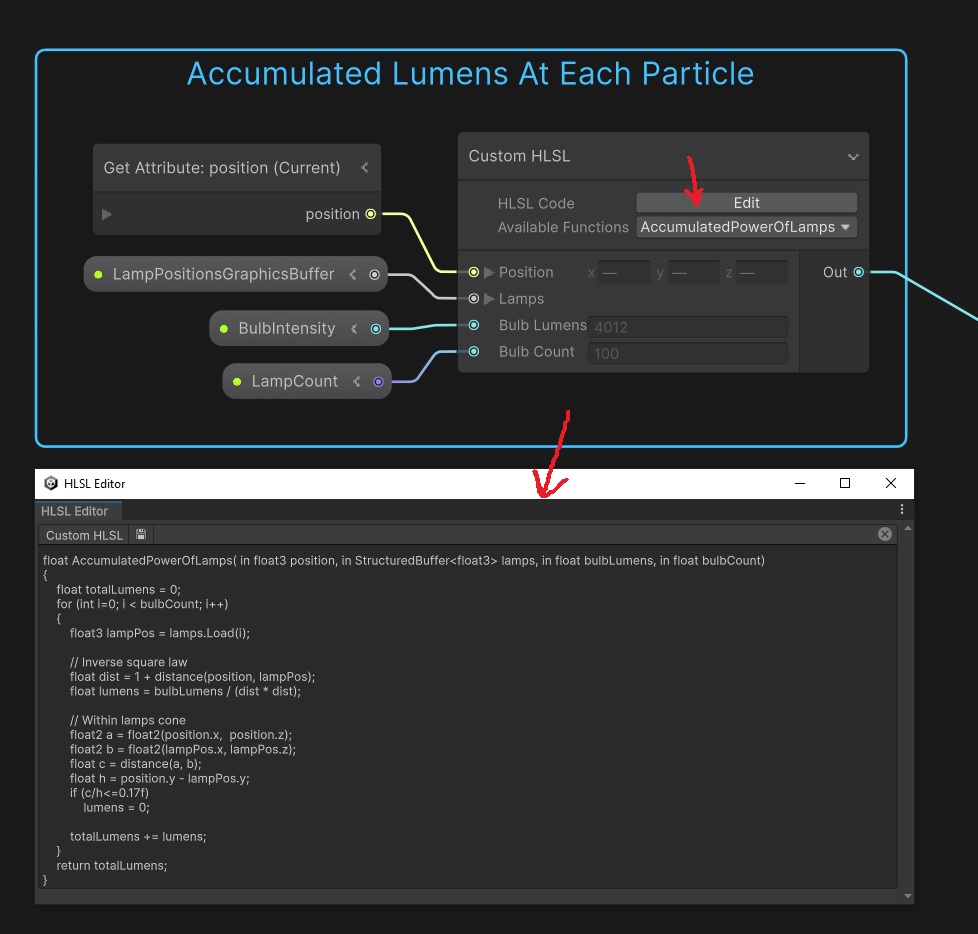
For others coming across this, the “Custom HLSL” (available in Unity 2023.2.3f1, VFX Graph 16.0.4) is a VFX graph node that essentially provides you with a window to put in your own code, including loops!
And GraphicsBuffer is a convenient way of passing arrays of any type in to your VFX graph.