When I go into the …Data folder, I don’t see any output.txt file in there.

Inside …Data folder:

So how can I see the logs from my standalone build?
When I go into the …Data folder, I don’t see any output.txt file in there.
Inside …Data folder:
So how can I see the logs from my standalone build?
It’s located at C:\Users\username\AppData\LocalLow\CompanyName\ProductName\Player.log
Hmm, I see this folder but when I run the Windows build nothing is written there. I was kind of expecting some unity logs - I have an issue where my shader is not working in the build so was expecting to find some complaint in the log file… but nothing. When I had this before debugging quest it was there.
Note that CompanyName and ProductName is the name you actually set in your project settings. The log should always be created when you run your game, not just when an error occures. Though you could have deactivated the logging in your build settings in which case the log is probably not created.
Thanks! Where would I have deactivated logging? I was looking through the build and project settings but couldn’t see anything?
I’m kind of expecting to see the kind of startup logs I see when connected to quest and debugging, streams of initialisation tasks and general info and occasionally an error. Just can’t figure out what’s wrong. Black screen so a bit odd. Is clearly shader related as I am able to swap out the shader and it run fine….
In your project settings:
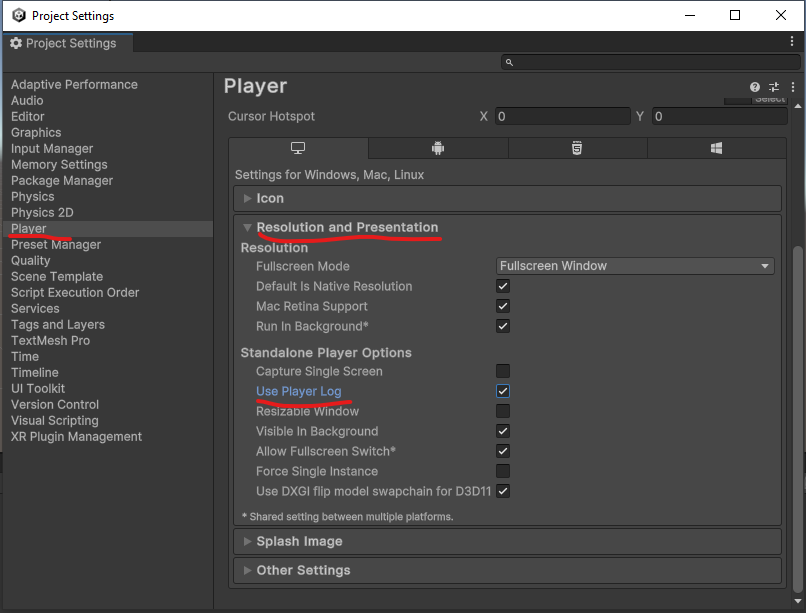
Many don’t understand what “Player” means here in the settings and even when it comes to “PlayerPrefs”. This has nothing to do with the person playing a game. The “player” is essentially the Unity engine itself that is playing your game / content. Like the VLC player plays videos or the flash player played flash content.
Note that at the end of the “Other Settings” foldout, you can also specify what kind of stack trace you want in your logs:

Thanks very much, I literally come back to say I suspect I found it, the bottom set to ScriptOnly… much apreciated, I completed missed these log settings earlier, can now confirm I have logs! Now, if I can just figure out WHY the shader is broken… 