Hello,
I’m working on an URP 2D Great Strategy game. I have a big map with envrionment sprites like trees, bushes, hills and mountains. Currently, I have nearly 4000 sprites set as GPU Instanced, static and without collider but they consumes really much of my frame.
That’s why I’m looking for displaying them only when I zoom. [the zoom is decreasing the orthographic size of the camera]. I want to use LOD Group component because Unity recognized the distance from the object even on the orthographic mode. This way I can display or not my sprites if I’m at the max dezoom or zoom.
But the LOD change is too brutal, it just culls the renderer and I want to make it fade (with dither, noise, or simply lerping the alpha). And it doesn’t seem to work with any of shader it tried: default Unlit/Lit, custom shader graph with custom crossfade node, custom shaderlab with explicit crossfade call.
Online resources are really not helpful, or too outdated. So, if anyone can help me understand what am I doing wrong? Thank you very much 
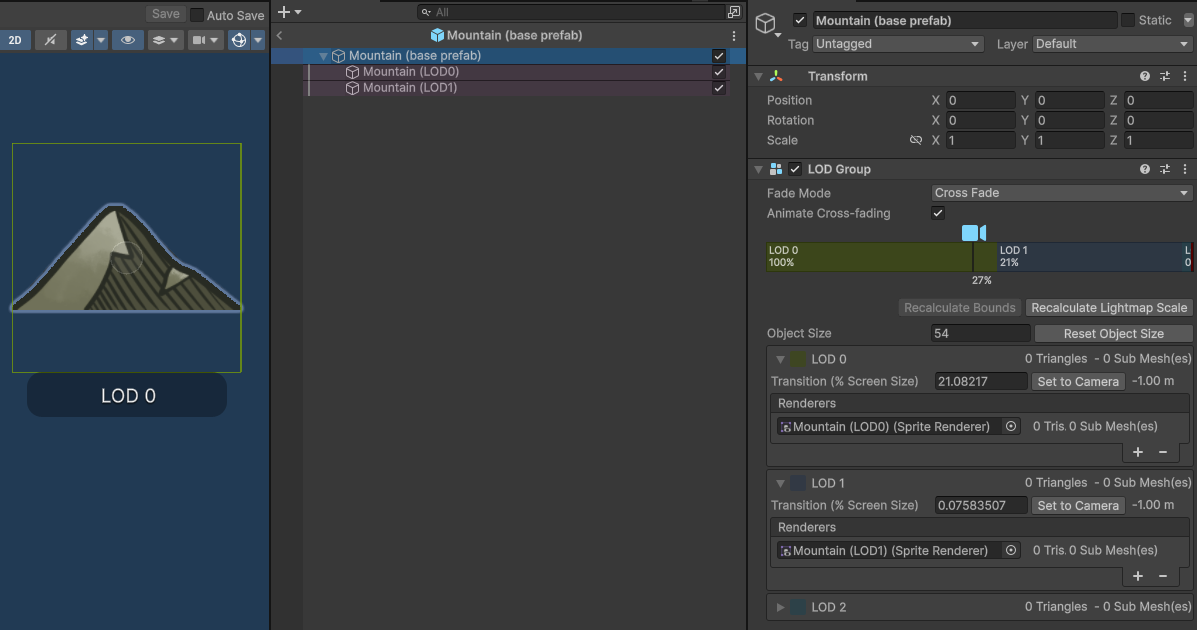
My LOD setup:
The Shader Graph I tried (following this thread: LOD CrossFade Shader in URP):

The Shader Lab I tried too:
Shader "Custom/SpriteMountainLOD"
{
    Properties
    {
        _MainTex ("Texture", 2D) = "white" {}
    }
    SubShader
    {
        Tags { "RenderType"="Transparent" }
        LOD 100

        Pass
        {
            CGPROGRAM
            #pragma vertex vert
            #pragma fragment frag
            // make fog work
            #pragma multi_compile_fog
            #pragma multi_compile_vertex LOD_FADE_PERCENTAGE LOD_FADE_CROSSFADE
            #pragma multi_compile_fragment __ LOD_FADE_CROSSFADE

            #include "UnityCG.cginc"

            struct appdata
            {
                float4 vertex : POSITION;
                float2 uv : TEXCOORD0;
                fixed4 color: COLOR;
            };

            struct v2f
            {
                float2 uv : TEXCOORD0;
                fixed4 color : COLOR0;
                UNITY_FOG_COORDS(1)
                float4 vertex : SV_POSITION;
                UNITY_VERTEX_INPUT_INSTANCE_ID
            };

            sampler2D _MainTex;
            float4 _MainTex_ST;

            v2f vert (appdata v)
            {
                v2f o;
                o.vertex = UnityObjectToClipPos(v.vertex);
                o.uv = TRANSFORM_TEX(v.uv, _MainTex);
                o.color = v.color;
                UNITY_TRANSFER_FOG(o,o.vertex);
                return o;
            }

            fixed4 frag (v2f i) : SV_Target
            {
                // sample the texture
                fixed4 col = tex2D(_MainTex, i.uv) * i.color;
                UNITY_APPLY_DITHER_CROSSFADE(i.vertex.xy);
                // apply fog
                UNITY_APPLY_FOG(i.fogCoord, col);
                return col;
            }
            ENDCG
        }
    }
}