I am very sad AKA why these keywords are not what I expect in a shader variant collection

I made a script to scan all the materials set as addressable and create a cube for each material and combination of keywords. All these shaders have the gpu instancing on, why isn’t the INSTANCING_ON showed since enable GPU instancing is on? This is a shader create with shader graph, which really hasn’t many options

however if I open the keywords linked to the shader

I see

96 keyword variants used in scene:

INSTANCING_ON _BATTLEROYALEMODE INSTANCING_ON _BATTLEROYALEMODE _CLUSTERED_RENDERING

but when I save the shader found in the scene in a shader collection, instancing on is not there :frowning: however I do have a ShadowCaster pass although I have remove shadow casting from all the options :((

I had to give up on my OP and I am now trying to build a shader variant collection via code, but even this proves to be very stressful

I want to add the shader variances I find in a scene using this code

foreach (Renderer renderer in renderers)
{
    Material[] materials = renderer.sharedMaterials;

    foreach (Material material in materials)
    {
        // Ensure the material has a shader
        if (material.shader != null)
        {
            // Get the shader and its keywords
            Shader shader = material.shader;
            string[] keywords = material.shaderKeywords.Intersect(shader.keywordSpace.keywordNames).ToArray();
            
            Debug.Log($"Shader: {shader.name} Keywords: {string.Join(", ", keywords)}");
            
            // Create a new ShaderVariantCollection.ShaderVariant
            ShaderVariantCollection.ShaderVariant variant = new ShaderVariantCollection.ShaderVariant(shader, PassType.ScriptableRenderPipeline, keywords);

            // Add the variant to the HashSet
            shaderVariants.Add(variant);
        }
    }
}

however I get this error

ArgumentException: passed shader keyword variant not found in shader WEO/EnvironmentVariants pass type 13
UnityEngine.ShaderVariantCollection+ShaderVariant…ctor (UnityEngine.Shader shader,

The documentation on the matter is practically not existent, I am not sure what the passtype even is and what value I should use and why should ever be different from ScriptableRenderPipeline

note that I am intersecting the material keywords with the shader material, so if materials has keywords not using in the shader, these should be removed.

so these are also my source of high frustration:

why isn’t INSTANCING_ON part of the material keywords when the option is on? And again (from the first post) why the shader variant collection automatically generated by the editor doesn’t have it, but it has it in the shadow caster pass!?!

@aleksandrk for help :confused:

Still didn’t get it yet, but I started to wonder if INSTANCING_ON is just something that is set at run time, since it depends if SRP batcher is on or not. But still, since it’s on in our project, why do I get variants that want INSTANCING_ON ?!

Eventually I fixed it being sure that a variance with INSTANCING_ON is always present.

However is still so freaking confusing that the client wants on with instancing_on if SRP batcher is available.

I wish someone would shed a light

Because it’s not a material keyword. It’s set internally by the engine.

This should only contain a list of keywords valid for the shader, IIRC.

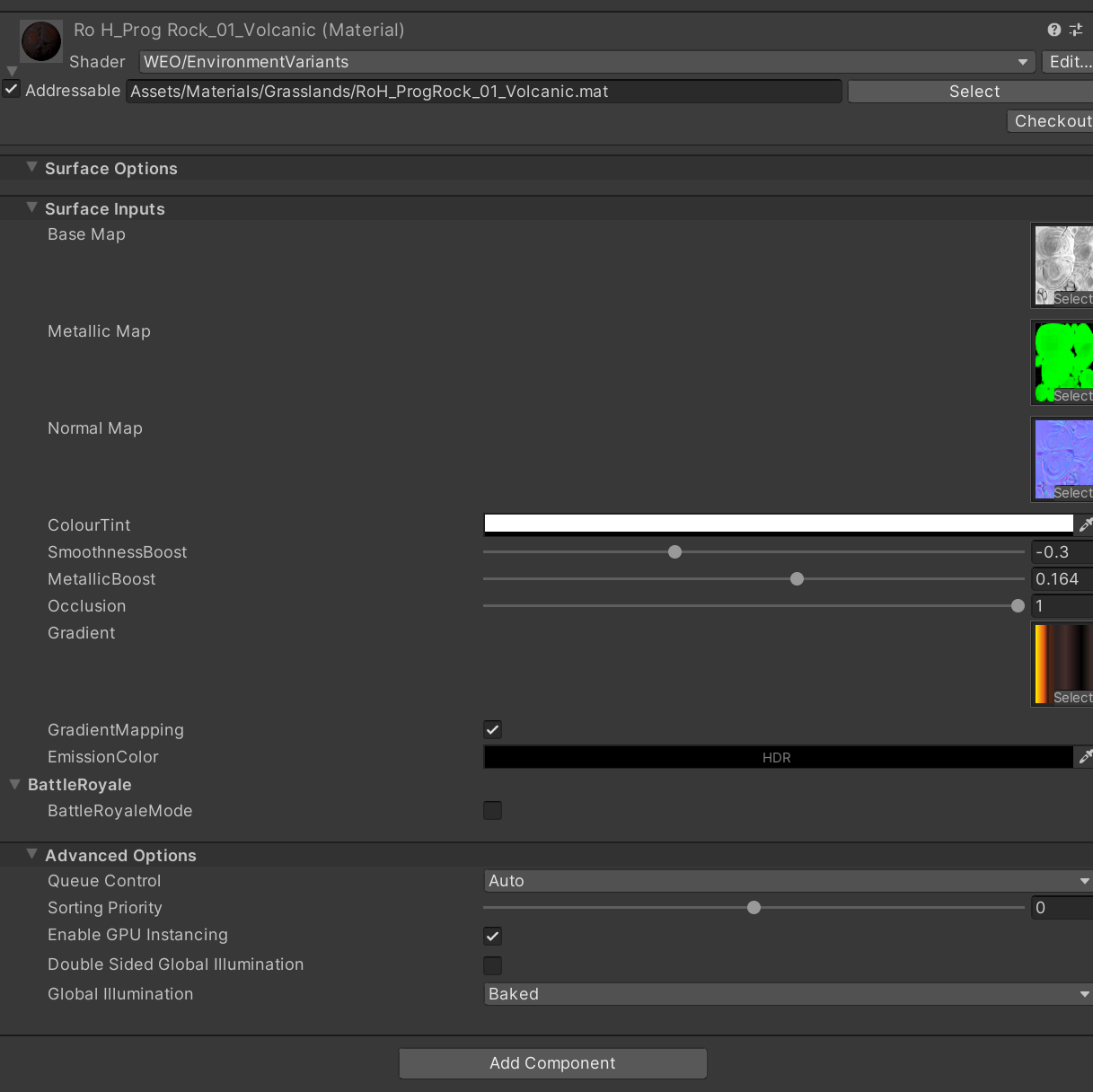
but GPU Instancing is a check in the material:
9468107--1330493--upload_2023-11-13_14-12-22.png

unfortunately without intersection it won’t work, I found it weird as well.

I also find very weird that the only way to have GPU Instancing with SRP Batching is on, is to force breaking SRP compatibility.
However must of all I find EXTREMELY weird, that unity is requesting INSTANCING_ON keyword when instead the shader is SRP compatible! Why is it doing so if GPU instancing is not used? Maybe it needs the same code anway?

I would like to add that pre warming shaders is not caching the shader compilation like I was told on my samsung s10 device (opengl)

the more I study this stuff the more questions I have unfortunately.

Looking at the code it’s treated more as “does material disable instancing” :slight_smile:

As far as I remember the performance of both rendering modes doesn’t differ in a meaningful way. That’s why SRP batcher is rendering without using instancing.

Which GPU is in your device?

My point was: why is the SRP Batching pipeline requiring a shader variance with INSTANCING_ON?
For example, this is one of the shader compiled with SRP BATCHING ON:

WEO/EnvironmentVariants, pass: Universal Forward, stage: all, keywords INSTANCING_ON _ADDITIONAL_LIGHTS_VERTEX _MAIN_LIGHT_SHADOWS

I am trying to collect the right variances here, so details like this are fundamental to understand.

I don’t think SRP batcher requires (or sets) the INSTANCING_ON keyword.
Sounds like something is being rendered without the SRP batcher.

I verified on purpose, the materials are SRP Batcher compatible

9471232--1331188--upload_2023-11-14_17-18-44.png

9471232--1331194--upload_2023-11-14_17-20-54.png

9471232--1331191--upload_2023-11-14_17-19-6.png

I was about to open a new thread since I have to ask another question, but at this point I continue here. Back to my original code (updated):

using System.Collections.Generic;
using System.Linq;
using UnityEngine;
using UnityEngine.Rendering;

public class ShaderVariantCollector : MonoBehaviour
{
    public ShaderVariantCollection collection;

    public void CollectShaderVariants()
    {
        collection.Clear();
        // Get all renderers in the scene
        Renderer[] renderers = FindObjectsOfType<Renderer>();

        // Create a HashSet to store unique shader variants
        HashSet<ShaderVariantCollection.ShaderVariant> shaderVariants = new HashSet<ShaderVariantCollection.ShaderVariant>();

        // Iterate through all renderers and their materials
        foreach (Renderer renderer in renderers)
        {
            Material[] materials = renderer.materials;

            foreach (Material material in materials)
            {
                // Ensure the material has a shader
                if (material.shader != null)
                {
                    // Get the shader and its keywords
                    Shader shader = material.shader;
//                    GlobalKeyword[] global = Shader.enabledGlobalKeywords;
//                    var asd = global.ToArray();
//                    var enumerable = new List<string>(shader.keywordSpace.keywordNames);
//                    enumerable.AddRange(asd);
                    var  keywords = material.shaderKeywords.Intersect(shader.keywordSpace.keywordNames).ToList();
             
                    try
                    {
                        // Create a new ShaderVariantCollection.ShaderVariant
                        ShaderVariantCollection.ShaderVariant variant = new ShaderVariantCollection.ShaderVariant(
                            shader, PassType.ScriptableRenderPipeline, keywords.ToArray());
                 
                        shaderVariants.Add(variant);
                 
                        Debug.Log($"Shader: {shader.name} Keywords: {string.Join(", ", keywords)}");
                 
                        if (material.enableInstancing && variant.keywords.Contains("INSTANCING_ON") == false)
                        {
                            keywords.Add("INSTANCING_ON");

                            variant = new ShaderVariantCollection.ShaderVariant(shader, PassType.ScriptableRenderPipeline, keywords.ToArray());

                            shaderVariants.Add(variant);

                            Debug.Log($"Shader: {shader.name} Keywords: {string.Join(", ", keywords)}");
                        }
                 
                        if (material.GetShaderPassEnabled("ShadowCaster"))
                        {
                            variant = new ShaderVariantCollection.ShaderVariant(shader, PassType.ShadowCaster, keywords.ToArray());

                            shaderVariants.Add(variant);
                        }
                    }
                    catch
                    {
                        Debug.LogError($"Skipping Shader: {shader.name} Keywords: {string.Join(", ", keywords)}");
                    }
                }
            }
        }

        // Create a ShaderVariantCollection and add the variants
        foreach (var shaderVariant in shaderVariants)
            collection.Add(shaderVariant);

    }
}

The code is easy to read, as you can see what I am trying to achieve is to populate a shader variant collection with all the shaders variants I can collect from the shaders of the materials of the renderers in the current scene.

OK I thought it was going well until (some points are repeated some point are new)

  1. no clue what keywords I actually have to use. My deduction was to use the intersection between the material and the shaders keyword. Seems to work, but am I missing some keywords? e.g. as you can see I have to enable INSTANCING_ON manually because the keyword is nowhere to be found otherwise

  2. PassType parameter is NOT the pass type! It is actually the LightMode!! which is annoying because how can the shader variant be based only on the light mode and not also on the pass type? This stuff is very confusing. Even considering it’s just LightMode, some are missing, like Depth and DepthNormal. How am I supposed to create variances for these passes?

If I build a shader variant collection using the graphics panel, I get these variances:

Normal (what is Normal? How do I know if a Shader has a Normal pass?)
ScriptableRenderingPipeline (but some shaders do not have it, have only Normal!)
ShadowCaster (I assume I will add this manually if shadow is on?)

I actually don’t see other PassTypes. Examples

9471280--1331206--upload_2023-11-14_17-41-2.png

To be clear, I cannot even used the editor generated shader variant collection, because the player wants the INSTANCING_ON keyword that is NOT captured by the editor for some reason.

If I filter using the SVC generated from the editor, I get this:

2023/11/14 18:02:19.910 32130 32230 Error Unity Shader WEO/FoliageVariants, subshader 0, pass 0, stage all: variant INSTANCING_ON _ADDITIONAL_LIGHTS_VERTEX _MAIN_LIGHT_SHADOWS not found.

and in fact in the SVC you will see:

with no INSTANCING_ON for the ScriptableRenderingPipeline variances generated by

We’re working on improving it (or will soon be working on it).
The variant collection stuff hasn’t been touched much, unfortunately. Those pass types made sense when it was introduced, and only for BiRP. You can check the pass types here: Unity - Scripting API: PassType

My problem is that I am not understating how to map a shader pass to a shader variance, hence I am not able to create a proper shader variant collection.

My new experiment is to see if, through the ShaderUtil class, I can extract the info I need and serialize the information in my own file.

all right, I am getting somewhere, I am going to share my current code, still far from being complete, but it shows potential.

Shader Variant Collection phase:

#if UNITY_EDITOR
using System;
using System.Collections.Generic;
using System.Linq;
using System.Security.Cryptography;
using System.Text;
using UnityEditor;
using UnityEngine;
using UnityEngine.Rendering;
using UnityEngine.Rendering.Universal;

public class ShaderVariantCollector : MonoBehaviour
{
    public static string CalculateMD5Hash(string[] inputStrings)
    {
        using (MD5 md5 = MD5.Create())
        {
            // Sort the strings
            Array.Sort(inputStrings);

            // Concatenate all strings into one
            string concatenatedString = string.Join("", inputStrings);

            // Convert the concatenated string to bytes
            byte[] inputBytes = Encoding.UTF8.GetBytes(concatenatedString);

            // Calculate the MD5 hash
            byte[] hashBytes = md5.ComputeHash(inputBytes);

            // Convert the byte array to a hexadecimal string
            StringBuilder sb = new StringBuilder();
            for (int i = 0; i < hashBytes.Length; i++)
            {
                sb.Append(hashBytes[i].ToString("x2"));
            }

            return sb.ToString();
        }
    }

    public void CollectShaderVariants()
    {
        var doesMainLightSupportShadow = DoesMainLightSupportShadow();
      
        var shadersObj = new ShaderFilteringData();
        var shaders = shadersObj.shaders;
        shaders.Clear();
        // Get all renderers in the scene
        Renderer[] renderers = FindObjectsOfType<Renderer>();

        // Iterate through all renderers and their materials
        foreach (Renderer renderer in renderers)
        {
            Material[] materials = renderer.materials;

            foreach (Material material in materials)
            {
                // Ensure the material has a shader
                if (material.shader != null)
                {
                    // Get the shader and its keywords
                    Shader shader = material.shader;
                    if (shaders.TryGetValue(shader.name, out var stringsMap) == false)
                    {
                        stringsMap = new Dictionary<PassIdentifier, HashSet<string>>();
                        shaders.Add(shader.name, stringsMap);
                    }
                    GlobalKeyword[] global = Shader.enabledGlobalKeywords;
                    var materialAndGlobalKeywords = new List<string>(material.shaderKeywords);
                    foreach (var keyword in global)
                    {
                        materialAndGlobalKeywords.Add(keyword.name);
                    }

                    ShaderData shaderData = ShaderUtil.GetShaderData(shader);
  
                    for (int i = 0; i < shaderData.SubshaderCount; i++)
                    {
                        var subShader = shaderData.GetSubshader(i);

                        for (int j = 0; j < subShader.PassCount; j++)
                        {
                          
                            var pass = subShader.GetPass(j);
                          
                            try
                            {
                                var passIdentifier = new PassIdentifier((uint)i, (uint)j);
                              
                                LocalKeyword[] passKeywords = ShaderUtil.GetPassKeywords(shader, passIdentifier);
                                var localPassKeywords = new List<string>();
                                foreach (var keyword in passKeywords)
                                {
                                    localPassKeywords.Add(keyword.name);
                                }

                                var keywords = new List<string>(materialAndGlobalKeywords.Intersect(localPassKeywords));
                                ComputeAndAddHash(keywords.ToArray(), stringsMap, passIdentifier);
                              
                                //add extra keywords that are NOT found in the material, because they depend on other settings

                                if (doesMainLightSupportShadow)
                                    keywords.Add("_MAIN_LIGHT_SHADOWS"); //this is the URP Asset setting Main Light. It's always enabled, but it's not in the material
                              
                                if (material.enableInstancing)
                                    keywords.Add("INSTANCING_ON");

                                ComputeAndAddHash(keywords.ToArray(), stringsMap, passIdentifier);
                            }
                            catch (Exception e)
                            {
                                Debug.LogError($"Something wrong with pass {j} in subshader {i} of shader {shader.name} - {pass.Name}.\n{e.Message}");
                            }
                        }
                    }
                }
            }
        }
      
        BinarySerializer.SerializeToFile("Assets/shadersdata.bin", shadersObj);
      
        EditorApplication.ExitPlaymode();

        void ComputeAndAddHash(string[] inputStrings, Dictionary<PassIdentifier, HashSet<string>> stringsMap, in PassIdentifier passIdentifier)
        {
            var hash = CalculateMD5Hash(inputStrings);

            if (stringsMap.TryGetValue(passIdentifier, out var hashSet) == false)
            {
                hashSet = new HashSet<string>();
                stringsMap.Add(passIdentifier, hashSet);
            }

            hashSet.Add(hash);
        }
      
        bool DoesMainLightSupportShadow()
        {
            var urpAsset = QualitySettings.renderPipeline as UniversalRenderPipelineAsset;

            if (urpAsset != null)
            {
                // Check if the shadow feature is enabled in the asset
                bool isShadowsEnabled = urpAsset.supportsMainLightShadows;

                // You can add more conditions or check other properties based on your requirements

                return isShadowsEnabled;
            }

            return false;
        }
    }
}
#endif

Shader Building (and filtering) phase:

using System;
using System.Collections.Generic;
using System.IO;
using UnityEditor;
using UnityEditor.Build;
using UnityEditor.Rendering;
using UnityEngine;
using UnityEngine.Rendering;

class ShaderBuildProcessor: IPreprocessShaders
{
    readonly ShaderFilteringData shaderFilteringData;

    public ShaderBuildProcessor()
    {
        shaderFilteringData = BinarySerializer.DeserializeFromFile("Assets/shadersdata.bin");
    }

    public int callbackOrder => 0;

    public void OnProcessShader(Shader shader, ShaderSnippetData snippet, IList<ShaderCompilerData> data)
    {
        if (EditorUserBuildSettings.activeBuildTarget != BuildTarget.Android &&
            EditorUserBuildSettings.activeBuildTarget != BuildTarget.iOS)
        {
            return;
        }

        int skipped = 0;
        var dataCount = data.Count - 1;
        var shaders = shaderFilteringData.shaders;
        for (int i = dataCount; i >= 0; --i)
        {
            var shaderKeywords = data[i].shaderKeywordSet.GetShaderKeywords();
            var shaderKeywordSet = new List<string>();
            foreach (var keyword in shaderKeywords)
            {
                shaderKeywordSet.Add(keyword.GetKeywordName());
            }
            if (shaders.TryGetValue(shader.name, out var passMap) == false)
            {
                skipped++;
                data[i] = data[data.Count - 1];
                data.RemoveAt(data.Count - 1);
              
                Debug.Log($"Skipped {shader.name} {snippet.passType} with keywords: {string.Join(", ", shaderKeywordSet)}");
                continue;
            }

            if (passMap.TryGetValue(snippet.pass, out var keywordsPass) == false)
            {
                skipped++;
                data[i] = data[data.Count - 1];
                data.RemoveAt(data.Count - 1);
                Debug.Log($"Skipped {shader.name} {snippet.passType} with keywords: {string.Join(", ", shaderKeywordSet)}");
                continue;
            }

            ShaderKeyword[] keywordSet = shaderKeywords;

            var keywords = new List<string>();
            foreach (var keyword in keywordSet)
            {
                keywords.Add(keyword.GetKeywordName());
            }

            var hash = ShaderVariantCollector.CalculateMD5Hash(keywords.ToArray());

            if (keywordsPass.Contains(hash) == false)
            {
                skipped++;
                data[i] = data[data.Count - 1];
                data.RemoveAt(data.Count - 1);
                Debug.Log($"Skipped {shader.name} ({snippet.passType} with keywords: {string.Join(", ", shaderKeywordSet)})");
                continue;
            }

            Debug.Log($"Added {shader.name} ({snippet.passType}) variant with keywords: {string.Join(", ", keywords)}");
        }

        Debug.Log($"Skipped {skipped} variants of {shader.name} ({snippet.passType})");
    }
}

Notes in the next post.

From the shader variants collection phase, you can see that I have completely dropped the support for ShaderVariantCollection objects, this is because I couldn’t understand the relationship between shaders, their passes and the ShaderVariant pass type.

I decided that I didn’t need a SVC object at this point, so I am simply serializing in local file (thanks chatgpt).
As usual I am scanning all the shaders of all the materials of all the renderers in a premade scene, where I should have all the materials used in the game.

For each shader I now scan both subshaders and their passes to be thorough. I am using ShaderUtil for this.
I am still intersecting, but now for each pass, the keywords of the material with the keywords of the shader.

This actually made me wonder why the shader object has a list of keywords if THEN different keywords are found per pass! So much stuff that doesn’t make any sense. Makes my heart bleed.

Anyway, materials keywords are not enough. I am adding the currently enabled global keywords too and other I have to add manually from the current settings.

Now I am impressed that the idea of the hash is working, which makes me think I am on the right path.
In fact the android version is working fine with “strict shader variants matching” ON.

Now remember that I am doing this for two reasons:

  1. the game was actually crashing with strict shader variants matching off. I am sure it’s because it was picking up a shader not compatible with the platform

  2. without this filtering, I get 100MB+ more of compiled shaders, which I am also sure (although I didn’t prove it) that they are loaded in memory.

with shader filtering the game is faster too, which I am not really sure why.

A list of keywords on the shader object is literally a union of keywords in all passes.

I don’t think it’s the case. Variants that are not compatible with the HW are normally not loaded. If the GPU driver says it’s not compatible, we use the magenta error shader and print some info in the logs.
It would be great if you could submit a bug report that reproduces this crash.

It depends on your settings. Dynamic variant loading limits the amount of memory shaders use.

WDYM exactly?

I am not sure why yet, but with 100MB less of shaders bundled in the addressables, the game performs noticeably better GPU wise.