"Invalid texture used for cursor - check importer settings" warning spam since Unity 5.4 update

Hi everybody,

since the Unity 5.4 update my console is being spammed with an endless stream of the warning “Invalid texture used for cursor - check importer settings”.

Yes, I’ve got a custom cursor, and it’s changing every now and then using the UnityEngine.Cursor.SetCursor() method. It still works great, if it wasn’t for the warnings spamming my console.

The importer settings of the Cursor-images are the same I use for many other sprites that render well and do not throw warnings:

TextureType: Sprite (2D & UI)
SpriteMode: Single
PackingTag:
Pixels per Unit: 100
Pivot: Center
Generate Mip Maps: no
FilterMode: Bilinear

Currently no platform-dependent overrides.

Also, the images are 64x64px, so they are square and divisible by 2 as well as by 4. Not that it would/should be required, but still…

Does anybody have an idea as to why these warnings happen? Is it a bug or what could be wrong with my cursor textures?

1 Like

Obviously this is a very late reply, but these are the import settings that are checked to generate this error:

  • Format is ARGB32
  • The texture is readable
  • alphaIsTransparency is true
  • The texture is not mipmapped

If you’re generating textures at runtime, you would have to set “alphaIsTransparency” to true after constructing the texture, but because of this bug, you’ll need to wrap that in an #if UNITY_EDITOR block. This is fine because the warning does not appear in the standalone.

8 Likes

Just set Texture Type to CURSOR

59 Likes

Got it:
after you set it as Cursor, you have to check “Read/Write Enabled” in Advanced.

23 Likes

You, sir, was very helpful! How am I supposed to know that after setting a cursor texture type to “Cursor” it wouldn’t work as a cursor unless I changed a parameter in advanced without you?

Indeed I was wondering too until I’ve discover it :smile:

Hi,
Where I find this option?

Regards

I would also like to know where to find Advanced? so that I can checkmark ‘Read/Write Enabled’. please and thanks

I just stumbled upon this very same problem so I thought to give you a screenshot:

1 Like

How I can open this page, where?

Select the texture in the assets.

Thank you so much

No problem :slight_smile:

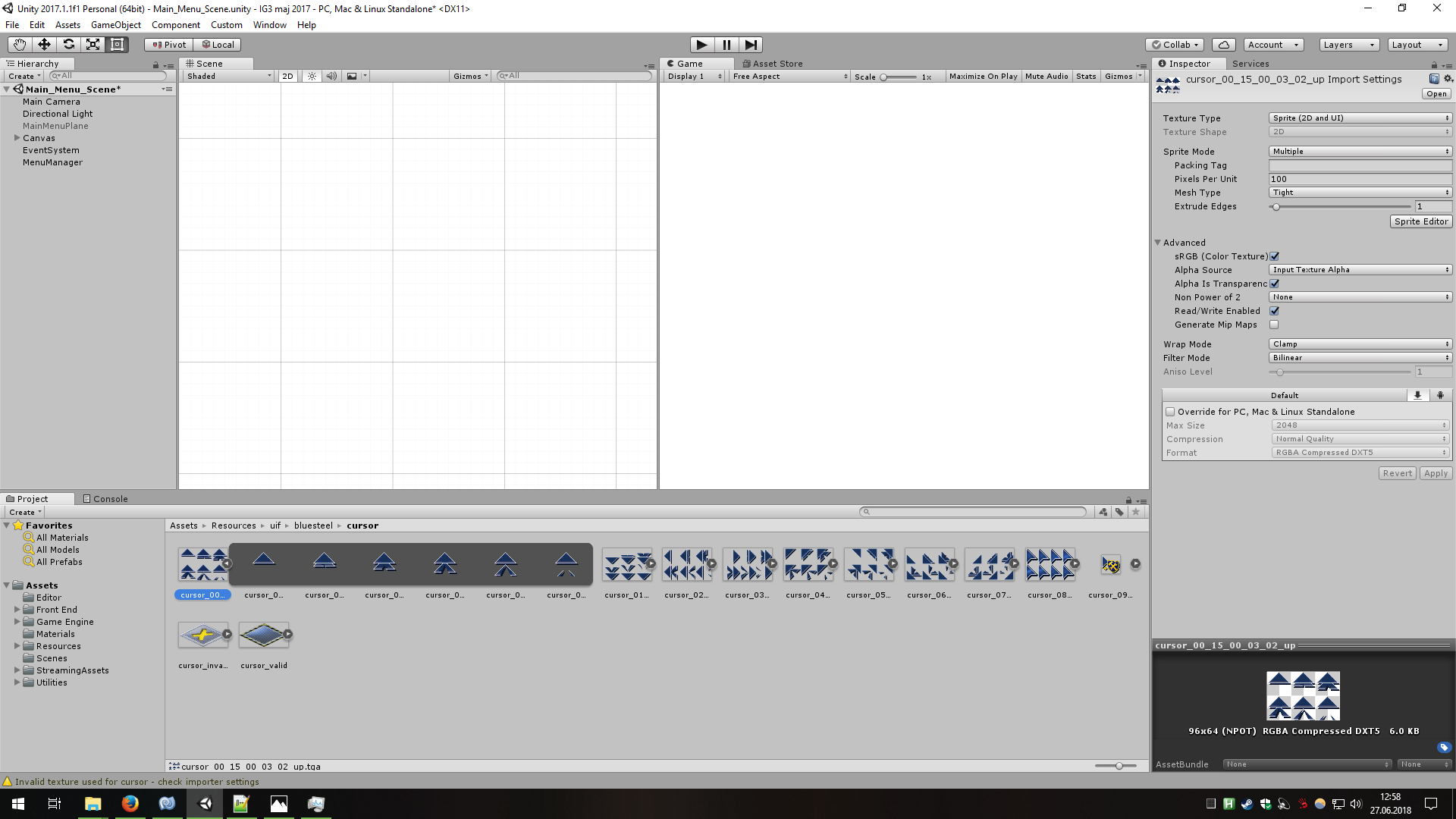
I know this is very old topic but since it’s the most relevant one found and my problem has exactly same basis, I decide to write here anyway.

  1. I get “Invalid texture used for cursor - check importer settings” warning (same as author)
  2. Cursor is animated by looping through sprites…
  3. … and these sprites all originate from same texture (see included image)
  4. Problem is that setting Texture Type to CURSOR forbids from using sprite editor to slice texture.

So what do I do? Any alternative to slicing all cursor images into even more cursor images?

1 Like

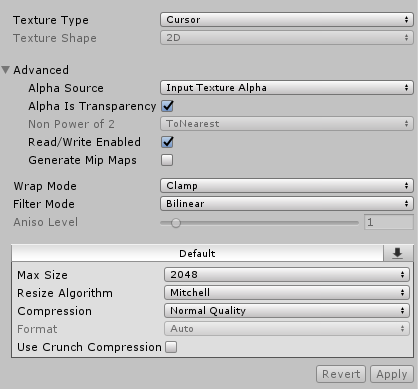
Hey Pan (and anyone in the future reading this), I found these settings fixed the issue, you might want to start with them and see if you can’t use a cursor texture, then at least you’re heading in the right direction to get the issue fixed:

3556996--286390--upload_2018-7-8_23-1-12.png

Make sure the settings are exactly as you see them here, it should resolve the error!

3 Likes

I guess the option is to create a texture programatically from the sprite’s rect texture and set it as cursor. Somebody who has done it?

I just had to reimport cursor.

1 Like

Late reply, but I just did:

    static private Texture2D MakeTexture2DFromSprite( Sprite sprite )
   {
       Texture2D texture2D = new Texture2D( (int) sprite.rect.width, (int) sprite.rect.height, TextureFormat.RGBA32, false );

#if UNITY_EDITOR
       texture2D.alphaIsTransparency = true;
#endif
       var pixels = sprite.texture.GetPixels( (int) sprite.textureRect.x,(int) sprite.textureRect.y, (int) sprite.textureRect.width, (int) sprite.textureRect.height );
       texture2D.SetPixels( pixels );
       texture2D.Apply();

       return texture2D;
   }

   static private Vector2 GetHotspotFromSprite( Sprite sprite  )
   {
       return sprite.pivot;
   }

Generate these once from all my sprites at start time, and set them dynamically using:

Cursor.SetCursor( texture, hotspot, UnityEngine.CursorMode.Auto );
1 Like

that did it for me, tanks

Damn ur helpful

Right away, I wanted to use one of the ink resource images, and you made it 100% easier

thanks again!