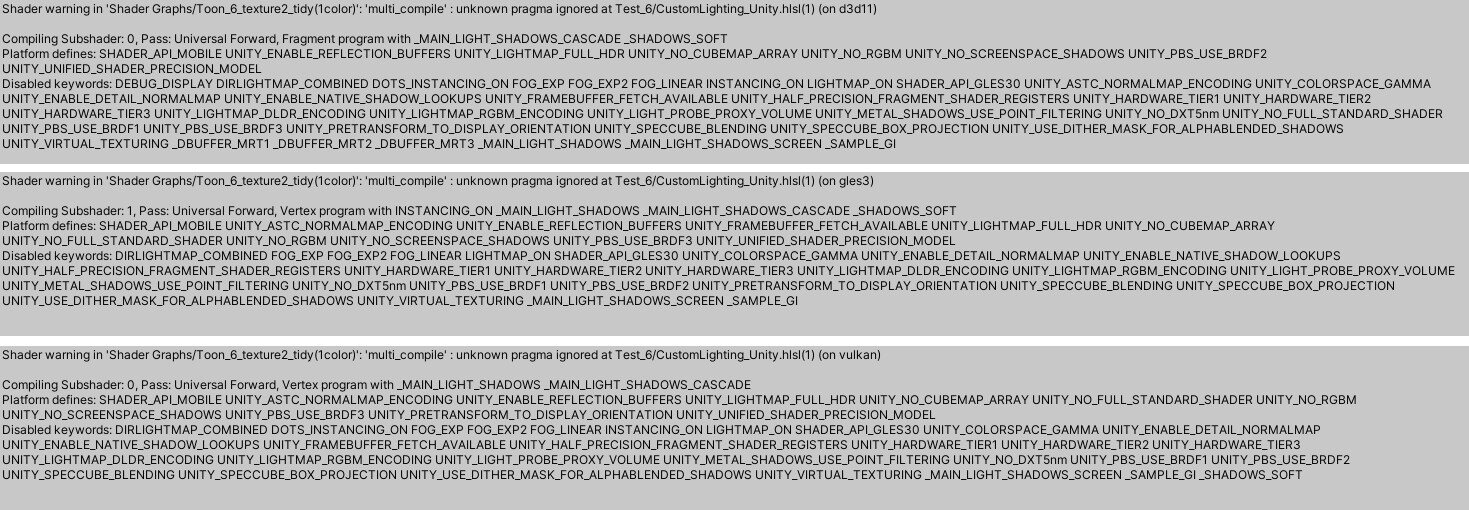
Hi!
Pragma directives specific to ShaderLab (including the multi_compile) do not work when placed in include files that are included using the regular #include directive. You need to include them using #include_with_pragmas all the way to the top.
No, the file you’ve created needs to be included by ShaderGraph using this directive. I’m not sure whether it’s possible to configure SG to do this or not. If not, you could add these keywords in the graph itself instead of adding the directive in the custom node.
Hi, I made a keyword in shadergraph at first, but there was only shadows and shadows cascade.…
After your reply, I added the shadows screen keyword, and there is also shadows on my mobile…
Stupid but I wouldn’t have thought of doing this without your response. Thank you so much!
Hey i am bumping this thread because i am having issues.
Is that connected to this change?
This messed up all my custom shaders inside URP.
My custom hlsl function had a buch of those keywords
#pragma multi_compile & #pragma shader_feature
And after this patch, those has been completely ignored.
Adding them one by one manually inside the shader graph is not really an option for me (And we are physically limited by how many keywords we can add in the shader graph).
If Unity could add in the Shader Graph Custom Function (When we add a HLSL file)
Just add a checkbox with #include_with_pragmas as an option.
If we check it, it add our HLSL file with #pragma.
Sounds like a pretty easy fix to do, and when more and more people move to URP to add custom shaders or HLSL code you will get this request a lot.
I tested to add manually #include_with_pragmas to my HLSL file in the compiled shader and it worked like a charm.
The ShaderGraph where i need this implemented was designed on previous Unity version where this was allowed. My concern is that i cannot really move the keywords to be declared in ShaderGraph itself.
This is because ShaderGraph normally would manually implement a define for each Keyword permutation, and this is our base “UberShader” that has soo many features included that the way ShaderGraph works it just explodes trying to write a .shader file with some many permutations (not even mentioning that it surpasses any variant limit, so we just manually define our allowed permutations for a particular project using a shader stripping processor, so when doing stripping it just works without the need of ShaderGraph to hard-code them).
We manually defined them in HLSL include files for this very reason, so ShaderGraph wouldnt need to worry about them.
Ok so in case anyone is as impatient as me and needs this right now xD
Override the ShaderGraph package (move it from “Library/PackageCache” to the “Packages” folder on your project) and override the following:
CustomFunctionNode.cs
    class CustomFunctionNode : AbstractMaterialNode, IGeneratesBodyCode, IGeneratesFunction, IMayRequireTransform
    {
        // ...
        // add this serializable field for the pragma include
        [SerializeField]
        private bool m_IncludeWithPragmas = false;

        public bool includeWithPragmas
        {
            get => m_IncludeWithPragmas;
            set => m_IncludeWithPragmas = value;
        }

        // on this method, add the following
        public void GenerateNodeFunction(FunctionRegistry registry, GenerationMode generationMode)
        {
              // ...
              // find this line
              // registry.RequiresIncludePath(path);

              // and change it to this
              registry.RequiresIncludePath(path, m_IncludeWithPragmas);

              // ...
        }
HlslFunctionView.cs
    internal class HlslFunctionView : VisualElement
    {
         // on this method, add the following
        private void Draw(CustomFunctionNode node)
        {
            // ...
            // at the end of the method:
            var includeWithPragmasToggle = new Toggle()
            {
                value = node.includeWithPragmas
            };
            includeWithPragmasToggle.RegisterValueChangedCallback(
                change =>
                {
                    if (node.includeWithPragmas == change.newValue)
                        return;
                    node.owner.owner.RegisterCompleteObjectUndo("Change Include With Pragmas");
                    node.includeWithPragmas = change.newValue;
                    node.ValidateNode();
                    node.Dirty(ModificationScope.Graph);
                }
            );
            var includePragmaRow = new VisualElement() { name = "Row" };
            includePragmaRow.Add(new Label("With Pragmas"));
            includePragmaRow.Add(includeWithPragmasToggle);
            Add(includePragmaRow);
        }
And at least now its implemented xD. I hope eventually something similar is added to ShaderGraph!
I would also like to hear updates on this. The old behavior was much better IMO. @Canijos solution should be super easy for unity to integrate officially, so we dont have to modify the package every update.
Hi! We have a fix in progress that will add a similar option for choosing whether the Custom Function node uses #include or #include_with_pragmas. It’s still making its way through, but should become available in an upcoming patch release.
@dhsav Hey i really appreciate that your team is receiving our feedback on this.
I am also glad that i am not alone on this case and other devs are having the same issue. @Canijo Hey thanks a bunch mate for providing a quick hack to get the job done.
@Canijo
For some reason, when i try to move the package from “Library/PackageCache” to “Library” Unity is showing me and give me hundreds of errors.
I have done that operation in the Finder.
Is there anything else i should do?
@dhsav
Any idea when this will be out?
My company moved to Unity6 and it broke 80% of our shaders…
@jujunosuke
Why Library? Did he not say to move to the Package folder? I copied the whole folder from the PackageCache? Like this:
It worked. Unity 6 has some errors when you create a material from the shader graph the error keeps printing when you save the shader graph (Only if you assign the material to Sprite Renderer I think?). I just stick to 2022 until they fix it. ( Unity6 2D Sprite Renderer in 3d lights BUG! - Unity Engine - Unity Discussions)
I’ve checked and it looks like the #include_with_pragmas fix is available now in Unity 6000.0.26f1. Similar to the above, you’ll find a “Use Pragmas” option in the Custom Function Node’s inspector when using a file as the source.
Thanks for your patience, and do let us know if you run into further issues.
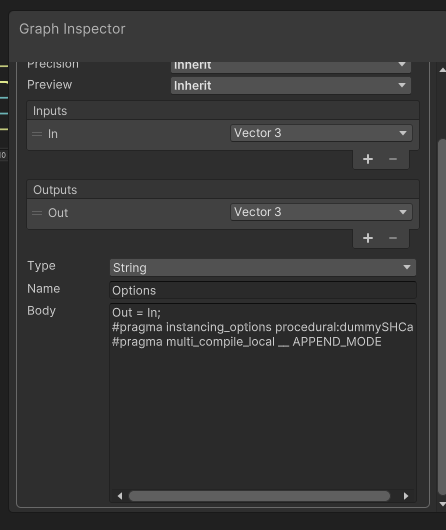
Just in case you still need this, know that you can technically basically inject anything into shader graph via the Custom Function node, in string mode.
Basically, you can have a system like this
In this case, you should remove the pragmas from the included file and add them manually here.
Or add the Include_with_pragmas and call the method from any other node after that.
Shader graph will compile it to something like this
 void Options_float(float3 In, out float3 Out){

        Out = In;

        #pragma instancing_options procedural:dummySHCall
        #pragma multi_compile_local __ APPEND_MODE

        }
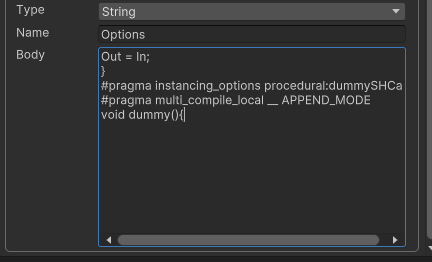
And if you don’t like the pragmas inside a method (still works tho), you can make it prettier by adding some extra lines in the node.