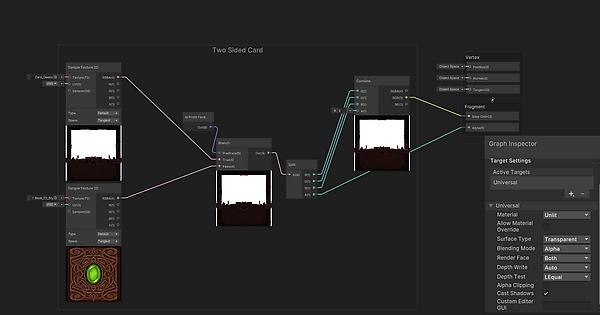
Very new to shader language / graph. But did the best I could. I have a basic shader to display two sides of a card. It renders both front and back, and is plugged in to alpha for transparency.
Currently have a card face and a card back, so it’s pretty basic.. here’s the shader down below.
But now I have come to the question. I followed a few different tutorials on how to create a simple outline effect by using shader graph, but the issue is that my card mesh is a Quad, and when I added this new material to the quad, the back face would be completely black whilst the front wouldnt render.. as it remained the same.
So I’m wondering how would I go about this?
It seems using a Quad is not as simple as I thought to use for the outlines to render as well.. kind of defeated after following a few youtube tutorials that seemed to only give me half of the results i wanted.
results i’m after: i’m using a mesh quad to render the card itself with a two sided card material. but i also want to have a material, which displays an outline effect around the card (quad).
what’s currently happening with the current outline shader material; its only rendering the back face to completely black, (hiding the two sided material whilst not correctly displaying as an aura around the card)
It’s not the the exact solution to your problem, but assuming you want to get your job done and make it as simple as possble, then just don’t use quad - create two quads looking at differents sides with very thin space between them or simply use very thin box. I see you want to use hull outline, then the (smoothed) box is even better as you need correct normals to make it work.
Hey, thanks for the reply. I did try your solution but turned out I played around with the shader and added a multiply node with a new float property and changed some settings.
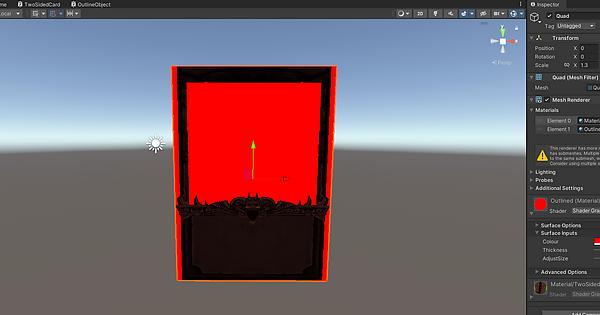
I ended changing the outline shader graph settings from ‘transparent’ to opaque, and then simply rendering it from the front face.
In the image below reason - why you can see the red in the middle is because my shader doesn’t have a ‘art’ texture set up and adjusted yet so that space is transparent with my two sided card shader.
Of course I’ll look into getting this improved, since it’s not really an outline is it? It’s just a opaque box that will slightly bleed over the edges of the card to give me the outline effect but realistically its still rendering the full box.
Kind of have to use this method for now since I’m still a bit unclear on how to use the shader graph… if there’s any other suggestions would love to hear them out.