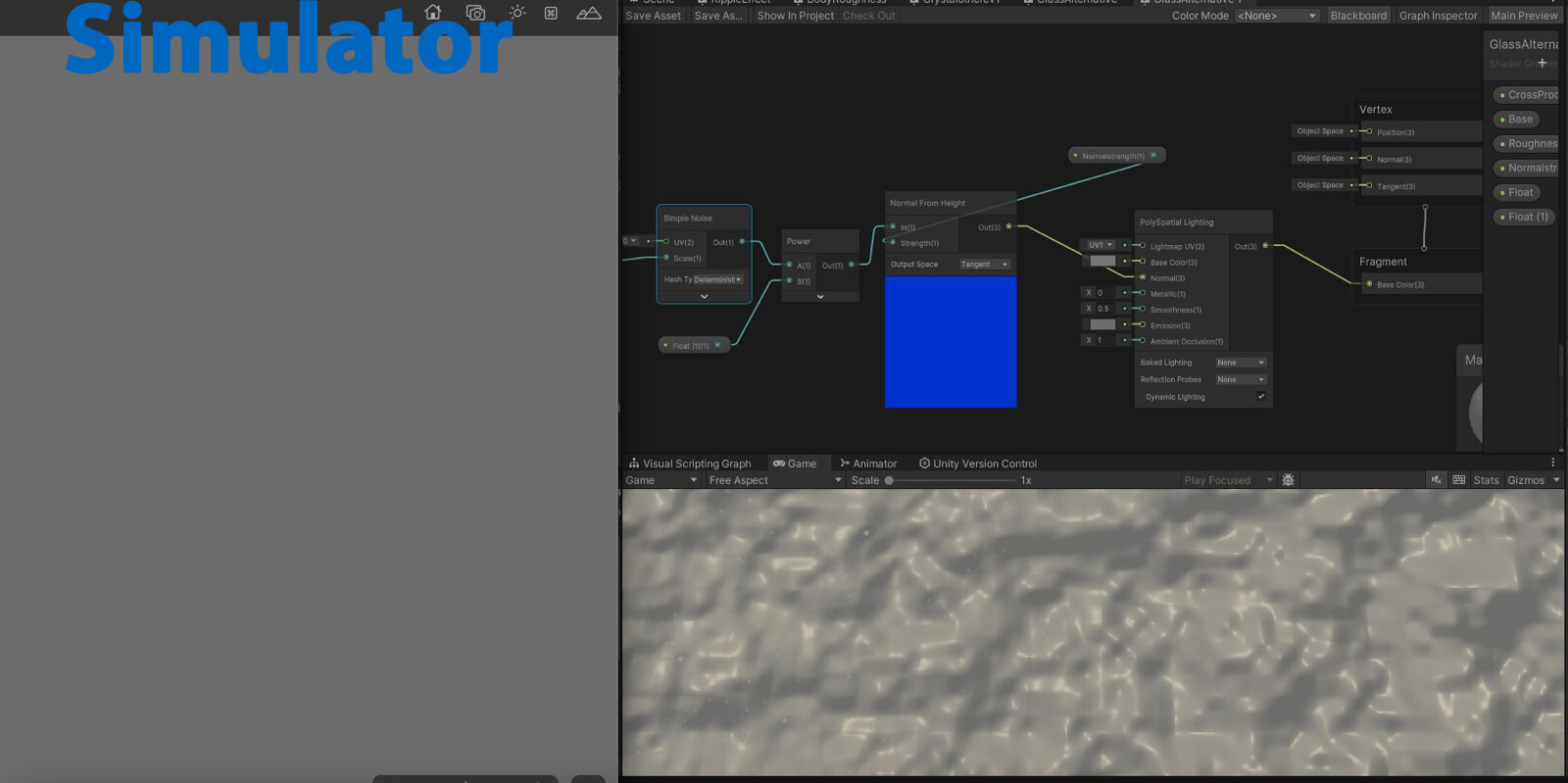
I have no problems when using a Normal map texture in the shader graph, but when I create a normal map using the Normal From Height Node, it doesn’t work in the simulator.
(Normal Texture)
(Normal From Height)
- Unity Editor 2022.3.20f1
- App mode: Mixed Reality
- Polyspatial 1.2.3
Thanks for the heads-up! I can replicate this. We use the standard MaterialX “heighttonormal” node, and it looks like visionOS doesn’t actually support that, so we will reimplement “Normal From Height” using the reference implementation (which will probably only be possible on visionOS 2.0, since it uses the fragment derivatives).
Is this still a work in progress as of PolySpatial 2.0.0-pre-11? I updated my project to 2.0.0-pre-11 and I’m currently not seeing the normal map that I’m expecting to see from the Normal from Height node in Shader Graph on AVP or Simulator. I even added a MaterialX boolean keyword object to my Shader Graph and I’m still not seeing it. Is there something that I may be missing?
The Normal From Height node should work in 2.0.0-pre.11/latest visionOS 2.0 beta (not on 1.X/visionOS 1.0, due to the lack of the fragment derivative nodes as mentioned above). You don’t need the MaterialX keyword; the only purpose of that is to have separate subgraphs for Unity rendering versus MaterialX export. If you provide more information about your shader and what you expect to see (or, better yet, submit a repro project and let us know the incident number: IN-#####), we can try to debug what might be going wrong.
I’m having the exact same problem as OP with Unity 6 in 2025 with out-of-the-box URP settings. What is the solution to this? Is Sample Texture 2D the only node that works when plugged into the Normal Tangent Space input on the Fragment Shader? Do I need to update my Shader Graph to an experimental version? That is not clear from the above conversation. I don’t know what App mode or Polyspatial mean.
PS I can’t even find examples on the internet of people using this method, but coming from Blender, it feels like procedurally generated normal maps should be an obvious and supported feature. I’m really not sure what I’m missing.
Well, first of all, are you targeting the Apple Vision Pro (visionOS)? PolySpatial is a mode used for visionOS builds that translates the Unity scene graph into RealityKit, Apple’s high-level rendering API. That includes translating Unity shader graphs into MaterialX, which is an entirely separate implementation from Unity’s normal shader graph support.
If you’re not targeting visionOS/RealityKit, then this could be a general shader graph issue.
Thanks for the clarification. No I’m targeting regular PC.
So if I can just clarify: This is still a bug in the latest version?
Is there a JIRA or anything tracking this issue so I might know when it’s available?
The procedural texture generation helps a lot with prototyping. I’m just starting shader graph and now I’m wondering if some of my issues were actually bugs instead of me not using the nodes properly. I’ve been messing with normals programmatically for a couple days now with ambiguous results. The OP’s use case just happen to exactly match one of mine.
It’s not a bug that I’m aware of, but I’m not on the shader graph team. The Normal From Height node has worked as expected for me when I did the work to implement it in MaterialX for visionOS. I would have been testing in macOS, but the HLSL code that it generates should apply to Windows as well. If it’s not working for you, I would definitely recommend submitting a bug report with a repro case.
Just for reference, here’s an example of a simple shader graph using Normal From Height:
And what it looks like in the editor (macOS, Unity 6000.0.22f):
Thanks for the response. However, the above example you shared does not represent the issue I’m describing. Sample Texture 2D always works in any sequence of nodes I use for normals.
The problem arises when I use a noise node to generate a pattern. Refer to the OP and you can see that s/he is using a Simple Noise generator node and then applying it to a Normal From Height node. This should in theory plug directly into the normal input of the fragment shader, but somehow nothing is happening.
I would wager the issue is something in the Noise From Height node. I don’t know what it could be yet but will keep looking into it and follow your advice and send a report. I can easily make a demonstration project. I wanted to check here first though because I still won’t rule out that there’s some setup I’m missing.
As I mentioned previously, I’m a little surprised I can’t find an example on the internet. It seems every tutorial discussing normal nodes in Shader Graph are using Texture samples and not noise generators with Normal From Height. I just need one functional example 
Ah, I see; I missed that the first example in the thread wasn’t using Normal from Height. However, using a procedural node (such as Simple Noise) works just as well for me:
Thanks for confirming. And the above is a standard URP project right? I’ll try again tomorrow with a new project and confirm. If that doesn’t work I’ll try sharing the project and see if anyone can identify the cause.
I’ve verified the problem is in the project project file I’m using for prototyping, though I don’t know the root cause yet.
I recently updated from 6000.0.30f1 to 6000.0.41f1 in the prototyping project. And that project had been updated to URP from non-URP once already.
However, when I created a new project straight from 6000.0.41f1, I verified that the normal from heightmap works with a procedural noise exactly as above. I’ll have to submit the problem project to support to find out what the real issue is.