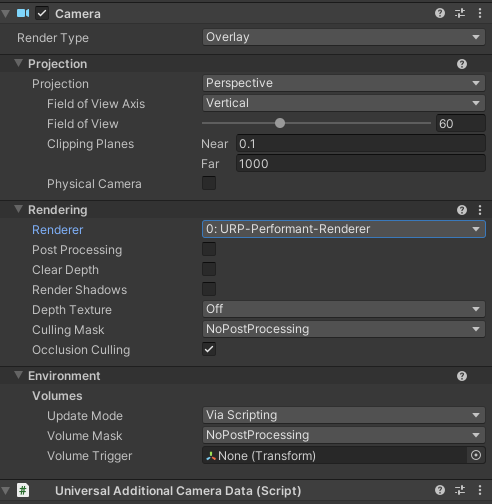
In URP, overlay cameras have a ‘Clear Depth’ Toggle.
How can this be set via script?
It can be read from UnityEngine.Rendering.Universal.UniversalAdditionalCameraData.clearDepth but not set?!
Thanks!
In URP, overlay cameras have a ‘Clear Depth’ Toggle.
How can this be set via script?
It can be read from UnityEngine.Rendering.Universal.UniversalAdditionalCameraData.clearDepth but not set?!
Thanks!
Standard cameras have a clearFlags property on them. Are URP cameras different? Look in their API… it won’t be at a global universal level, it will be at a per-camera level if it exists.
The is a clear flag but it seems to be unrelated to the clear depth flag 
I think this is a bug. Indeed changing clearFlags won’t affect Clear Depth. The way I workarounded this is that I manually created an overlay camera in unity editor, unchecked the Clear Depth field in the inspector, and then saved this object as a prefab. Later then instead of creating a new camera from script using the new operator, I just instantiated this prefab. It is a very dirty solution, but it works.
private FieldInfo floatingUIFieldInfo;

floatingUIFieldInfo = currentPlayer.Camera.FloatingUICamera.GetUniversalAdditionalCameraData()?.GetType().GetField("m_ClearDepth",
BindingFlags.Instance | BindingFlags.NonPublic);

floatingUIFieldInfo.SetValue(currentPlayer.Camera.FloatingUICamera.GetUniversalAdditionalCameraData(), false);
If anyone still wonder how to do that. Here is the way i have found. I don’t know the cost but you can use this.
First, add new Universal Renderer Data ( You can copy default one)

Then in the inspector, Add Renderer Feature and set this settings. Set the layer mask you created. Layer mask should match with your overlay camera’s culling mask.
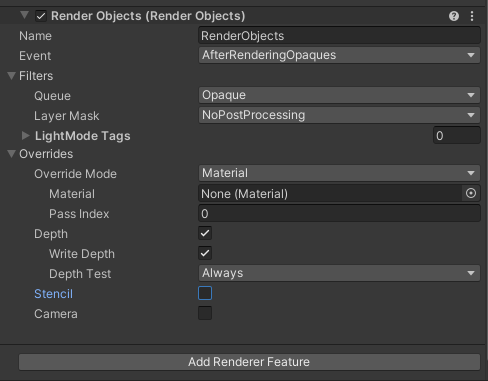
After that in your camera settings, you can disable clear depth and set renderer as a default. (You can see the new one if you select dropdown, we are gonna change this via script)
Finally in your script, wherever you want, you can change renderer index (1) as the renderer data we create.