Hello Everyone.
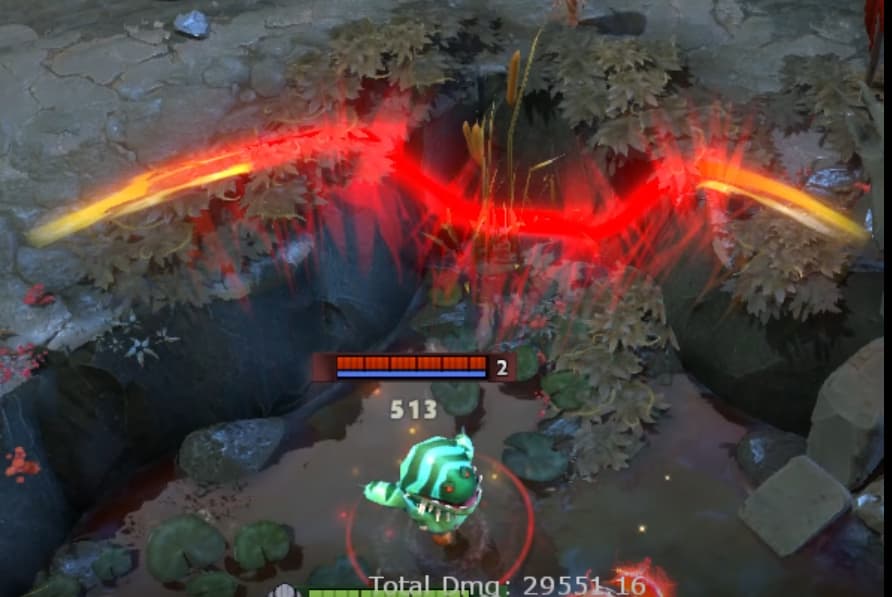
I’m currently struggling on a rendering problem, here is what I wanna achieve:
(Sven’s cleave effect in Dota2)
(Ability Indicator in Dota2)
Notice how these effects flow and bend over terrain (normally it’s just flat).
First my idea is to use Decal shader, but the cleave effect sames like it has some height offset over the ground, and I couldn’t find a way to add height displacement in HDRP Decal shader, so I tried to create a custom Unlit shader, but unable to do so.
In the blow graph,
Black slop: Opaque terrain/ground.
Green line: Camera ray.
Red line: Transparent effect mesh.
Red dot line: The displaced transparent mesh I want.
the idea is to add vertex displacement by (blue line) amount (and additional offset), the problem is I can get A and B’s position, but can’t get enough information to calculate the blue line, therefore I give up.
My another attempt is to create a RenderTexture which store the height value of the terrain, and sample the height texture in shader and do the vertex displacement, it will works but I don’t wanna an extra RT and it just feels it’s not the right approach and I’m missing something.
I’ve been googling around but couldn’t find what I want. I appreciate any help. Thanks.
My project is using Unity 2022.3.60f1 HDRP.
I’m not aware of the effect but you could make particles flow over a terrain or mesh by enabling the Collision and ‘Force over Lifetime’ modules. Or you could send the particles along a path/curves. You would need to calculate a unique path for each new instance of the effect.

This is what I’m looking for, whatever the ground shape is, the particle mesh just flow with it(with an offset/gap). The particle collision will just make the whole particle flow, doesn’t make the mesh bend with it.
Ah I see. Take a look at the Trails module on the particle system.
If that can’t give you the effect you need then another option is a Trail Renderer with its Alignment set to ‘Transform Z’.
Yeah I can see the trail works in some scenarios, but in the simplest case show in the .gif, with one single texture the trail will mess up the effect, and it won’t looks well if the particle stop moving and stay bending for a sec. it’s a good option though
Morning. I’m not very familiar with Dota2. Now, from your description, if using decals isn’t an option, an Height map and some vertex shader could fit your needs. If your terrain is mainly static, to can just bake the Render Texture Height map. This is what has been done in the Oasis scene of the Universal 3D sample.
If you use a Custom Render Texture you can easily export the texture by clicking the Upper dot and choose export. While it’s not perfect, this allows you to stay inside Unity and easily select the size and format of your Height Map based on your needs.
From there, it’s just a matter of properly sampling the Map and pushing the vertices in the shader.
In the Oasis scene, this technique has been used to create some Sand meshes on the top of the Dune. This allows the particle meshes to flow over the without them intersecting with the terrain.

If you want to take a look, you can easily grab the Universal 3D sample from the Hub by creating a new project and choose this sample as the starter template.
You’ll find the described VFX and shader in the Oasis scene, and there’s also a prefab with the Custom Render Texture already setup.
I hope this will unblock you and help you achieve what you’re looking for. Good day to you.
1 Like
Thanks, this is what I’m doing right now.

(Ignore the inappropriate textures)
But I still have some concerns.
Here is the project background: the terrain is not static, it’s procedural generated similar to Minecraft, with some smooth calculations on the terrain, the height map is stored in StructuredBuffer(instead of RT) with 64*64 = 4096 float height value. I placed the height map under the camera covering a large area and made it follow the camera.
Concern 1 - Performance
The StructuredBuffer contains 4096 length of float, in the worst case, the height map may update entirely 1 time/sec, some partial of the height map(a few blocks) may update 5 times/sec using SubUpdate method, plus dozens of smooth calculation instructions per vertex(the height map is just blocky float data). In my experience this kind of cost is not a big deal on PC, but I’m still concerned about it, just wanna know is there a better way.
Concern 2 - Object placed on terrain
With this approach, the effect mesh flow on terrain but will still intersect with objects placed on the terrain, rocks for example, it can’t flow over the rocks, it will looks weird without soft particle or some special cares.
I’m happy with current result anyway, just looking for a better/simpler solution for learning purpose, and what’s on your mind when face these little problems(i guess it’s a stupid question).
Hi. The standard way to do this would be to displace a tesselated quad in vertex shader based on height map sampling, as Orson suggested,
Heighmap are generally stored as textures as it allows to take advantage of built in interpolation and optmized layout.
To take terrain objects like stones into account, one way to do it would be to generate the heightmap, from a top down ortho depth only camera, so that props heights are baked in. If the terrain/props are dynamic, it’s just a matter of rerendering this heightmap.
Regarding performance, this should not be a concern. Levers would be map resolution, frequency of updates etc.
Hope this helps
3 Likes