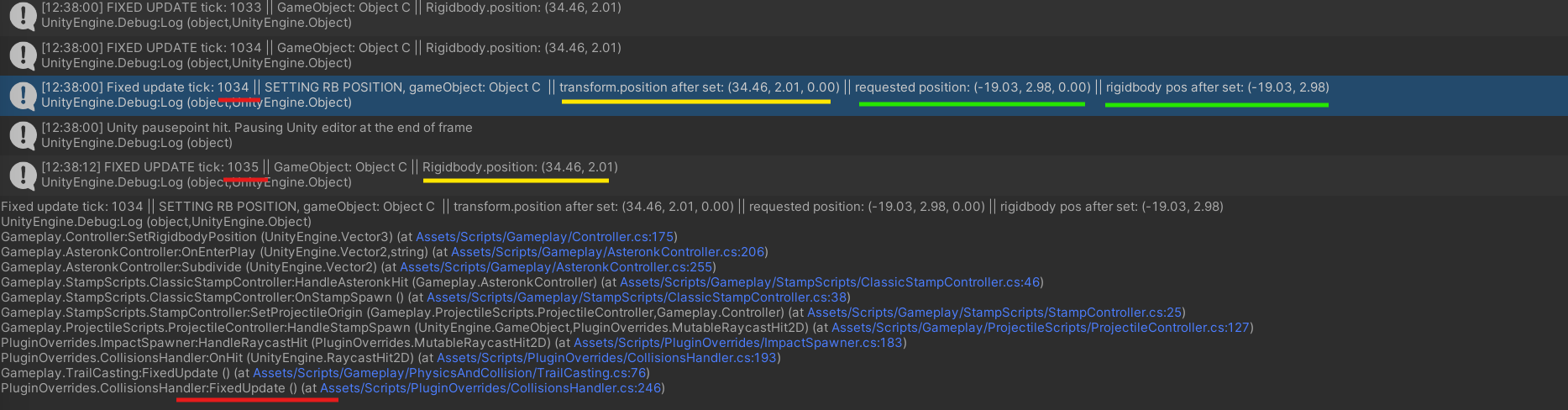
I’m super confused about how to reliably set the position of a Rigidbody2D object in Unity. When I try to set Rigidbody2D.position, the position sometimes gets reset in the next frame. Instead of updating the Transform.position, the reverse seems to happen—the Rigidbody2D gets reset to the Transform’s position, even though no external forces are acting on the object. Interestingly, using a coroutine with WaitForFixedUpdate ensures the position sticks, but I’m unsure if this workaround is necessary or if there’s a more appropriate way to instantly and reliably move a Rigidbody2D. I’m trying to set the position in response to a collision, so I assume this is all being handled in FixedUpdate?
Additionally, when I Instantiate new objects, Instantiate seems to set the Transform.position, which I understand isn’t ideal for physics objects. Since I’m supposed to move Rigidbody2D objects by setting Rigidbody2D.position, how can I avoid setting the Transform during instantiation? Is there a physics-friendly alternative to Instantiate that works directly with the Rigidbody2D? If I try to set the Rigidbody2D.position immediately after instantiation, it doesn’t seem to work without the coroutine trick.
I see MovePosition exists, but that doesn’t seem to be what I want, as I’m looking to “teleport” the object without being limited by distance.
Any help on understanding how and when to use Rigidbody2D.position would be amazing. The 2D docs seem a bit sparse on use cases, so any guidance would be greatly appreciated!
Use Rigidbody2D.position but only use it from within FixedUpdate. Instead of using WaitForFixedUpdate you may find it easier to just move your teleporting code into FixedUpdate.
Instantiate does set transform.position but it’s okay because there’s no movement involved.
Ah, okey doke. So, just to clarify—are you saying that even if I’m responding to a collision (for example, between object A and B), and I want to move an unrelated object C, I should wait until the next frame in FixedUpdate to move it, rather than setting Rigidbody2D.position immediately in response to the collision?
I was under the impression that I was already operating within FixedUpdate when reacting to a collision. Is that assumption incorrect?
I am already doing that—I’m firing a ray between objects A and B in FixedUpdate, and I want to move object C (on hit). However, when I try to set Rigidbody2D.position, it gets reset to the Transform.position in the next frame unless I wait for another FixedUpdate between the raycast and setting Rigidbody2D.position.
To be more specific, the attached screenshot shows the ray being fired in FixedUpdate Tick 1034, where I set Rigidbody2D.position to (-19.03, 2.98, 0.00). The position is correctly updated at that point.
However, in the following FixedUpdate Tick 1035, the Rigidbody2D.position reverts to its previous value of (34.46, 2.01, 0.00).
From your response, I understand that collisions and physics calculations are in sync with FixedUpdate, so I should be able to modify Rigidbody2D.position directly in response to the raycast within the same tick. But as you can see, the position doesn’t “stick,” and it’s being reset unless I wait for an additional frame.
Is there something I’m missing here? Shouldn’t the position change persist across frames if I’m doing everything within the same FixedUpdate cycle? Is there any reason I would need to defer the movement to a subsequent FixedUpdate? Or is something else resetting the Rigidbody2D.position unexpectedly?
The collision event is in sync with FixedUpdate in that it happens in the same frame but I believe any change you make to Rigidbody2D.position won’t happen until the next physics frame because the collision event comes just after FixedUpdate.
If assigning the position of the rigidbody in the collision isn’t working, that might suggest that something else is overriding/setting that position between that point and the next fixed update.
@spiney199 you’re absolutely right! I thought I had checked for this thoroughly, but I’ve now figured out the issue: I was indeed reparenting the transform in the same frame that I was setting Rigidbody2D.position, which was canceling out the new position. I mistakenly assumed this would be fine since the parents are just empty GameObjects used for organization and aren’t physics objects themselves.
It seems that setting the parent in the same frame you’re moving the Rigidbody2D is a no-go, no matter how simple the parent is.
That said, I’m glad I’ve finally gotten to the bottom of this. Thanks for all the help @zulo3d and @spiney199! Spiney, I think we might’ve actually met before in the Odin Discord—if you’re the same person, you were incredibly helpful there too. Great to see you again!
But this does raise a new issue—maybe a new thread is needed—but how should we handle transform hierarchies now? Are we expected to just leave all physics objects at the root? That seems like an organizational nightmare for the hierarchy, especially when objects are getting thrown around, pulled in/out of pools, etc.
I’ve tried deferring any reparenting to LateUpdate in the same frame I’m setting Rigidbody2D.position, but that doesn’t work either. It looks like I’d need to wait until the next frame to reparent things and make sure I’m not setting the rigidbody there either… which makes the code a little more convoluted, but I guess it’s doable.