[RELEASED] fAutonomy for Unity (Free Open Beta) - World's 1st Deep Learning AI Plugin for Unity


World’s 1st full-fledged Deep Learning AI plugin for Unity
The Deep Learning AI Behaviour Designer

>>> GET IT NOW <<<

Deep Learning AI for all Unity games and apps.

First release – still in Open Beta (Free).

Goal-driven, lightning fast, lightweight, DNN (Deep Neural Network) based AI behaviours for NPCs (Non-Player Characters), able to learn and generalize.

Train instead of scripting (reduces time & cost of game design / development).

Uses Google TensorFlow for training and inference.


IMPORTANT: fAutonomy requires AI server-connection only for training AI behaviours (into Deep Neural Networks - DNNs). AI behaviours made with fAutonomy are trained on the fAutonomy AI servers.

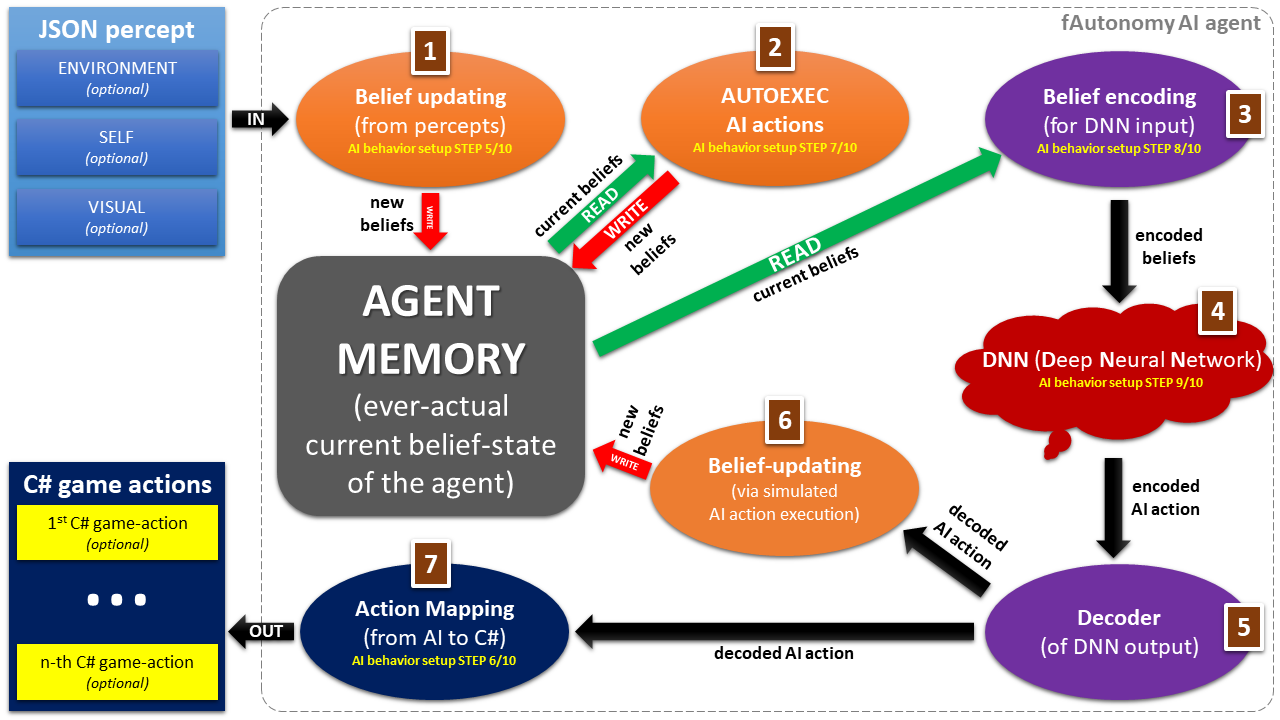
The 7 reasoning steps trained fAutonomy agents perform under-the-hood in runtime (e.g. during gameplay), when receiving a percept (sensory input / observation) from the Unity game-environment:
Regarding data-privacy: only user credentials (if any - user-credentials are optional: not necessary), and the created AI behaviours are shared with the fAutonomy AI servers, nothing else.

  • 1 or more AI agents per Unity Scene.

  • Compared to standard scripted game AI, with fAutonomy, games developers can have better quality AI, for more agents in their game-scenes, for the same computational cost, and thus with fAutonomy you can create e.g. living-breathing game-environments, that are more immersive for the players and improve re-playability, especially in comparison to immersion-breaking simple game-environments populated with simple shallow non-responsive NPCs, still typical in many, even AAA games today.

  • fAutonomy provides better AI behaviours via server-side SL (Supervised Learning) using propriety, domain-independent training data generation (patented technology). SL can produce better, more robust AI behaviours and more quickly than RL (Reinforcement Learning), while also being able to complement it.

  • NOTE: RL and SL can be used together in tandem.*

  • fAutonomy also comes with convenient visual editors to allow non-AI experts to access the state-of-the-art in game AI.

>>> GET IT NOW <<<

  • Game-builds do not require fAutonomy server-connectivity. fAutonomy AI runs completely on-device.

  • Lightning fast instantaneous real-time responses (due to DNN-based AI behaviours).

  • Applicable to any Unity game (even though building games with fAutonomy works only for Windows x64, as of now (1st open beta release), but soon it is going to be extended to other platforms, including mobiles and consoles).

  • fAutonomy is domain-independent. Works with any type of game (RPG, FPS, puzzle, platformer, simulation, …).

  • fAutonomy provides goal-driven AI behaviours, that require minimal / constant computational resources (CPU/GPU/memory due to the DNNs at the core of fA AI Behaviours == fA is lightweight and scalable (so games developers can have better AI for more agents in their game-scenes, and thus create e.g. living-breathing game-environments, that are immersive and improve player-engagement and re-playability, especially in comparison to immersion-breaking game-environments populated with shallow and non-responsive NPCs, even in many of today’s AAA-games).

>>> QUICK USER GUIDE <<<

fAutonomy provides non-scripted AI agent-behaviours able to GENERALIZE (unlike scripted game AI, such as behaviour trees or finite state machines).

Robust AI agent-behaviours can be trained online even in just a few minutes using SL (Supervised Learning), relying on patented training data generation. SL is superior to RL (Reinforcement Learning) in terms of behaviour quality and training times (convergence). Create complex AI behaviours quickly and robustly.

Goal-driven, lightweight, quick, scalable & domain-independent (applicable to all Unity games). Coming with Visual Editors, and a lightweight C# API, with which you can simply adapt it exactly to your game.

Supports an arbitrary number of agents (one or more). Each agent can have the same AI behaviour, or each agent can have a different AI behaviour, or anything in-between.

fAutonomy agents can learn, adapt & respond intelligently even to unexpected situations, unlike scripted game AI. Scripted game AI cannot be prepared for every situation. With fAutonomy you do not have to worry about that anymore (saves time & development cost). With fAutonomy AI, agents (e.g. NPCs) act in order to achieve their goals in a forward planning fashion, and these goals can change even in runtime. Agents can learn and change their behaviour in runtime.

Each fAutonomy agent has it’s own personal agent memory (expressive belief-system), which they can use for planning & reasoning using human-like semantic and episodic memory, and patented, state-of-the-art, DNN-based forward planning technology, called ‘NeuralPlanner’.

Each fAutonomy agent has it’s own sensors, with which they perceive their environment (partly or completely - you decide), and actuators (with which they can change their environment, or even their own state, including physical, communicative and/or cognitive/reasoning actions).

Create environments that are alive, with depth, with agents, that have their own life, their own goals – agents, that are fully autonomous…and all of that at a price of minimal CPU and memory cost, thanks to DNN-based AI. In runtime only DNN inference is performed, which requires constant time and space (memory). This way fAutonomy AI is truly scalable, without any compromise to the quality of AI behaviours.

Integrates seamlessly with the Unity Editor (adds a Tools/fAutonomy menu).

Comes with unlimited-time free AI server access (no subscription or website registration required), and 2 example projects.

Train with AI servers & play on the device!!

No AI server connection needed after building, neither Unity Pro. Games can be distributed without any server-connection. Connection to fAutonomy AI servers is required only for the time of game-development, for training the AI agent-behaviours. Once AI agent-behaviours are trained, no fAutonomy AI server connection is needed anymore to play the game.

NOTE: runs on any platform, where Unity Editor runs, however currently games can be built with fAutonomy only for Windows 64-bit.

PLEASE NOTE: fAutonomy for Unity is still in Open Beta, provided as free. Soon more target-platforms are also going to be added, including mobiles and consoles.

>>> GET IT NOW FOR FREE <<<

Stay ahead of the curve – switch to fAutonomy now!

For more information, please visit the Asset Store product page, or the official website, or please contact us via our email address.

Also please don’t forget to leave a comment here on the Forum to share with us your impressions or questions.

We truly hope you enjoy our product, and use it to create something new and awesome!

Thank you very much for trying fAutonomy!
AIBrain’s fAutonomy Team

2 Likes

been trying for a few days now. promising stuff (actually brilliant), but needs more examples and tutorials. it may be not yet ready for us too switch to it from regular game AI tools, such as behavior trees or fsm, but a great leap in the right direction. good job guys! keep on pushing!

your stuff is already better than any other deep learning AI tool out there. with more documentation and the ability to build games with fautonoym also for console and mobile this would be definitely my choice.

1 Like

Hi Louis,

Thanks so much for your great, supportive and insightful comment, and also for trying our product.

We are in the process of including more examples, more detailed documentation, video tutorials, and also of course the support for mobile and console platforms is also in-development. We hope to be able to include a release-ready version of these in one of the coming regular product patches.

Thank you and please stay tuned and let us know, if you have any more questions or comments!

fAutonomy Team

1 Like

Thanks for making an awesome tool, keep on pushing.

3 Likes

Thanks, Mr. Spark - we’re on it :)) Thank you for the positive reinforcement! :slight_smile:

1 Like

thanks
now it looks like its all free. are you going to keep it that way?

Hi Louis,

Yes, absolutely.

fAutonomy is always going to be provided as free (even without any registration), however in 1-2 months we are planning to launch ‘fAutonomy Pro/Plus’, which is going to be a paid asset on the store.

So there are going to be 2 fAutonomy assets on the store: a free version (current version improved), and a paid version. That latter, paid version is going to provide better AI server-side.

We are still in the process of collecting feedback from the community with the current free (open beta) version, and the mentioned next steps also depend on that feedback.

Please let us know, if you have any more questions and also if you have anything to share about your experience with fAutonomy.

Thank you,
fAutonomy Team

1 Like

sounds like a plan. also thanks for replying to my question in detail on the product page. your explantion helped. looking fw to the updated docs and tutorials. best, lj

Hey,
Any small tutorial for a beginner in AI?

1 Like

Hi, sure! Are you looking for a tutorial for using fAutonomy, or AI in general?

Did you see the Quick Start Guide link above in the original post?

Thanks for the response.
I am new in both (ML AI & fAutonomy) .
So I want to how to start ?

1 Like

For AI this is a superb-amazing full free intro course on Udacity (highly recommended):

https://www.udacity.com/course/intro-to-artificial-intelligence--cs271

You do not have to complete any exams, of course, and since it is full free, you can just go through the videos, and enjoy. :slight_smile: Peter Norvig (head of research at Google) and Sebastian Thrun made this course (latter is head of Udacity, before AI prof., really good AI researcher).

This course is of course not necessary to use fAutonomy, but in case, as you asked, someone is interested in the basics of AI (not just Deep Learning, but AI in general) in a most principled and comprehensive, exciting, up-to-date way, then this is definitely a good starting point.

Now it is 1st of July in the US. On the 9th of July the best Coursera ML (Machine Learning) course is going to start, created by Stanford University, headed by the very well known Andrew Ng. Please check it out here:

https://www.coursera.org/learn/machine-learning

Of course there are tons of resources about ML all around the web, and also the intro to AI course above (by Norvig & Thrun) include some information about ML.

Then, as a next step, you can check A. Karpathy’s great DL (Deep Learning) course at Stanford, here:

http://cs231n.stanford.edu

Then about CNNs (Convolutional Neural Networks), which are now used in fAutonomy, in relation to the above CS231n Stanford course, you can find really good info and explanation here:

http://cs231n.github.io/convolutional-networks

After that, if you check the Quick User Guide of fAutonomy, also linked above, it should be like a piece of cake. :slight_smile:

http://fautonomy.ai/file/QuickUserGuide.pdf

Nonetheless, since fAutonomy creates sort of a planning AI model of the world (game-world), which is then used to train a DCNN with goal-driven behaviour / data, it may be worth, if you check also some stuff about AI planning. The intro to AI course covers some of that as well (after search algorithms are explained), but you can find some more useful info about that e.g. here:

https://en.wikipedia.org/wiki/Planning_Domain_Definition_Language

PDDL (Planning Domain Definition Language), and its Multi-Agent extension, called MA-PDDL, are one of the underlying data-description formats in fAutuonomy.

We hope that this can give you a good headstart!

Please let us know, if we can provide you with anything more.

Thanks,
fAutonomy team

3 Likes

Thanks for the in-depth information.

1 Like

You’re most welcome! Please let us know, if we can provide anything more.

BTW: new YouTube demo video is available of fAutonomy in the works, FYI:

https://www.youtube.com/watch?v=HTIexsOfqBU

2 Likes

great stuff guys! keep it coming. more such videos and demos that explain what one can do with fautonomy.

1 Like

Thanks, Louis, it’s all on the way. :slight_smile:

I’m trying to get started and I seem to have an issue. The window that pops up from Tools → Setup AI Scene has some grid areas that, according to the documentation, can be interacted with by right clicking to create new nodes. However, when I do it, nothing happens.

I am using Unity 2018.2

In the quickstart guide I would include details where it says “this can be left blank for now” to reference a page number (in either pdf) where details can be found on how to utilize these property string methods.

Additionally, the example scenes don’t seem to run correctly (they throw null pointer exceptions). It is unclear what needs to be done in order to see these work.

I also get this network error waiting for training sometimes:

Exception: System.Net.WebException: Error getting response stream (ReadDone2): ReceiveFailure ---> System.Exception:    at System.Net.WebConnection.HandleError(WebExceptionStatus st, System.Exception e, System.String where)
   at System.Net.WebConnection.ReadDone(IAsyncResult result)
   at System.Net.Sockets.Socket+SocketAsyncResult.Complete()
   at System.Net.Sockets.Socket+Worker.Receive()
  at System.Net.WebConnection.HandleError (WebExceptionStatus st, System.Exception e, System.String where) [0x00000] in <filename unknown>:0
  --- End of inner exception stack trace ---
  at System.Net.HttpWebRequest.EndGetResponse (IAsyncResult asyncResult) [0x00000] in <filename unknown>:0
  at System.Net.HttpWebRequest.GetResponse () [0x00000] in <filename unknown>:0
  at AIBrainEditor.AIBrainServerComms.SendAndProcessWebRequest (System.Net.WebRequest request, System.Byte[] requestData) [0x00000] in <filename unknown>:0
  at AIBrainEditor.AIBrainServerComms.Poll () [0x00000] in <filename unknown>:0
  at AIBrainEditor.AIBrainServerComms.WorkerThread () [0x00000] in <filename unknown>:0
UnityEngine.Debug:LogError(Object)
AIBrainEditor.AIBrainLog:LogException(String)
AIBrainEditor.AIBrainServerComms:WorkerThread()

Hi Draco,

Thanks for letting us know!

Can you please try with one of the last/latest 2017 versions of Unity?

We are planning to switch with fA to Unity 2018 in one of the next patches, so your input is most valuable (we were not aware, that the NodeEditor does not function properly in v2018.2, so we are going to investigate), but in the meanwhile it would be great, if you could try e.g. with Unity 2017.3.1f1…

Please let us know, if possible!

Thanks,
fA team

I was planning on doing that tomorrow (bit late to do it tonight), as I figured there might be some incompatibilities (nothing every upgrades cleanly).

(Oh, and trying to fiddle with the Tools → Setup window for the sample scenes sometimes will throw Null Pointer Exceptions; unclear if this is because the data is missing, the data is bad, the window is bad due to the higher Unity version, or what)

1 Like

Sounds good. Thanks for making the effort, and please let us know, how it went!

The NullPointerException may be due to your Unity version. Please try with v2017, and let us know, if you still have the same issues, or if they are solved.

Your beta-testing effort is most appreciated. :slight_smile:

Thanks,
fA team