[SerializeReference] Not doing what i think it does?

    public class MyComponent: MonoBehaviour
    {
        public MyClass myClass;
        [SerializeReference] public MyClass myClass2;
    }
    [System.Serializable]
    public class MyClass
    {
        public int num;
    }

From what I understand, the first myClass should be serialized as a value i can edit, and the second should be serialized as a reference of MyClass, meaning it should be similar to GameObject fields where u drag in a game object? Am I understanding it wrongly?

If so, Is there a way to inject a reference of a serializable class via the inspector?
(I know you can technically get a reference of the monobehaviour, and access the field that way, but then I am forced to hard code that specific MyClass in MyComponent instead of being able to use any MyClass provided)

SerializeReference use cases are outlined here (yours isn’t):

How do you intend to drag & drop an instance of MyClass to the Inspector? :wink:

It’s not an asset and it can’t be assigned to an asset (like a MonoBehaviour). Inspector fields only make types selectable that derive from UnityEngine.Object which must be either instances in a scene or an asset. SerializeReference helps with serializing polymorphic classes or interfaces, but it won’t make any type appear in the Inspector.

In your case you probably want to use a ScriptableObject that either represents MyClass or contains MyClass as a public field. Then you can drop that SO onto your MyComponent SO field.

Thanks for the reply!

To be honest, I thought this paragraph in the docs was describing my use case:
You want multiple references to the same instance of a custom serializable class.
For example, reference serialization is necessary for reference-based topologies based on custom serializable classes (such as linked lists, tree structures, or cyclical graphs). This is because the default value-based serialization stores each reference as a separate copy of the object, when fields originally shared a single reference to the same object. In particular, if you serialize a cyclical graph data structure, you must use SerializeReference to preserve the graph properly and to avoid potential freezes or crashes that can arise from the default serialization approach.

As for how I expected it to drag n drop…
Since public MyClass myClass; already creates the class in the inspector (by value if i understand correctly?), so maybe this instance could be dropped into a reference field and passed by reference haha

Ok for my use case specifically MyClass will change often so I thought Scriptable Objects wasnt the best use case.
Well this is not a big deal but being able to do smth like this will definitely make my code abit more modular

It is indeed for your use case RE: ref versus value. By “yours isn’t,” I think he just meant that “it should be similar to GameObject fields where u drag in a game object” is the part of your use case that is not possible with vanilla serializable class refs. They do serialize into inspector just like anything else, but you can’t drag/assign/replace entire instances of them. If they contain objects recognized by the engine, you can drag/drop their constituents, but not the entire class instance itself, since there’s nothing to drag/drop without first storing the instance as an asset file, which you can’t do with vanilla serialized classes.

One of the main differences between a serializable class and an SO is that an SO can be easily instanced as an asset file via the [CreateAssetMenu] attribute, or in code via AssetDatabase.CreateInstance() followed by AssetDatabase.CreateAsset(). And then you can get the file later via Resources.Load() or via Addressables.

public MyClass myClass; does indeed serialize by value. Using [SerializeReference] will switch that to serializing by reference, which is what I think you’re after.

“so maybe this instance could be dropped into a reference field and passed by reference…”

It could be assigned in code, yes, but not dropped if you meant drag/dropped in editor, since there’s no draggable asset file. However, there’s no wrapper necessary if you use [SerializeReference]. It works as advertised, just with no drag/drop capability.

AFAIK, there’s nothing about scriptable objects that will make them worse than serializable classes if they’re changing often, other than the fact that they autoserialize in editor both in/out of play mode, which might be a perf op concern, but rarely.

If you anticipate needing to drag/drop instances, you definitely want SOs. That said, even if you never drag/drop them, they’re still a fine alternative to serializable classes. Many devs in the forums will tell you that SOs are the wrong thing to use if you need to generate/load instances in code. This is 100% false. Lots of devs think you can’t/shouldn’t instance/load SOs purely in code just because they’ve never/rarely done it. It’s quite powerful in certain use cases.

For instance, with editor tooling, any process that should work across multiple scenes will often need metadata that automatically serializes into asset files in project view, and it’s not always appropriate for the dev/artist who uses that tool to touch those files directly. So you could write your own serialization for vanilla class instances, or you could use SOs, which have that feature built-in.

Some old-school Unity devs would argue that loading SOs in code requires the Resources.Load() method, which is grossly inefficient, but that’s only if you use it for 100s/1000s of files in a short timespan during a build. If you do it only during #if UNITY_EDITOR, and you still hit perf op issues on a beefy dev machine, then you can load them with Addressables instead, so problems of the past are in the past.

Lot of weird takes in this thread. I feel like I’m the only one who ever uses SerializeReference sometimes.

[SerializeReference] is by-reference serialisation, which means is supports null. In this example code, myClass2 is going to be null as you don’t initialise anything into it. This differs from Unity’s normal serialisation, which does not support null, meaning myClass will be initialised with an inline-instance despite no inline-initialiser.

Unity’s inspector support for SerializeReference is absolutely minimal (and based on how Unity’s inspector stuff works, native support for it is impossible unless they do some low-level changes). SerializeReference fields that are null just won’t draw, I believe. Fields with a value will draw, but there is no selector to draw alternate types.

So if you did this:

public class MyComponent: MonoBehaviour
{
    [SerializeReference]
    public MyClass myClass = new();
}

[System.Serializable]
public class MyClass
{
    public int num;
}

You should see myClass draw in the inspector.

If you want to make use of SerializeReference, you will either need to write your own custom-inspectors where it’s used, or find an addon that adds support. The best addon for such is Odin Inspector, as it provides the best ‘out of the box’ support with zero extra work.

I’m pretty sure the idea behind this is to just make it possible to pass value types as references. Back when they initially deployed it, I had a very difficult time finding an actual use case but evidently there were some pretty compelling reasons for it internally with node based graphs and such so they just pushed it out to the public as a cool thing. The devs for it seemed ultra hyped about it.

In short my understanding is simply that if you have a reference type, you never need it. If you have a value type and want to use it like a reference, then add the attribute.

But, maybe I’m wrong, I never ended up using it, just read the docs and watched everyone be confused.

This is very wrong, sorry. It only supports reference types.

It’s meant to enable by-reference serialisation. Ergo, enabling null values, allowing polymorphism, and non-linear data structures (tree-like and nose based, for example) for non-Unity object reference types. And there is plenty of use-cases for all of those, I’ve found.

Weird. That seems so obscure, what is an actual use case for that which another pattern would not solve better?

I feel like it exists to easily enable code written without Unity in mind into the Inspector.

public class Foo : MonoBehaviour
{
    [SerializeReference] public Animal animal = new Dog();
}

[System.Serializable]
public class Animal
{
    public string name;
}

public class Dog : Animal
{
    public string breed;
}

9804264--1407603--upload_2024-4-29_20-3-15.png

Being able to serialise with polymorphism is huge. Being able to compose functionality into an asset (monobehaviour or scriptable object) is incredibly flexible.

My first use-case was with an item system. Rather than having a base item class with inherited types, I can have a single item class, and a collection of item components serialised with polymorphism in each item. Whenever I need more functionality in an item, I can just make a new item component class. It scales infinitely and is so much more flexible than traditional inheritance.

You could do this with lots of components and/or scriptable objects, as they also support polymorphic references, though you can get bogged down with too many assets that way.

Recently, being able to serialise non-linear structures has come up a lot, too. Namely, tree-like structures for my current project. Being able to serialize null can be useful as well where null is a valid state.

I think a number of Unity’s packages/tools have started to use it, too.

Here’s how I most often use SerializeReference, it’s how I use it most often that I generalized it into a PropertyDrawer for reuse.

Use example:


9804315--1407618--upload_2024-4-29_20-22-15.png

So this script is i_LoadSceneByOptions, it’s part of our “t&i” system (a sort of lego like visual scripting system that allows chaining components together to perform complex actions). When this component is “triggered” it loads a scene.

Thing is I’ve object-fied the scene loading process via my ISceneManager which accepts a ‘LoadSceneOptions’. See when I load certain scenes I may want to perform certain logic.

There is simple logic like… load a given scene by name. This is what SimpleLoadSceneOptions does:

Or say I want to reload the scene I currently have loaded as the active scene. I can use ReloadCurrentScene.

But say for this specific game (a puzzle game) I want to retry the current puzzle I’m in. This is similar to ReloadCurrentScene, but also requires incrementing the “try” counter in the game state, and other things. So I have a special load options specifically for that task and by loading via it all of that happens.

This game also has a ‘GoToNextScene’ which literally just goes to the next scene in the build list (as a prototyping phase we just ordered the levels in order you play them and call gotonext at the end of every level).

SerializeReference facilitates this all.

…

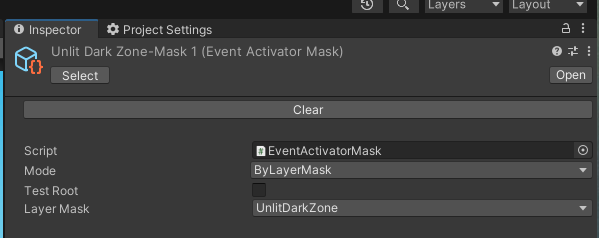
Another example is we have something we call an ‘EventActivatorMask’. So lets say we have some generalized script that watches for OnTriggerEnter or something like that. But we want to be more specific about what it does. We have TONS of these kinds of scripts that generally perform configurable actions. For example our weapon system in our Twisted Metal game we’re working on has a modular weapon making system. Thing is a given weapon may be shot by an enemy or by the player and maybe we want to filter out who is effected by the AOE of a bomb, or who is targetable by a homing missile, and so on and so forth. And this needs to be configurable at runtime based on who used the weapon.

This mask thing is very general purpose and I use it all over the place.

It looks like so:
9804315--1407630--upload_2024-4-29_20-33-44.png
9804315--1407636--upload_2024-4-29_20-35-2.png

And I could easily add new options on a per game basis by just implementing a new IMode:

Now sure I could just have created distinct i_LoadSceneX Y and Z instead and bake the logic into those there. Thing is I actually use these options outside of the modular system as well. It was actually designed before SerializeReference existed and I manually called them through code and it was just a design pattern that worked for me. The fact SerializeReference gave me the ability to then put it into the editor was a yay bonus!

Another option could be to have this interface be for a companion composited component and I call ‘GetComponent()’ to get a reference to it. But now I have to have 2 components on the thing, and I have to know all the options available to me. The little drop down of all serializable options for a specific type works great.

Also that wouldn’t have worked for my EventActivatorMask since it’s a ScriptableObject which can’t have extra components on it.

I could think of other ways to pull of stuff like this. But man… I really like SerializeReference for it.

Hi thanks for showing an example! But I understand this is using SerializeReference to serialize child classes or classes containing an interface, which I have also implemented in a few parts in my project, and find it very useful especially with https://github.com/mackysoft/Unity-SerializeReferenceExtensions, which i think does something similar to your Subclassselector.

What my specific use case is:
Lets say I have a StatsComponent (MonoBehaviour) with multiple IntStat health, stamina, mana etc. IntStat is a pure C# (serializable) class that manages clamping the value, setting current, min, max values, and all the logic ‘stat’ field requires.

So I wanted to make a slider bar script that can accept any IntStat value passed in (by the inspector), instead of passing in the StatComponent and manually retrieveing the health/whatever component I want the slider to reference. I also need the slider script to reference that exact instance so as to track that stat (using an event system)
Not sure if this is overcomplicating things but this seems most logical and scaleable to me! I had thought SerializeReference is the way to accomplish this but seems it doesn’t do that… Scriptable Objects won’t work so straightforwardly too because different entities would share the same IntStat instances (health, mana, etc).

TLDR:
Enemy Object

  • Stat Component

    • IntStat health
    • IntStat mana
    • maybe other IntStats
  • Slider script 1

    • referencing IntStat health by inspector injection
  • Slider script 2

    • referencing IntStat mana by inspector injection

In my mind this way the Stat Component doesn’t know (nor should care) which IntStat has a UI slider displaying it. And I can easily change which stat each slider is displaying…

SerializeReference can’t be used across Unity objects. If you read the docs on it, it will explain the concept of a ‘host object’: https://docs.unity3d.com/ScriptReference/SerializeReference.html

You use it serialise pure data into a scriptable object or component, on a per object basis.

Regardless, this UI stuff should be hooked up dynamically at runtime. You can still have your UI that reads off an interface implementation (which I’d say is a good way to reuse UI), but you’d have to grab or pass the instance along at runtime.

Ah, I tend to do items with a scriptable object approach but serialization with polymorphism is really useful I agree! (though by default there is no option to pick the subclass type, I think most ppl use some custom drawer for it)

I was wondering how would do you use this to serialize tree structures? I am thinking maybe something like traditional graphs/binary trees? Maybe using an adjacency list representation for example?

Can I know how exactly do you hook it at runtime?

because this is what i had in mind for a reuseable slider ui component

public class SliderUI{
    public IntStat stat;
    void OnEnable=> stat.OnChange+=UpdateUI;
    void OnEnable=> stat.OnChange-=UpdateUI;
    void UpdateUI(value)=>slider.value=value
}

Since I cannot assign a reference from inspector, this doesn’t work.
I know you can reference SliderUI and set the stat class from another class, but that creates a dependency on the Slider which I don’t really want…
what I’m doing now is:

public class SliderUI{
    public StatComponent stat;
    void OnEnable=> stat.health.OnChange+=UpdateUI;
    void OnEnable=> stat.health.OnChange-=UpdateUI;
    void UpdateUI(value)=>slider.value=value
}

which you see how I would have to modify the class for each stat i want to display.

I still use scriptable objects. Just I only need the one scriptable object class for my items. And all functionality is composed as ‘components’, serialised into scriptable objects.

It’s for the data structure of the player in my current project. You play a robot with customisable parts. In my head, having a root part (the chassis), with connections to child parts, and so on and so-forth (aka, a tree like structure) made a lot of sense for keeping the system flexible and extensible.

There’s actually two. A slimmed down one called PartsTreeLayout just for the ‘layout’ of parts (like your custom builds), and then a fully-fledged PartsTree for runtime use. But both are entirely serialisable within Unity so I can capture the state of the player at any given time. I only have PartsTreeLayout editable via the inspector, and it did require ample custom work to get to that point.

Just give the UI component a reference to a stat component via code and let it hook itself in. Doesn’t have to be complicated:

public class StatSlider : MonoBehaviour
{
    [SerializeField]
    private Slider _slider;
  
    [System.NonSerialized]
    private IStat _stat;
  
    public void SetStat(IStat stat)
    {
        _stat = stat;
        // other setup here
    }
}

You do need something to grab the stat and pass it to the UI. I’ve always composed all stats in a collection (rather than individual fields, etc), so some primary UI handler can enumerate them and set up individual elements for each stat. But you could still just have an interface that expresses an enumerator for stats, and let individual objects have their own implementation for said enumerator.

@yuzuvalentine - to give you an idea of the limitation and as to why you’re limited to the “host object” spiney referenced is to look at the yaml associated with a serializereference.

I’m going to use a ScriptableObject here just because the yaml for those is much simpler than prefabs or scenes. But the principles still stand between them all.

%YAML 1.1
%TAG !u! tag:unity3d.com,2011:
--- !u!114 &11400000
MonoBehaviour:
  m_ObjectHideFlags: 0
  m_CorrespondingSourceObject: {fileID: 0}
  m_PrefabInstance: {fileID: 0}
  m_PrefabAsset: {fileID: 0}
  m_GameObject: {fileID: 0}
  m_Enabled: 1
  m_EditorHideFlags: 0
  m_Script: {fileID: 11500000, guid: 1af0673dba5990a478290442f951312e, type: 3}
  m_Name: NotNPC-Mask
  m_EditorClassIdentifier:
  _mode:
    rid: 5484116880779116551
  references:
    version: 2
    RefIds:
    - rid: 5484116880779116551
      type: {class: EventActivatorMask/Inverted, ns: com.spacepuppy, asm: com.spacepuppy}
      data:
        mode:
          rid: 5484116880779116552
    - rid: 5484116880779116552
      type: {class: EntityActivatorMask/ByEntityType, ns: com.wreckage, asm: Assembly-CSharp}
      data:
        type: 4

This is for this ScriptableObject which is an EventActivatorMask from my last post:
9804567--1407681--upload_2024-4-30_0-38-22.png

Note that it consists of 2 'IMode’s in this case. Inverted and ByEntityType.

Our yaml basically goes:
some identification stuff for yaml version
line header for a coming object
object declaration (MonoBehaviour: … I know this is a ScriptableObject, but Unity for whatever reason just uses the same identifier for both SO and MB)
required fields by assets internally (ids, hideflags, etc)
m_Script - this actually is what tells unity which class your asset is, not that it’s defined via guid. If you look at the meta file for EventActivatorMask in my proj it’ll have the guid ‘1af0673dba5990a478290442f951312e’ in it
m_Name - the name
m_EditorClassIdentifier - this is just some editor time only junk

…

Now we get to the meat of our object. This is where our custom stuff is.

It starts by declaring the name of our property to be set, in this case _mode. From my previous post that’s the 1 field/variable in my EventActivatorMask.

And that _mode is set to a specific thing:
rid: 5484116880779116551

After this you’ll find the “references:”, this is where our referenced objects are declared and they’re done on a per object basis. If this was a prefab you’d see all the “references:” stuff then another “— !u!114 …” bit moving onto the next MonoBehaviour or other script after that.

So following this ‘references:’ we see a version number and entries for 2 references assigned these weird large numbers. Those numbers are just identifiers.

But we’ll see the first one has that same 5484116880779116551. This is how the serialization engine knows which of the 2 objects gets put in _mode back above.

This first object has info about what is the type of the object. Note how this is by name and not by guid. This is actually an important consideration… you can relatively easily rename your MonoBehaviours and ScriptableObjects and your serialized assets will update respectively because as long as that meta file exists named the same thing with the guid in it, that’s how Unity looks those up. But NOT for SerializeReference! This is actually by name… if you change the name of the class or move its namespace it will break the serialized object. There’s a way to deal with this using the ‘MovedFrom’ attribute, but ain’t going to lie it has some quarks to it depending on your version of unity, you can google about this subject and find threads discussing it.

But yeah, after that is a data which is the fields of this type, and note this first one has a rid: to the next. That’s because our ‘Inverted’ mode has a nested SerializeReference:

        [System.Serializable]
        public class Inverted : IMode
        {

            [SerializeReference, SerializeRefPicker(typeof(IMode), AlwaysExpanded = true)]
            public IMode mode;

            public bool Intersects(Object obj) => mode != null ? !mode.Intersects(obj) : true;

        }

And that rid: has the number for the next object in our list of reference objects and it is configured with the value ‘4’ in its type field. (4 in this case is the enum value for NPC from my pic above)

…

But yeah. You should now see why you can’t just drag and drop something into the editor (honestly I’m with @CodeSmile when he asked what you were expecting to drag in regards to MyClass).

Honestly at the end of the day… it’s like we’re serializing really simplistic pointers. You know, like in C, where a pointer is really just an int that is the address of some struct. That rid: ###### is really like the address of some variable like if you said &myval in C. And our fields are just MyValType* refs to it.

The 2 main benefits of this are:

  1. polymorphic serialization so that while the field is of type IAbstractType, it can serialize the distinct fields of the ConcreteType

  2. you can have recursive links to objects like in a link list

What do I mean by that 2nd thing? Well… if you just do this:

class MyScript : ScriptableObject
{
    public MyData root;

    [System.Serializable]
    public class MyData
    {
        public int value;
        public MyData next;
    }
}

Unity would freak out! Reason being that unity’s normal serialization ALWAYS fills in a serialized type (it never assigns null). So the serializer will fill in ‘root’ which consists of an int and a MyData. So it then fills in ‘next’ with a MyData which consists of an int and a MyData. So it fills in the next ‘next’ with a MyData which consists of an int and a MyData. So it fills in the next next ‘next’ with a MyData which consists of an… ad infinitum.

The yaml would effectively look like:

root:
    value: 0
    next:
        value: 0
        next:
            value: 0
            next:
                value: 0
 ... crash

By giving them these ‘rid’ integers it can now just shove the rid into ‘root’ or ‘next’, or 0 (I think) for null. And if there are N distinct objects regardless of the linked list layout, it just has the N and references them accordingly.

…

So yeah, it’s a really simplistic system. Nothing crazy going on here. And as a result its usefulness is limited to something less than what you’re hoping for unfortunately.

A little follow-up.

To anyone wanting to upgrade their Unity coding skillset… start reading the yaml for scenes and assets. A lot of the weirdness starts to make sense when you look at it.

Cause at the end of the day… the game engine relies heavily on serialization and the serialization is just some random strings representing these complex relationships.

Reading the C# source for the unityengine namespace is also interesting:
https://github.com/Unity-Technologies/UnityCsReference

You can see what is actually going on for lots of types:

Thank you for the writeup!

That part about serializing recursive classes was something I didn’t know! I’ve tried in the past implementing a custom data structure (building a tree) but ended up with serialization error… so that’s why :smile: This is a very useful use case for serializeref!

So if I understand correctly, the RIDs are id for type information? Meaning SerializeRef is just a reference to a type and allowing the inspector to display the fields of this type?

Just to clarify I was actually expecting something like a C pointer that can be ‘assigned’ (which I realise seems like something only doable in runtime)

MyClass value;
MyClass* refToValue;

But then I’m curious about why the part with the Linked List works because won’t the inspector still try to do

nextnode:
    rid: some number
  references:
    version: 2
    RefIds:
    - rid: some number
      type: {class: Node}
      data: Node data which includes another node

Meaning the nodes are still recursively expanded?

I think it’s important to note that serialisation and inspector drawing are two, entirely separate things. All the serialisation happens well before anything inspector related happens. When you inspect an object, it gets deserialised entirely (including linking up any references), and then Unity’s inspector system draws what it knows how to.

These rid addresses tell Unity’s serialisation system tells which reference point to which lump of managed data. This data includes the rid again, the assembly qualified type name, and the actual data itself.

So yes you can have a situation which may lead to infinite drawing if you aren’t careful about it. But again, Unity’s built in understanding of how to draw managed references is nearly non-existant.