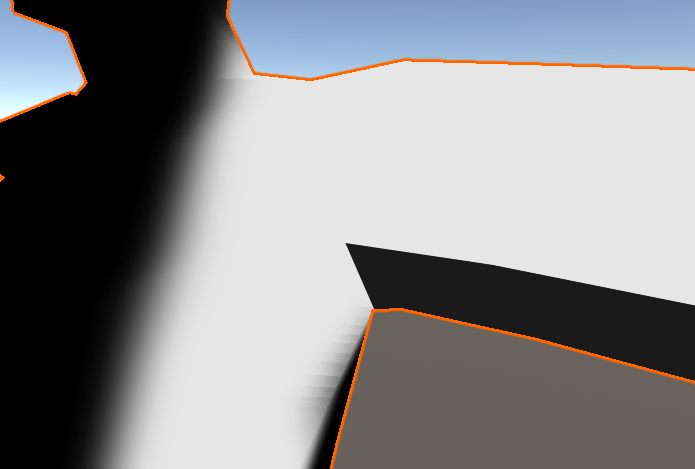
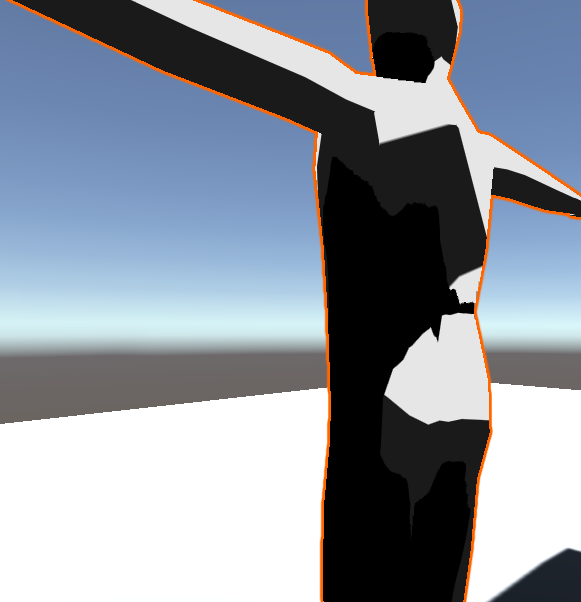
Notice how in this screenshot, the shadow on the arm has much sharper shading than the other shadow.
Here is the code:
Shader "Custom/Toon Ramp"
{
    Properties
    {
       _MainTex("Texture", 2D) = "white" {}
       _ShadingRamp ("Shading Ramp", 2D) = "white" {}
       _AlphaTex("Alpha Texture", 2D) = "white" {}
    }
        SubShader
        {

           CGPROGRAM
            #pragma surface surf CustomToonRamp
            sampler2D _ShadingRamp;
            sampler2D _MainTex;
            sampler2D _AlphaTex;
            struct Input
            {
                float4 Color : COLOR;
                float2 uv_MainTex;
            };
            void surf(Input i, inout SurfaceOutput s)
            {
                s.Albedo = tex2D(_MainTex, i.uv_MainTex).rgb;
            }
            half4 LightingCustomToonRamp(SurfaceOutput s, half3 lightDir, half atten)
            {
                float4 color;
                float lightAmt = dot(s.Normal, lightDir);
                lightAmt = (lightAmt + 1) / 2;
                float2 coordinates = float2(lightAmt, 0.5);
                float4 rampColor = tex2D(_ShadingRamp, coordinates);

                color.rgb = s.Albedo * _LightColor0.rgb * rampColor * atten;
                color.a = s.Alpha;

                return color;
            }

           ENDCG
        }
        FallBack "Diffuse"
}
Does anyone know how to fix this problem?
bgolus
August 21, 2023, 6:39pm
2
This is the difference between a shadow and shading . Shading is determined by the difference between the light direction and surface normal, and that’s what this “cell shader” has control over. A shadow is handled via a shadow map, and in Unity’s case it is filtered (ie: blurred) prior to the shader code you have access to in this file ever even touching it. For surface shader custom lighting functions, the shadow is passed in as part of the atten value. You can make that sharp like this:
atten = saturate((atten - 0.5) / max(0.0001, fwidth(atten)) + 0.5);
But there’s one big caveat to this, it only works properly for directional lights! If you have any point or spot lights the atten value also passes in the distance falloff. Unfortunately there’s not an easy way to separate the shadow from the distance falloff without writing a fully custom shader.
bgolus:
This is the difference between a shadow and shading . Shading is determined by the difference between the light direction and surface normal, and that’s what this “cell shader” has control over. A shadow is handled via a shadow map, and in Unity’s case it is filtered (ie: blurred) prior to the shader code you have access to in this file ever even touching it. For surface shader custom lighting functions, the shadow is passed in as part of the atten value. You can make that sharp like this:
atten = saturate((atten - 0.5) / max(0.0001, fwidth(atten)) + 0.5);
But there’s one big caveat to this, it only works properly for directional lights! If you have any point or spot lights the atten value also passes in the distance falloff. Unfortunately there’s not an easy way to separate the shadow from the distance falloff without writing a fully custom shader.
It also has this issue where an extra shadow is added on top of the shadow from the light.
bgolus
August 22, 2023, 12:39am
4
Well, that is what the code is doing. You’re getting the shading from a texture, and then multiplying that by the atten. Try multiplying the lightAmt with atten before it’s used to sample the ramp texture instead of multiplying it on top at the end.
bgolus:
This is the difference between a shadow and shading . Shading is determined by the difference between the light direction and surface normal, and that’s what this “cell shader” has control over. A shadow is handled via a shadow map, and in Unity’s case it is filtered (ie: blurred) prior to the shader code you have access to in this file ever even touching it. For surface shader custom lighting functions, the shadow is passed in as part of the atten value. You can make that sharp like this:
atten = saturate((atten - 0.5) / max(0.0001, fwidth(atten)) + 0.5);
But there’s one big caveat to this, it only works properly for directional lights! If you have any point or spot lights the atten value also passes in the distance falloff. Unfortunately there’s not an easy way to separate the shadow from the distance falloff without writing a fully custom shader.
Ok so I tried doing a custom shader but for some reason the recieved shadow keeps disappearing depending on the camera angle. It also doesn’t use the shading ramp for some reason.
Shader "Custom/CelShadeLighting"
{
    Properties
    {
        _Color ("Color", Color) = (1,1,1,1)
        _MainTex ("Texture (RGB)", 2D) = "white" {}
        _ShadingRamp ("Shading Ramp", 2D) = "white" {}
    }
        SubShader
    {
        Pass
        {

            CGPROGRAM
            #pragma vertex vert
            #pragma fragment frag
            #include "UnityCG.cginc"
            #include "Lighting.cginc"
            #pragma multi_compile_fwdbase
            #include "AutoLight.cginc"

            struct v2f
            {
                float4 pos : POSITION;
                float2 uv : TEXCOORD0;
                SHADOW_COORDS(1)
                float3 normal : NORMAL;

            };
            sampler2D _MainTex;
            float4 _MainTex_ST;
            float4 _Color;
            sampler2D _ShadingRamp;
            v2f vert(v2f i)
            {
                v2f o;
                UNITY_INITIALIZE_OUTPUT(v2f, o);
                o.pos = UnityObjectToClipPos(i.pos);
                o.uv = TRANSFORM_TEX(i.uv, _MainTex);
                o.normal = i.normal;
                TRANSFER_SHADOW(o)

                return o;
            }
            float4 frag(v2f i) : COLOR
            {
                float4 color;
                UNITY_INITIALIZE_OUTPUT(fixed4, color);
                float4 texColor = tex2D(_MainTex, i.uv);
                half3 worldNormal = UnityObjectToWorldNormal(i.normal); //get world normal
                float4 tintcolor = _Color;
                float3 lightDir = normalize(_WorldSpaceLightPos0.xyz); //light direction
                float lightAmt = dot(worldNormal, lightDir);
                lightAmt = (lightAmt + 1) / 2;
                float2 coordinates = float2(lightAmt, 0.5);
                float4 rampColor = tex2D(_ShadingRamp, coordinates);
                float shadow = SHADOW_ATTENUATION(i) * rampColor;
                color.rgb = texColor * tintcolor * rampColor * _LightColor0 * shadow;

                return color;
            }
            ENDCG
        }
        UsePass "Legacy Shaders/VertexLit/SHADOWCASTER"
    }
}
bgolus
August 25, 2023, 10:01pm
6
You’re missing the appropriate lightmode tags.
You’ll also have the same darkening issue from the shadows since you’re multiplying the color ramp by the shadow.
Yeah I found that out, still need to figure out how to make it so the received shadows blend with the lighting shadow. Good news is the received shadow now uses the shading ramp.
Shader "Custom/CelShadeLighting"
{
    Properties
    {
        _Color ("Color", Color) = (1,1,1,1)
        _MainTex ("Texture (RGB)", 2D) = "white" {}
        _ShadingRamp ("Shading Ramp", 2D) = "white" {}
    }
        SubShader
    {
        Pass
        {
            Tags
            {
                "LightMode" = "ForwardBase"
            }

            CGPROGRAM
            #pragma vertex vert
            #pragma fragment frag
            #include "UnityCG.cginc"
            #include "Lighting.cginc"
                        #include "AutoLight.cginc"
            #pragma multi_compile_fwdbase

            struct appdata
            {
                float4 vertex : POSITION;
                float4 uv : TEXCOORD0;
                float3 normal : NORMAL;
            };

            struct v2f
            {
                float4 pos : SV_POSITION;
                float3 worldNormal : NORMAL;
                float2 uv : TEXCOORD0;
                float3 viewDir : TEXCOORD1;
                // Macro found in Autolight.cginc. Declares a vector4
                // into the TEXCOORD2 semantic with varying precision
                // depending on platform target.
                SHADOW_COORDS(2)
            };
            sampler2D _MainTex;
            float4 _MainTex_ST;
            float4 _Color;
            sampler2D _ShadingRamp;
            v2f vert(appdata v)
            {
                v2f o;
                o.pos = UnityObjectToClipPos(v.vertex);
                o.worldNormal = UnityObjectToWorldNormal(v.normal);
                o.viewDir = WorldSpaceViewDir(v.vertex);
                o.uv = TRANSFORM_TEX(v.uv, _MainTex);
                // Defined in Autolight.cginc. Assigns the above shadow coordinate
                // by transforming the vertex from world space to shadow-map space.
                TRANSFER_SHADOW(o)
                return o;
            }
            float4 frag(v2f i) : COLOR
            {
                float4 color;
                UNITY_INITIALIZE_OUTPUT(fixed4, color);
                float4 texColor = tex2D(_MainTex, i.uv);
                half3 worldNormal = (i.worldNormal); //get world normal
                float4 tintcolor = _Color;
                // -Cel Shade effect-
                float3 lightDir = normalize(_WorldSpaceLightPos0.xyz); //light direction
                float lightAmt = dot(worldNormal, lightDir);
                lightAmt = (lightAmt + 1) / 2;
                float2 coordinates = float2(lightAmt, 0.5);
                float4 rampColor = tex2D(_ShadingRamp, coordinates);
                // -Receiving Shadows-
                float shadow = SHADOW_ATTENUATION(i); //get shadow attenuation
                half shadowRamp = tex2D(_ShadingRamp, float2(shadow, 0.5));
                float4 light = shadowRamp * _LightColor0;

                // -Combining all elements together
                color.rgb = texColor * tintcolor * rampColor * light;

                return color;
            }
            ENDCG
        }
        // Shadow casting support.
        UsePass "Legacy Shaders/VertexLit/SHADOWCASTER"
    }
}