Single shade Toon cast and received shadows for a stylized look?

I started working on a game that will have similar graphics to Wind Waker. I’ve googled quite a bit and it seems many developers are aiming for a similar style. Strangely enough I wasn’t able to find a solution for my issue. Due to having $0 budget, I’m forced to develop my own shaders. So I’ve been fully dedicated to learning CG lately. I’ve managed to write a simple Toon fragment shader that’s nearly identical to the Unity “Toon Lit” shader you can download from their archive page. I’ll be using Unity “Toon Lit” shader in this example to make things easier.

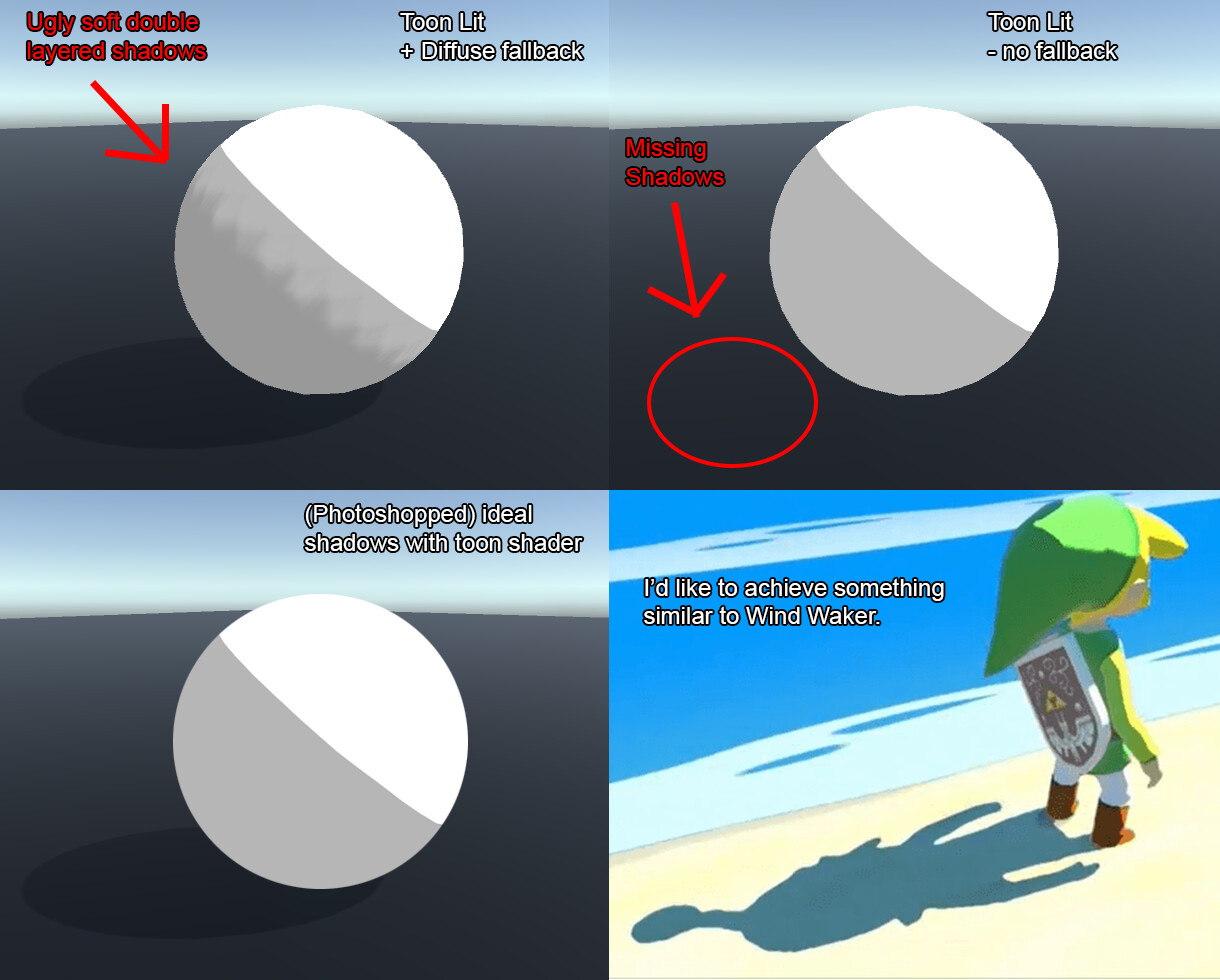
I’m trying to create a fragment shader that’s able to both, receive shadows as well as cast them on the floor and surrounding objects. Using the Toon Lit shader, I can receive beautiful Toon shadows with a custom grayscale ramp, however there are no shadows being cast on the floor. I’ve been researching a lot and so far the only way I’ve managed to cast shadows was to add a fallback shader which in this case is the Unity Diffuse shader. The problem with this is that Diffuse shadows are more aimed towards a realistic look which is the opposite of what I want to achieve. What ends up happening is the Diffuse shadows are cast on top of the Toon shader, creating double layered shadows (shadow on shadow). I’d like for the shadows to fully blend together with the Toon shader so it looks like it’s just one shadow and also have shadows cast on the floor. Additionally, I’d like to have control of the sharpness of the shadows that are cast on the floor and surrounding objects.

This may be a bit confusing so I put together an image to better visualize what I’d like to achieve.

I learn best by example so I can examine the code. I would really appreciate if someone would give me an example and maybe explain a little bit how it works.


I’ve copy pasted the Toon Lit shader code here so you can take a look at it. I undid most of my changes I had there for testing. It should be near to default except for the rendertype which I believe used to be set to “Opaque”. The fallback shader is commented out since I don’t want to use it due to unwanted results.

Shader "Toon/Lit" {
    Properties {
        _Color ("Main Color", Color) = (0.5,0.5,0.5,1)
        _MainTex ("Base (RGB)", 2D) = "white" {}
        _Ramp ("Toon Ramp (RGB)", 2D) = "gray" {}
    }

    SubShader {
        Tags { "RenderType"="TransparentCutout" }
        LOD 200
      
CGPROGRAM
#pragma surface surf ToonRamp fullForwardShadows

sampler2D _Ramp;

// custom lighting function that uses a texture ramp based
// on angle between light direction and normal
#pragma lighting ToonRamp
inline half4 LightingToonRamp (SurfaceOutput s, half3 lightDir, half atten)
{
    #ifndef USING_DIRECTIONAL_LIGHT
    lightDir = normalize(lightDir);
    #endif
  
    half d = dot (s.Normal, lightDir)*0.5 + 0.5;
    half3 ramp = tex2D (_Ramp, float2(d,d)).rgb;
  
    half4 c;
    c.rgb = s.Albedo * _LightColor0.rgb * ramp * (atten * 1);
    c.a = 0;
    return c;
}


sampler2D _MainTex;
float4 _Color;

struct Input {
    float2 uv_MainTex : TEXCOORD0;
};

void surf (Input IN, inout SurfaceOutput o) {
    half4 c = tex2D(_MainTex, IN.uv_MainTex) * _Color;
    o.Albedo = c.rgb;
    o.Alpha = c.a;
}
ENDCG

    }
    //Fallback "Diffuse"
}

EDIT: After posting, I realized the Toon Lit is a surface shader. I just wanted to clarify that I’m interested in writing this using fragment shaders. Although I wouldn’t mind a temporary solution using a surface shader.

If you really just want it to work like your mock up, just don’t apply the shadow to the lighting. For surface shaders your only option is to not apply the “atten”, which is both the falloff and shadow, but you can have complete control of this with fragment shaders.

However that’s not what Windwaker does. Windwaker doesn’t use a ramp, or any kind of wrap around style lighting, which is the cause of the ugly “back” shadowing you’re seeing. They’re basically just using normal diffuse lighting and ambient lighting, but the dot product is multiplied by some high number and clamped.

Here’s an example that just uses a hard edge via an if condition.

1 Like

First you need to set your cel shaded object as shadow caster but NOT shadow receiver, the weird shadow blob you have is due to receiving self shadow …

And wind waker use a simple step function :stuck_out_tongue:

Nope, they used something more like saturate(dot(light, normal) * 50) rather than a straight step function.
This is from an emulator, but notice how the lighting edge isn’t hard, but slightly soft.

They sharpened the effect slightly in the WiiU version, but only to make up for the HD resolution showing how soft the edge is.

but the GC don’t have shader they have a 8 pass fixed function, which would explain the band IMHO, ie the sampler interpolate a previous result of another sampler … wait … might be a simple env map :hushed:
I’m certain shadow are just a decal with a unlit rendering to a render texture.

Well, the example in @Peter_C 's post is actually an image from the WiiU version, which does have vertex fragment shaders and is doing shadow mapping with self shadowing. The original Windwaker on the GameCube did technically have shaders, just not programmable pipeline shaders; fixed function shaders are still shaders, just not shaders as we think of them now.

However I think you’re right about them doing it with an environment map, and basically using render texture decals. I think there’s even a breakdown someone did that goes into Windwaker’s shadows.

1 Like

That’s what I meant lol took some shortcut, since they could have 8 pass with any sampler, that’s functionally equivalent as a fixed 8 instructions long shader, so it’s partially programmable.

It’s amazing what you can do with just blend states and multiple passes.
http://lukasz.dk/files/ps2_normalmapping.pdf
Normal mapping on the PS2 for example, a system even more limited than the Gamecube.

Yeah I had tested dot3 normal map, I think that’s how it is do on gc too, they don’t have normal map out of the box. But I think they could use their pipeline to get envmap on top of it, factor5 did some miracle on the GC, the wii is basically a soup up GC and the double size pipeline (16 sampler) made for even more impressive tricks. BUT nothing beat mario mario sunshine’s water which use mimap bias and how it’s process at accute angle to create amazing water effect :hushed:

I managed to write a fragment shader in the past few days to partially fix my issue. I also have a test surface cel-shader which I mostly copied from 1 of the sources posted here.

I’m no longer getting the ugly double shadows, however I still need to figure out how to cast & receive clean hard shadows.


Image link: Imgur: The magic of the Internet

This is with “soft shadows” enabled on the directional light. Hard shadows look more pixelated but at the same time very blurry which actually makes soft shadows look a lot better in comparison. I’ve also noticed artifacts with hard shadows when testing with the surface cel-shader.

Here’s my barebones testing fragment shader:

Shader ".TEST/Fragment Cel-Shader"
{
    Properties
    {
        _Color ("Base Color", Color) = (1,1,1,1)
        _UnlitColor ("Shadow Color", Color) = (0.5,0.5,0.5,1)
        _UnlitThreshold ("Shadow Range", Range(0,1)) = 0.1
    }

    SubShader
    {
    Tags{"RenderType"="Opaque"}
    LOD 200

        Pass
        {
        Tags {"LightMode" = "ForwardBase"}

            CGPROGRAM
            #pragma vertex vert
            #pragma fragment frag

            #include "UnityCG.cginc"
            float4 _LightColor0;
           

            float4 _Color;
            float4 _UnlitColor;
            float _UnlitThreshold;

            struct appdata
            {
                float4 vertex : POSITION;
                float3 normal : NORMAL;
            };
            struct v2f
            {
                float4 pos : SV_POSITION;
                float4 posWorld : TEXCOORD0;
                float3 normalDir : TEXCOORD1;
            };

            v2f vert (appdata IN)
            {
                v2f OUT;
                OUT.pos = UnityObjectToClipPos(IN.vertex);

                float4x4 modelMatrix = unity_ObjectToWorld;
                float4x4 modelMatrixInverse = unity_WorldToObject;

                OUT.posWorld = mul(modelMatrix, IN.vertex);
                OUT.normalDir = normalize(
                    mul(float4(IN.normal, 0.0), modelMatrixInverse).xyz
                );

                return OUT;
            }

            float4 frag (v2f IN) : COLOR
            {
                float3 normalDirection = normalize(IN.normalDir);
                float3 lightDirection;
                float attenuation;
                float3 fragmentColor;


                attenuation = 1.0;
                lightDirection = normalize(_WorldSpaceLightPos0).xyz;
                fragmentColor = _LightColor0.rgb * _UnlitColor.rgb * _Color.rgb;


                if (attenuation * max(0.0, dot(normalDirection, lightDirection)) >= _UnlitThreshold) {
                    fragmentColor = _LightColor0.rgb * _Color.rgb; // lit fragment color
                }

                return float4(fragmentColor, 1.0);
            }
            ENDCG
        }
    }
    Fallback "Diffuse"
}

So I assume the code above would net the same result as using a grayscale texture ramp and changing the mesh settings so it doesn’t receive shadows to get rid of the extra diffuse shadow I had a problem with at the beginning. With the shader I pasted here, I have more control of the intensity and range of the shadow. I also prefer doing it like this instead of using texture ramps as it helps me learn more about writing shaders.

I’ll paste my slightly modified surface shader here too:

Shader ".TEST/Forward Cel-Shading" {
    Properties {
        _Color("Color", Color) = (1, 1, 1, 1)
        _MainTex("Texture", 2D) = "white" {}
    }
    SubShader {
        Tags {
            "RenderType" = "Opaque"
        }
        LOD 200

        CGPROGRAM
        #pragma surface surf CelShadingForward

        half4 LightingCelShadingForward(SurfaceOutput s, half3 lightDir, half atten) {
            half NdotL = dot(s.Normal, lightDir);
            if (NdotL <= 0.0) NdotL = 0;
            else NdotL = 1;
            half4 c;
            c.rgb = s.Albedo * _LightColor0.rgb * (NdotL * atten * 0.5);
            c.a = s.Alpha;
            return c;
        }

        sampler2D _MainTex;
        fixed4 _Color;

        struct Input {
            float2 uv_MainTex;
        };

        void surf(Input IN, inout SurfaceOutput o) {
            fixed4 c = tex2D(_MainTex, IN.uv_MainTex) * _Color;
            o.Albedo = c.rgb;
            o.Alpha = c.a;
        }
        ENDCG
    }
    FallBack "Diffuse"
}

I’ve only modified a few values if I remember correct because the colors were getting washed out badly. The shadows also seem to be unaffected by light color. I’m not worried about it as my main focus is to get shadows working properly in my fragment shader. In other words, I want full control of shadows.

I honestly don’t like using a fallback to cast shadows. It doesn’t give me any control. I’ve been having trouble finding anything about custom casting shadows. The archived Unity shaders don’t appear to have any code for casting shadows. I’m assuming it’s in one of the “.cginc” files that come with Unity.

Well I missed the shadow receiving part when giving advice ROFL
IS this helping you?
https://blogs.unity3d.com/2015/05/28/unique-character-shadows-in-the-blacksmith/

I don’t know if you are here yet Peter_C but try this?

I hacked it together and it’s WIP as hell but it gives some neat results for me in the WebGLs:

Shader "Toon/Lithe" {
    Properties {
        _Color ("Main Color", Color) = (1,1,1,1)
        _MainTex ("Base (RGB)", 2D) = "white" {}
        _Ramp ("Toon Ramp (RGB)", 2D) = "gray" {}
    }

    SubShader {
        Tags { "RenderType"="Opaque" }
        LOD 200
       
        CGPROGRAM
        #pragma surface surf ToonRamp

        sampler2D _Ramp;

        // custom lighting function that uses a texture ramp based
        // on angle between light direction and normal
        #pragma lighting ToonRamp exclude_path:prepass
        inline half4 LightingToonRamp (SurfaceOutput s, half3 lightDir, half atten)
        {
            #ifndef USING_DIRECTIONAL_LIGHT
            lightDir = normalize(lightDir);
            #endif
           
            half d = (dot (s.Normal, lightDir)* 0.5 + 0.5) * (atten);
            half3 ramp = tex2D (_Ramp, float2(d,d)).rgb;
           
            half4 c;
            c.rgb = (s.Albedo * 2) * _LightColor0.rgb * ramp; // * (atten * 2);
            c.a = 0;
            return c;
        }

        sampler2D _MainTex;
       
        //float4 _Color;

        struct Input {
            float2 uv_MainTex : TEXCOORD0;
        };
       
        UNITY_INSTANCING_BUFFER_START(Props)
           UNITY_DEFINE_INSTANCED_PROP(half4, _Color)
        UNITY_INSTANCING_BUFFER_END(Props)

        void surf (Input IN, inout SurfaceOutput o) {
            half4 c = tex2D(_MainTex, IN.uv_MainTex) * UNITY_ACCESS_INSTANCED_PROP(Props, _Color);
            o.Albedo = c.rgb;
            o.Alpha = c.a;
        }
        ENDCG
    }

    Fallback "Diffuse"
}
1 Like