Custom Vertex Streams, as detailed in the documentation, allow us to pass a wider range of data into our custom Shaders.
This works differently when using Billboards – or Meshes with GPU Instancing disabled – and using Meshes with GPU Instancing enabled.
Billboards, or Meshes with GPU Instancing disabled
When using billboards or meshes with GPU instancing disabled, all mesh transformations are done on the CPU, every particle’s mesh vertex data (position, normal, tangent) are already in Object Space and other data are stored in Vertex Color and Texture Coordinates (UV).
Meshes with GPU Instancing enabled
When using meshes with GPU instancing enabled, the particles’ positions and other data are passed in a StructuredBuffer filled with a customizable particle data struct.
This struct shall contain the ObjectToWorld matrix for the particle, as a float3x4 that accounts for position, rotation and size, and all other particles’ attributes.
All mesh transformations are then expected to happen on the GPU in the ParticleInstancingSetup function, and the particles’ Mesh data remains the same as the original mesh reference.
Now let’s see how this works with a practical example by creating a new shader graph that supports Flipbook Blending, just like the URP Particles Shaders.
Flipbook Blending
If you look in the GetParticleTexcoords() function body, you’ll see references to _FLIPBOOKBLENDING_ON.
This is a keyword you can find the definition of in
Packages\com.unity.render-pipelines.universal\Shaders\Particles\ParticlesLit.shader
as
#pragma shader_feature_local _FLIPBOOKBLENDING_ON
To implement this optional flipbook blending behavior, we need to
- Add this keyword to the shader graph blackboard,
- Enable it on the material instance,
- Get the secondary UVs and Blend amount,
- Blend between two texture samplers,
- As explained in the documentation, add the UV2 and AnimBlend streams,
- Add a custom particle instance data struct to feature animBlend
Adding the Keyword
As in the URP Particle Shaders, we’ll add the keyword to the Blackboard, as a Local – not Overridable – Shader Feature keyword, leave it available on both Vertex and Fragment stages, make it generate a material property, and leave its default value to disabled.

Enable Blending on the Material
On the material instance, we’ll then enable it.

Get Secondary UVs and Blend Amount
We also need to change the implementation of our GetParticleTexcoords() functions, to output the secondary UV and blend value.
Note we’re now taking UV0 as float4 and will need to change the Custom Function Node input type from Vector2 to Vector4. We’re also outputting the secondary UVs (UVs at frame n+1), and blend amount.
void GetParticleTexcoords_float(float4 inputTexcoord, float inputBlend, out float2 outputTexcoord, out float2 texcoord2, out float blend)
{
    float3 dummyTexcoord2AndBlend = 0.0;
    GetParticleTexcoords(outputTexcoord, dummyTexcoord2AndBlend, inputTexcoord, inputBlend);
    texcoord2 = dummyTexcoord2AndBlend.xy;
    blend = dummyTexcoord2AndBlend.z;
}
void GetParticleTexcoords_half(half4 inputTexcoord, half inputBlend, out half2 outputTexcoord, out half2 texcoord2, out half blend)
{
    half3 dummyTexcoord2AndBlend = 0.0;
    GetParticleTexcoords(outputTexcoord, dummyTexcoord2AndBlend, inputTexcoord, inputBlend);
    texcoord2 = dummyTexcoord2AndBlend.xy;
    blend = dummyTexcoord2AndBlend.z;
}
Blend between frame and frame n+1
We can then sample the texture twice, with the two UV sets, and interpolate between the results using the blend amount.
We also branch, using the keyword, between the single texture sample, and the interpolated samples.

Add Custom Vertex Streams
This would already work when GPU instancing is enabled, but wouldn’t otherwise as we need to feed the AnimBlend value.
We need to enable Custom Vertex Streams and add:
- Normal, to support lighting
- Tangent, if we need normal mapping
- Color
- UV
- UV2, that’s UVs at frame n+1
- AnimBlend, that’s the linear interpolation factor between frame n and n+1
- AnimFrame, this is the frame in the flipbook
Make sure to set UV and UV2 so they land in TEXCOORD0.xy and TEXCOORD0.zw.
It doesn’t really matter if AnimFrame comes first or second to AnimBlend.
We just need to make sure we fetch it properly in the shader graph. Here from UV1.x.

Note:
The mesh UV1 shall be the same as UV0 for this to work.
Define a custom Particle Data Struct
Since we added AnimBlend to the Vertex Streams, we need to add it to the particle instance data struct for this to work when GPU Instancing is enabled.

The benefit of using a define for the particle data struct, is that we can easily change its definition, given we implement the members already in use.
Here we add it before including particle instancing, so that it prevails.
Here we need to add the animBlend before the animFrame, to respect the ordering.
#ifndef UNITY_PARTICLE_INSTANCE_DATA
#define UNITY_PARTICLE_INSTANCE_DATA CustomParticleInstanceData
struct CustomParticleInstanceData
{
    float3x4 transform;
    uint color;
    float animBlend;
    float animFrame;
};
#endif

#include "Packages/com.unity.render-pipelines.universal/ShaderLibrary/ParticlesInstancing.hlsl"
Particle Age & Speed
Custom Vertex Streams can be used to fetch any particle attribute.
Let’s take a look at how we can use the particle’s age and speed.
We begin by adding AgePercent and Speed, two scalar values.
When adding them, it’s useful to turn GPU Instancing off to preview where in vertex data those attributes will be stored. Here in TEXCOORD1.z and TEXCOORD1.w.

Then we need to add them to the particle data struct.
#ifndef UNITY_PARTICLE_INSTANCE_DATA
#define UNITY_PARTICLE_INSTANCE_DATA CustomParticleInstanceData
struct CustomParticleInstanceData
{
    float3x4 transform;
    uint color;
    float animBlend;
    float animFrame;
    float agePercent;
    float speed;
};
#endif
And custom functions to fetch the values.
One for the Age.
#if defined(UNITY_PARTICLE_INSTANCING_ENABLED)
    UNITY_PARTICLE_INSTANCE_DATA data = unity_ParticleInstanceData[unity_InstanceID];
    Out = data.agePercent;
#else
    Out = In;
And one for the Speed.
#if defined(UNITY_PARTICLE_INSTANCING_ENABLED)
    UNITY_PARTICLE_INSTANCE_DATA data = unity_ParticleInstanceData[unity_InstanceID];
    Out = data.speed;
#else
    Out = In;
And eventually using the proper UV channel data as default for when instancing is disabled.
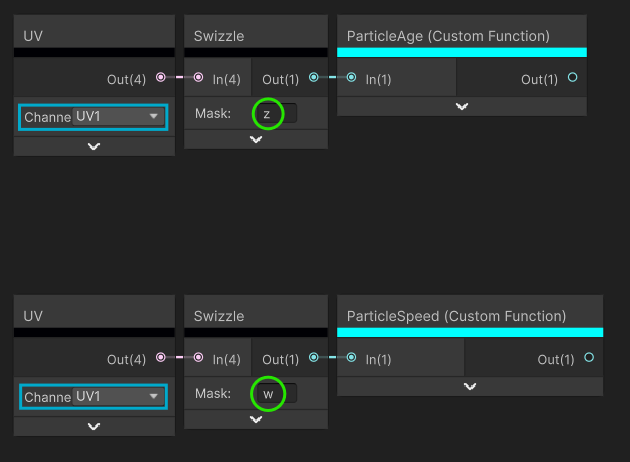
For more information on available particle data, see the documentation.
Vertex Stream Source
To help with Vertex Streams, we can create a subgraph with dropdowns, one for the UV channel, the other for the component.

It makes it easier than using UV and Swizzle nodes altogether.

That is all for now.
I shall follow up with more details on Cross Pipeline Setup, but should you use HDRP, I highly recommend using VFX Graph instead anyway.